
The 7 Biggest IT Problems We Find at Engineering & Architectural Firms
Engineering and architectural firms depend on technology differently than the average small business.
When an engineer can't open a large project file, Revit is performing poorly, AutoCAD crashes, or a remote employee can't access the files they need, the problem isn't simply an IT inconvenience. You're losing productive—and often billable—time.
For engineering and architectural firms with 20 or more employees, small technology problems can quickly become expensive business problems.
At Integral Networks, we support organizations throughout the Greater Sacramento region and Northern Nevada, and we repeatedly encounter the same technology issues when evaluating or onboarding engineering and architectural firms.
Here are seven of the biggest problems to watch for in your own environment.
1. Slow Workstations and Poor Application Performance
Engineering and architectural applications place very different demands on computers than ordinary office software.
Applications such as:
- AutoCAD
- Revit
- Bluebeam
- SolidWorks
- Other design and engineering applications
may require significantly more processing power, memory, graphics capability, and storage performance than a standard office workstation.
Yet one of the problems we regularly encounter is a workstation purchasing strategy that treats every employee the same.
An administrative employee using Outlook, Word, and a browser doesn't necessarily need the same computer as an engineer working with large models.
Likewise, an engineer shouldn't be expected to remain productive on a workstation that was purchased five or six years ago simply because it still turns on.
The Business Impact
Slow workstations don't just frustrate employees.
They consume expensive professional time.
If an engineer loses 20 minutes each day waiting for applications, files, or processes, that adds up to more than 80 hours of lost productivity per year.
Multiply that across 10, 20, or 40 technical employees and poor workstation performance becomes a significant business expense.
What Better IT Looks Like
Workstations should be matched to the applications employees actually use.
Your IT provider should also maintain an asset lifecycle plan showing leadership which systems are approaching replacement so hardware purchases can be budgeted instead of becoming emergencies.
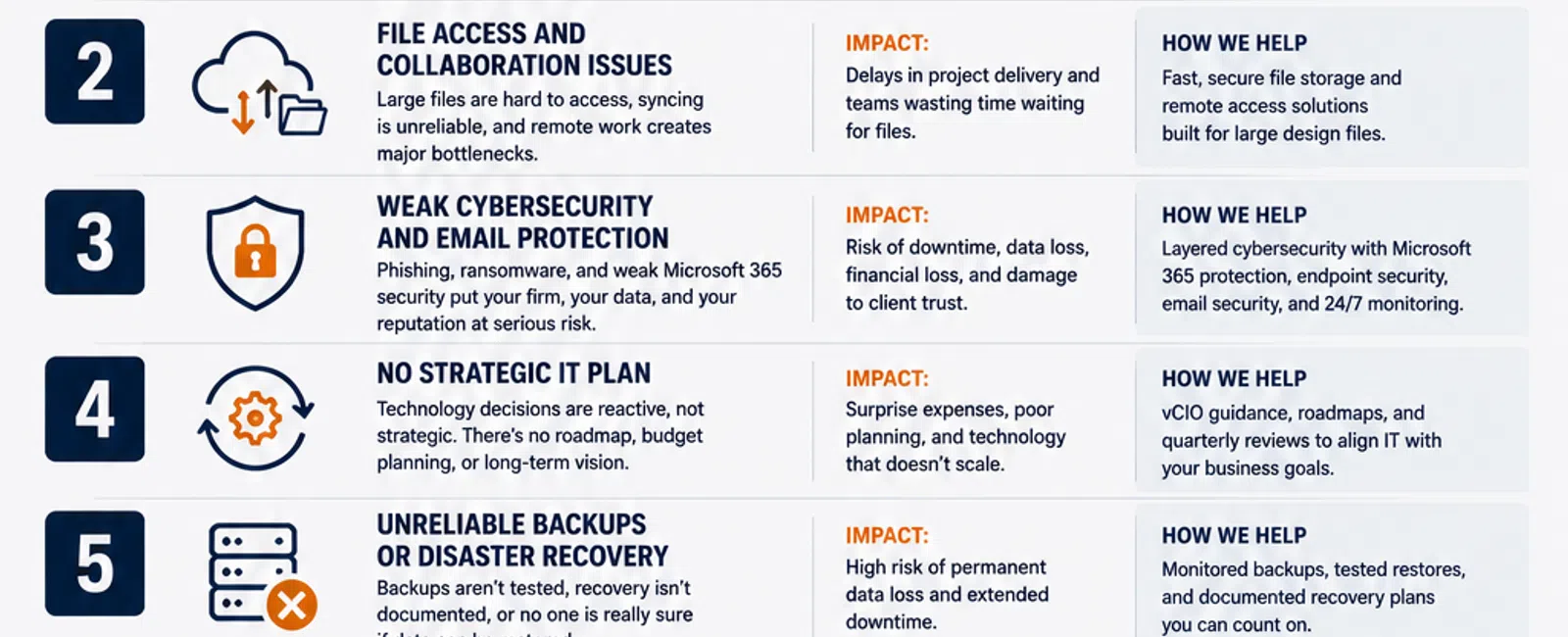
2. File Access and Collaboration Problems
Engineering and architectural firms generate large amounts of project data.
That creates challenges a typical office doesn't always experience.
Employees may need to access large files from:
- The main office
- A second office
- Home
- Client locations
- Project sites
If your storage and network infrastructure wasn't designed around those workflows, employees may experience slow file access, synchronization problems, unreliable remote access, or confusion over which version of a file is current.
The Business Impact
When employees spend their time waiting for files or troubleshooting access problems, project delivery slows down.
Even worse, poorly designed collaboration systems can create version-control problems and increase the risk of employees working from outdated information.
What Better IT Looks Like
The right solution depends on the organization.
A 20-person architectural firm operating from one office has different requirements than a 70-person engineering company working across multiple locations.
Your IT strategy should consider:
- File sizes
- Storage performance
- Network bandwidth
- Remote access
- Collaboration requirements
- Backup
- Recovery
- Cloud services
There isn't one universal answer.
The important thing is designing the environment around how your team actually works.
3. Weak Cybersecurity and Email Protection
Engineering and architectural firms possess information that attackers may find valuable.
That can include:
- Project data
- Intellectual property
- Contracts
- Employee information
- Client information
- Vendor information
- Email accounts
Email remains an especially important attack vector because compromising one employee's account can give an attacker access to conversations, contacts, invoices, and potentially sensitive project information.
Cybersecurity therefore needs to extend far beyond traditional antivirus.
The Business Impact
A successful attack can create downtime, data loss, financial loss, reputational damage, and significant disruption to client projects.
What Better IT Looks Like
Integral Networks uses a layered security approach for managed clients that includes technologies and capabilities such as:
- Microsoft 365 Business Premium
- Deep Instinct endpoint protection
- Avanan email security
- Blokworx managed security services
- Microsoft 365 security configuration
- Managed patching
- Continuous monitoring
We require Microsoft 365 Business Premium for managed clients because it provides security and management capabilities that allow us to establish a stronger, more consistent baseline.
Security shouldn't depend on whether an individual employee remembers to do the right thing.
It should be built into the environment.
4. No Strategic Technology Plan
This is one of the most common problems we see across businesses—not just engineering firms.
The IT provider fixes things when they break, but nobody is looking 12, 24, or 36 months ahead.
Leadership doesn't know:
- Which workstations need replacement
- When servers or network equipment will age out
- What major projects are approaching
- What next year's technology budget should be
- Which security improvements need priority
- Whether existing systems will support company growth
As a result, technology spending becomes unpredictable.
The Business Impact
Instead of budgeting for technology, the company receives surprise expenses.
Ten workstations suddenly need replacement.
A server reaches the end of its useful life.
Storage runs out.
An office expansion exposes network limitations.
These aren't necessarily unpredictable events.
Many of them simply weren't planned for.
What Better IT Looks Like
Managed IT should include strategic planning.
At Integral Networks, that means services such as:
- Quarterly Business Reviews
- Technology budgeting
- Asset lifecycle management
- Vendor management
- Technology roadmaps
- vCIO guidance
The objective is simple:
Know what's coming before it becomes urgent.
5. Backups Exist, but Nobody Knows Whether They Work
"We have backups."
That's a good start.
But the more important question is:
Can you restore them?
A backup job showing "successful" isn't the same thing as having a reliable recovery strategy.
Engineering and architectural firms can accumulate enormous amounts of project data, which makes recovery planning particularly important.
The Business Impact
A ransomware incident, hardware failure, accidental deletion, or other major event can quickly become a business continuity crisis if data cannot be restored.
What Better IT Looks Like
Your provider should know:
- What's being backed up
- How often it's backed up
- Where backups are stored
- Whether backups are completing successfully
- How data would be restored
- What happens during a larger disaster
Backups should be monitored.
Recovery should be planned.
And leadership shouldn't have to guess whether critical business data is protected.
6. Poor User Management and Offboarding
Employee access tends to accumulate over time.
People change roles.
Employees leave.
New applications are introduced.
Permissions are granted temporarily and never removed.
Eventually, organizations end up with former employees who still have accounts, unnecessary administrator access, unused software licenses, and permissions that nobody can explain.
The Business Impact
Poor account management creates unnecessary security risk and can increase software costs.
What Better IT Looks Like
Every organization should have repeatable processes for employee onboarding, role changes, and offboarding.
When someone joins the company, the right systems and permissions should be ready.
When someone leaves, access should be removed quickly and consistently.
That includes:
- Microsoft 365
- Computers
- Business applications
- Remote access
- File access
- Administrative privileges
This is basic IT hygiene, but it's frequently overlooked.
7. Slow or Inconsistent IT Support
This is one of the biggest reasons businesses start looking for another IT provider.
Employees submit a ticket.
Nothing happens.
They follow up.
Still nothing.
Eventually, someone in management gets involved just to get an IT problem addressed.
That's not how managed IT should work.
The Business Impact
For an engineering or architectural firm, slow IT support directly affects productivity.
If a designer can't work in Revit or an engineer can't access a project file, every hour waiting for support is potentially lost billable time.
What Better IT Looks Like
At Integral Networks, whenever possible, a technician answers the phone live.
If someone isn't immediately available, our response objective is generally 10-15 minutes.
The objective isn't merely responding quickly.
It's resolving issues efficiently because the environment is standardized, monitored, and documented.
Good customer service shouldn't be considered a premium IT feature.
It should be the baseline.
How Many of These Problems Exist in Your Environment?
Here's a simple test.
Give yourself one point for every statement that's true:
- Employees regularly complain about computer performance.
- Large files are slow or difficult to access remotely.
- You're not confident Microsoft 365 is configured securely.
- You don't have a documented technology roadmap.
- You're not sure when backups were last tested.
- You're not confident former employees lose access immediately.
- Employees regularly complain about slow IT support.
If you scored three or more, there are probably opportunities to improve your IT environment.
That doesn't automatically mean you need a new IT provider.
But it does mean these issues deserve a conversation.
What Should Engineering Firms Expect From Managed IT?
For organizations with 20 or more employees, managed IT should deliver more than help desk support.
You should expect:
- Responsive user support
- Proactive monitoring
- Cybersecurity
- Microsoft 365 management
- Asset management
- Backup monitoring
- Vendor management
- Technology budgeting
- Lifecycle planning
- Strategic guidance
The goal is to make technology predictable.
Your engineers and designers should be able to focus on projects while your IT partner handles the technology supporting them.
Supporting Engineering & Architectural Firms in Two Key Regions
Integral Networks primarily supports businesses across two geographic markets.
Greater Sacramento Region
Our Northern California service area includes businesses throughout:
- Sacramento
- Roseville
- Rocklin
- Folsom
- Elk Grove
- Woodland
- Stockton
- Modesto
- Surrounding communities
Northern Nevada
We also support businesses throughout:
- Reno
- Sparks
- Carson City
- Surrounding communities
This regional model allows us to combine remote support with onsite service when physical presence is needed.
For engineering and architectural firms with sophisticated workstations, network infrastructure, multiple offices, or large project files, that combination can be particularly valuable.
Final Thoughts
Most technology problems don't suddenly appear.
They accumulate.
A workstation gets a little slower.
A backup fails occasionally.
Nobody updates the network documentation.
Microsoft 365 security never gets fully configured.
Hardware replacements get postponed.
IT tickets take longer to resolve.
Individually, these issues may seem manageable.
Collectively, they create technical debt that costs your business productivity, increases risk, and makes future technology projects more difficult.
For engineering and architectural firms with 20 or more employees, the goal of managed IT should be to reverse that cycle.
Your technology should become more predictable.
Your security should become stronger.
Your employees should receive better support.
And leadership should understand what's coming next.
Ready for a Second Opinion?
If your engineering or architectural firm is experiencing several of these problems, we'd be happy to review your current environment and identify opportunities for improvement.
Integral Networks provides managed IT, cybersecurity, Microsoft 365 management, and strategic technology planning for growing organizations throughout the Greater Sacramento region and Northern Nevada.


