
How Much Does Managed IT Cost for a Financial Services Company? 2026 Pricing Guide
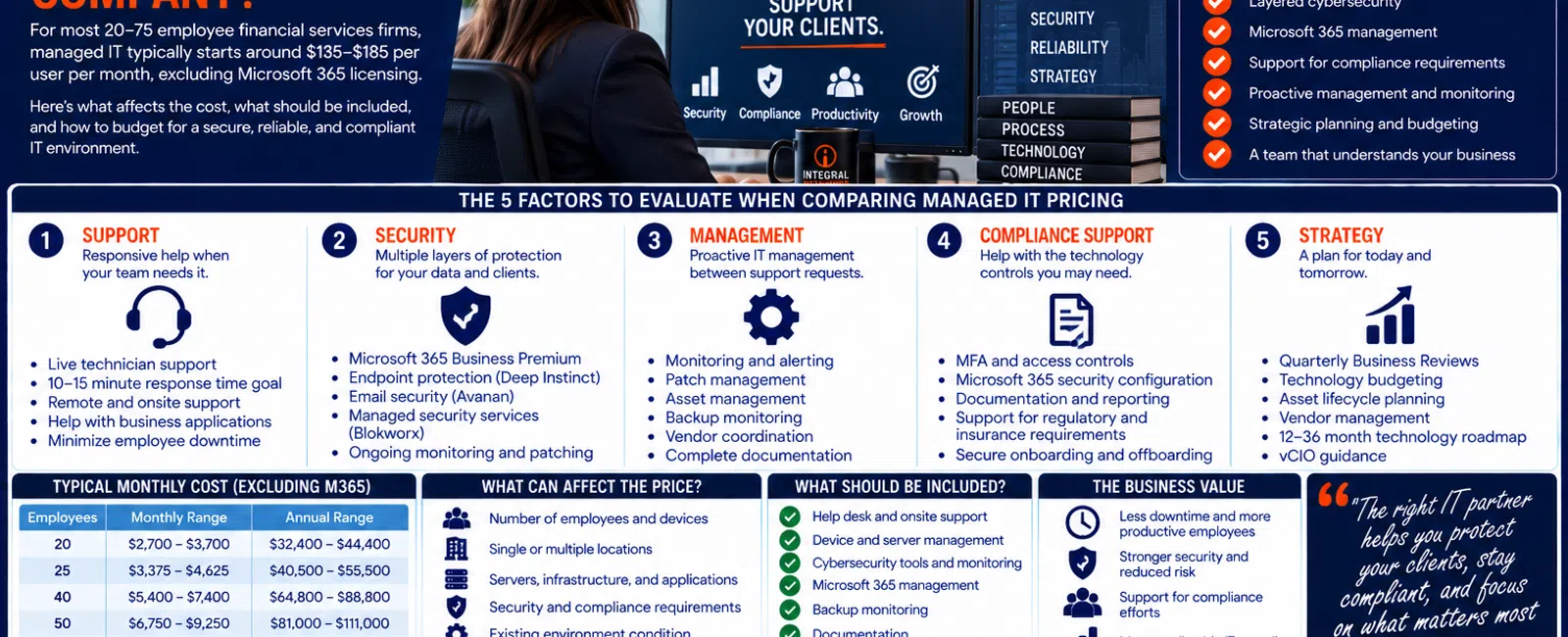
For a financial services company with 20 to 75 employees, managed IT with Integral Networks typically starts around $135-$185 per user per month, excluding Microsoft 365 licensing.
At that range, a 25-person firm would budget approximately $3,375-$4,625 per month, while a 50-person organization would budget approximately $6,750-$9,250 per month for managed IT.
But price alone doesn't tell you whether two MSP proposals provide comparable value.
Financial services organizations depend heavily on Microsoft 365, cybersecurity, employee access, reliable workstations, business applications, data protection, vendor coordination, and responsive support.
Use this five-part framework when evaluating the cost:
Support. Security. Management. Compliance Support. Strategy.
What Does Managed IT Cost at Different Company Sizes?
Using our typical $135-$185 per-user monthly range, here's a practical starting point:
| Employees | Approx. Monthly Managed IT | Approx. Annual Managed IT |
|---|---|---|
| 20 | $2,700-$3,700 | $32,400-$44,400 |
| 25 | $3,375-$4,625 | $40,500-$55,500 |
| 40 | $5,400-$7,400 | $64,800-$88,800 |
| 50 | $6,750-$9,250 | $81,000-$111,000 |
| 75 | $10,125-$13,875 | $121,500-$166,500 |
Microsoft 365 licensing is additional.
These figures are budgeting ranges, not quotes for every financial services organization.
The actual environment matters.
A 25-person company with relatively straightforward technology requirements may be very different from another 25-person organization with multiple offices, specialized applications, complex security requirements, or significant vendor dependencies.
The 5 Factors to Evaluate When Comparing Managed IT Pricing
When comparing MSP proposals, look beyond the monthly number.
Evaluate five areas.
1. SUPPORT
How quickly can employees get technical help?
2. SECURITY
What cybersecurity protections and management are included?
3. MANAGEMENT
What happens proactively between support requests?
4. COMPLIANCE SUPPORT
Can the provider help maintain the technology controls and documentation your organization may need?
5. STRATEGY
Who is planning hardware replacements, budgets, projects, and future technology requirements?
That's the service you're actually purchasing.
1. SUPPORT: Employee Downtime Has a Business Cost
Financial services employees rely heavily on technology.
A typical employee may depend on:
- Microsoft 365
- Workstations
- Financial applications
- CRM systems
- Document platforms
- Cloud applications
- Phones
- Printers
- Client information
When technology stops working, the cost isn't simply an IT ticket.
The employee may be unable to perform productive work.
What Should Support Look Like?
At Integral Networks, whenever possible, a technician answers the phone live.
If someone isn't immediately available, our general response objective is 10-15 minutes.
That's response time—not necessarily resolution time.
A complex application problem may require escalation or vendor coordination.
But employees should know someone has taken ownership.
Example: The Cost of Waiting
Suppose 10 employees experience a technology problem that prevents normal work for one hour.
That's:
10 employee-hours of disrupted productivity.
If the same problem happens twice per month:
20 employee-hours per month.
Over 12 months:
240 employee-hours.
That's why response time and problem prevention have economic value.
2. SECURITY: Financial Services IT Needs Multiple Layers
Financial services organizations may possess or access valuable information, including:
- Client information
- Financial information
- Employee information
- Credentials
- Business records
- Payment information
- Confidential documents
Cybersecurity therefore shouldn't be an optional upgrade added after basic IT support.
It should be integrated into the managed environment.
At Integral Networks, our managed security approach includes technologies and services such as:
- Microsoft 365 Business Premium
- Deep Instinct endpoint protection
- Avanan email security
- Blokworx managed security services
- Managed patching
- Microsoft 365 security configuration
- Ongoing monitoring
The objective is layered protection.
No individual security product stops everything.
Microsoft 365 Needs Active Management
Many financial services companies depend on Microsoft 365 for:
- Teams
- SharePoint
- OneDrive
- Employee identities
- Documents
- Collaboration
Integral Networks requires Microsoft 365 Business Premium for managed clients because it provides security and management functionality we use to establish a stronger baseline.
But purchasing the license doesn't automatically make the environment secure.
Someone still needs to manage it.
That includes areas such as:
- Multi-Factor Authentication
- Administrative access
- User lifecycle
- Security configuration
- Microsoft Secure Score
- Appropriate security recommendations
During onboarding, we review Microsoft Secure Score and remediate appropriate recommendations based on the client's environment.
3. MANAGEMENT: You're Paying for More Than Help Desk
This is one of the biggest differences between managed IT and outsourced break/fix support.
A Managed Service Provider should be doing work even when employees aren't calling.
That can include:
- Device monitoring
- Patch management
- Server management
- Network monitoring
- Backup monitoring
- Microsoft 365 administration
- Asset management
- Documentation
- User management
- Vendor coordination
- Security monitoring
The best support ticket is often the one that never happens because the underlying issue was identified earlier.
Documentation Matters
Financial services organizations shouldn't have critical technology information scattered across spreadsheets, emails, or one technician's memory.
Your provider should maintain documentation covering important areas such as:
- Network infrastructure
- Servers
- Firewalls
- Microsoft 365
- Backup systems
- Vendors
- Business applications
- Administrative access
- Assets
Good documentation improves support.
It also makes transitions, audits, recovery, and vendor coordination easier.
4. COMPLIANCE SUPPORT: Your MSP Should Understand Its Role
Financial services organizations may operate under various regulatory, contractual, insurance, or industry requirements.
The exact requirements depend on the type of business.
Your MSP shouldn't pretend to be your attorney, auditor, compliance consultant, or regulator.
But the technology provider may still play an important role in implementing and documenting technical controls.
Depending on the organization's requirements, technology considerations may involve areas such as:
- Multi-Factor Authentication
- Access controls
- Endpoint security
- Email security
- Patching
- Backup
- Monitoring
- Documentation
- User onboarding and offboarding
- Administrative privileges
Ask the MSP a Better Question
Instead of:
"Are you compliant?"
ask:
"How do you help us implement and document the technology controls our organization requires?"
That's a much more useful conversation.
Cyber Insurance Is Another Consideration
Cyber insurance applications may ask questions about technical controls.
For example, insurers may want information about:
- MFA
- Endpoint protection
- Backup
- Security monitoring
- Email security
- Administrative access
Your MSP may be able to provide technical information about the systems it manages.
But insurance decisions and representations ultimately belong to the organization and its appropriate advisors.
Again, clear roles matter.
5. STRATEGY: Managed IT Should Make Technology Spending More Predictable
A financial services organization shouldn't discover technology expenses only when something breaks.
Your provider should help leadership understand what's coming.
That includes:
- Workstation replacements
- Server replacements
- Network equipment
- Security improvements
- Microsoft 365 changes
- Business applications
- Major projects
- Company growth
At Integral Networks, strategic IT management includes:
- Quarterly Business Reviews
- Asset lifecycle management
- Technology budgeting
- Vendor management
- Technology roadmaps
- vCIO guidance
The objective is creating visibility 12-36 months ahead.
Example: A 25-Person Financial Services Company
Consider a hypothetical firm with 25 employees.
At our typical managed IT range:
$135 × 25 = $3,375 per month
at the lower end.
$185 × 25 = $4,625 per month
at the upper end.
That equals approximately:
$40,500-$55,500 per year
for managed IT.
Microsoft 365 licensing is additional.
The organization should also budget separately for items such as:
- Business applications
- Hardware replacements
- Major projects
- Other software subscriptions
But leadership should know those expenses are coming.
Example: A 50-Person Financial Services Company
For 50 employees, managed IT would typically start around:
$6,750-$9,250 per month
or:
$81,000-$111,000 per year.
At that investment level, leadership should expect more than:
"Call us when something breaks."
The provider should be actively involved in:
- Support
- Security
- Microsoft 365
- Monitoring
- Documentation
- Asset management
- Vendor coordination
- Budgeting
- Strategic planning
That's the difference between technical support and managed IT.
What's Typically Included in Our Managed IT Approach?
Our flat-rate managed IT model is designed around ongoing support and management.
That includes areas such as:
EMPLOYEE SUPPORT
- Help desk
- Remote support
- Onsite support
- Workstation troubleshooting
- Microsoft 365 assistance
TECHNOLOGY MANAGEMENT
- Monitoring
- Patch management
- Asset management
- Documentation
- Infrastructure management
CYBERSECURITY
- Endpoint protection
- Email security
- Microsoft 365 security
- Managed security services
- Ongoing monitoring
MICROSOFT 365 MANAGEMENT
- User administration
- Security configuration
- Exchange
- Teams
- SharePoint
- OneDrive
STRATEGIC IT
- Quarterly Business Reviews
- Technology budgeting
- Asset lifecycle planning
- Vendor management
- Technology roadmap
- vCIO guidance
Microsoft 365 licensing and other third-party licensing are separate.
Large standalone projects may also be scoped separately depending on the work involved.
What Can Affect the Price?
Even with per-user pricing, several factors can influence the environment and scope.
Number of Employees
More employees generally mean more:
- Support
- Accounts
- Devices
- Security requirements
Number of Devices
Some organizations have significantly more endpoints than employees.
Multiple Locations
Additional offices can increase infrastructure and support complexity.
Servers and Infrastructure
A cloud-heavy company may have different management requirements than one operating significant onsite infrastructure.
Security Requirements
Different organizations may require different controls or specialized services.
Business Applications
Specialized financial platforms may require vendor coordination or unique technical support.
Existing Environment Condition
A well-documented, standardized environment differs significantly from one with years of accumulated technical problems.
Don't Compare MSPs by Price Alone
Suppose two providers quote:
$150 per user per month.
They may not be offering equivalent services.
Provider A may include:
- Help desk
- Remote support
- Basic monitoring
Provider B may include a broader combination of:
- Help desk
- Remote and onsite support
- Cybersecurity
- Microsoft 365 management
- Monitoring
- Patching
- Documentation
- Asset management
- Vendor coordination
- Strategic planning
Same price.
Different service.
Ask:
"What does this investment actually include?"
The 12 Questions Financial Services Firms Should Ask an MSP
Before choosing a provider, ask:
- What's included in the monthly price?
- Is onsite support included?
- What's your normal response objective?
- How do you secure Microsoft 365?
- What email security do you provide?
- What endpoint protection do you provide?
- How do you monitor security alerts?
- How do you manage patches?
- How do you monitor backups?
- How do you document our environment?
- How do you help with technology controls and documentation requirements?
- How do you build our 12-36 month technology roadmap?
The answers are more valuable than the per-user number alone.
A 10-Question Financial Services IT Health Check
Give yourself one point for every "No" or "I'm not sure."
- Is MFA enforced appropriately?
- Do we know who has administrator access?
- Are all supported endpoints protected and monitored?
- Do we use advanced email security?
- Is Microsoft 365 actively managed?
- Are patches managed consistently?
- Are backups monitored?
- Is our environment documented?
- Do we have an asset replacement plan?
- Do we have a 12-36 month technology roadmap?
0-2 Points
Many foundational IT-management controls appear to be in place.
3-5 Points
There are meaningful areas worth reviewing.
6-10 Points
Your environment may be operating more reactively than a financial services organization should.
This isn't a compliance audit or formal security assessment.
It's a leadership-level framework for identifying areas that deserve attention.
Managed IT for Financial Services Companies in Greater Sacramento
Integral Networks supports financial services organizations throughout the Greater Sacramento region, including Sacramento, Roseville, Rocklin, Folsom, Elk Grove, Woodland, Stockton, Modesto, and surrounding communities.
Our primary managed IT focus is businesses with 20 or more employees that need responsive support, layered cybersecurity, Microsoft 365 management, and strategic technology planning.
Sacramento, CA: (916) 626-4000
Managed IT for Financial Services Companies in Northern Nevada
Our second primary service area is Northern Nevada, including Reno, Sparks, Carson City, and surrounding communities.
We provide the same combination of proactive management, cybersecurity, responsive support, and strategic IT guidance across both regions.
Reno, NV: (775) 446-4100
Final Thoughts
For a financial services company with 20-75 employees, $135-$185 per user per month is a practical starting range for managed IT with Integral Networks, excluding Microsoft 365 licensing.
But don't evaluate the investment by price alone.
Use five categories:
Support.
Security.
Management.
Compliance Support.
Strategy.
Can employees get help quickly?
Is cybersecurity actively managed?
Is someone maintaining the environment between tickets?
Can the provider support the technology controls and documentation your organization needs?
Does leadership have a roadmap for the next 12-36 months?
That's what you're really buying.
Not computer repair.
A technology operation your business can depend on.
Ready for a Second Opinion?
If your financial services organization is evaluating managed IT—or you're questioning whether your current provider is delivering enough value for what you're paying—Integral Networks can review your environment and explain what a more proactive managed IT relationship could look like.
We provide flat-rate managed IT, layered cybersecurity, Microsoft 365 management, responsive support, backup oversight, asset lifecycle planning, vendor management, and strategic IT guidance for financial services organizations throughout the Greater Sacramento region and Northern Nevada.
Related Articles
What Does Flat-Rate Managed IT Really Mean—and What Should Be Included?
What Is Proactive Managed IT—and How Is It Different From Reactive IT Support?
What Should Your IT Provider Do During a Cybersecurity Incident?
How Do You Know If Your Business Backups Will Actually Work When You Need Them?
What Should Happen During a Quarterly Business Review With Your IT Provider?


