
What Cybersecurity Does a Financial Services Company Actually Need?
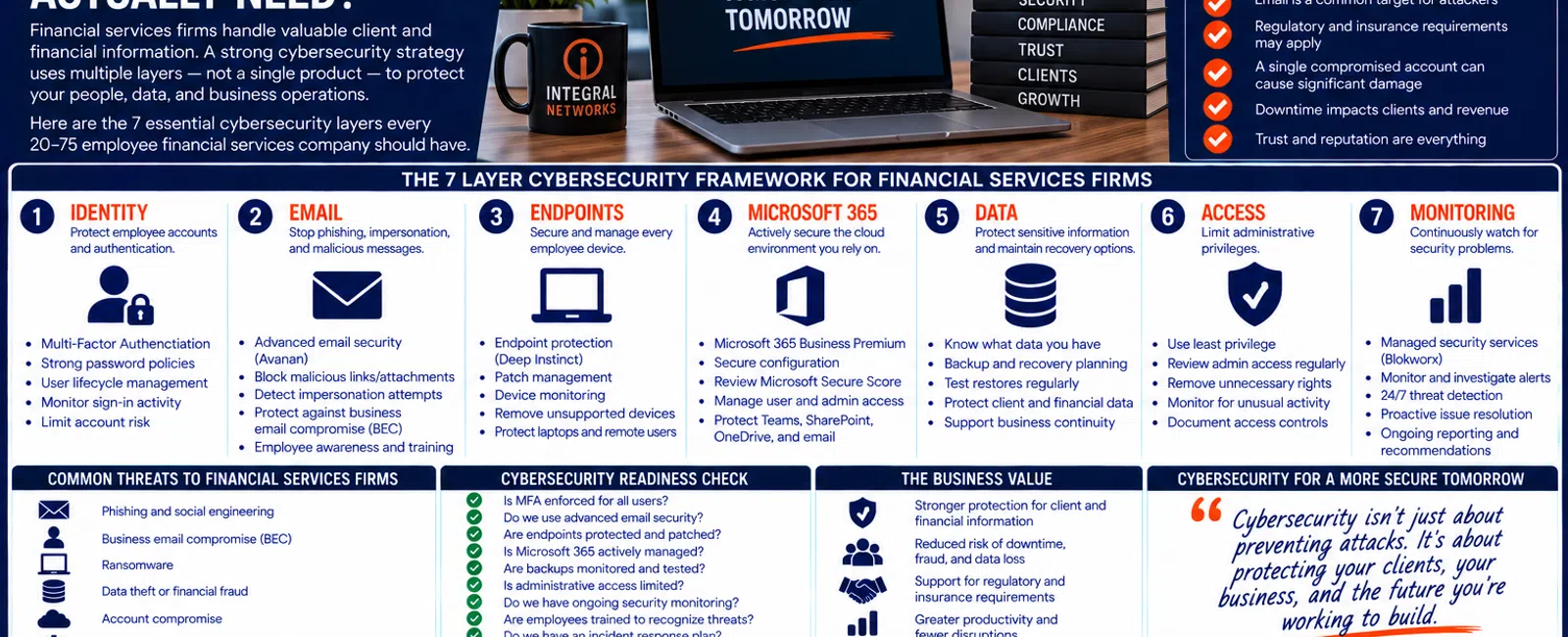
For a financial services company with 20 to 75 employees, cybersecurity should protect at least seven areas: identities, email, endpoints, Microsoft 365, sensitive data, administrative access, and security monitoring.
That doesn't mean buying seven unrelated cybersecurity products.
It means creating multiple security layers around the accounts, devices, applications, communications, and information your employees depend on every day.
Financial services organizations may handle client information, financial records, employee information, payment information, credentials, and other sensitive business data.
And because employees rely heavily on email and cloud services, an attacker doesn't necessarily need to "hack the network."
Sometimes compromising one employee account is enough to create a serious problem.
Use this seven-layer framework:
Identity. Email. Endpoints. Microsoft 365. Data. Access. Monitoring.
The 7-Layer Financial Services Cybersecurity Framework
A practical cybersecurity strategy should address:
1. IDENTITY
Protect employee accounts and authentication.
2. EMAIL
Reduce phishing, impersonation, and malicious-message risk.
3. ENDPOINTS
Protect and manage employee computers.
4. MICROSOFT 365
Secure the cloud environment employees depend on.
5. DATA
Protect sensitive business and client information and maintain recovery capabilities.
6. ACCESS
Limit unnecessary administrative privileges.
7. MONITORING
Continuously watch for security problems requiring investigation.
No individual layer is perfect.
That's the reason for having multiple layers.
1. IDENTITY: Protect the Employee Account First
Modern business technology increasingly revolves around identity.
One employee account may provide access to:
- Microsoft 365
- Teams
- SharePoint
- OneDrive
- Business applications
- Client information
- Cloud services
That makes stolen credentials valuable.
Attackers may attempt to obtain them through:
- Phishing
- Fake Microsoft login pages
- Password reuse
- Social engineering
- Compromised third parties
A strong password is useful.
But passwords shouldn't be the only protection.
Multi-Factor Authentication Should Be Enforced
Multi-Factor Authentication adds another verification requirement before an account can be accessed.
For a managed environment, MFA shouldn't simply be:
Available.
It should be:
Appropriately enforced.
Your IT provider should be able to explain:
- Which users are protected
- How MFA is enforced
- Whether exceptions exist
- Why those exceptions exist
- How administrative accounts are handled
Security shouldn't depend on employees voluntarily deciding whether to enable an important control.
2. EMAIL: Protect the Front Door Employees Use All Day
Financial services employees may exchange email with:
- Clients
- Banks
- Vendors
- Accountants
- Attorneys
- Insurance providers
- Business partners
- Internal leadership
Attackers can exploit those relationships.
A malicious email may look like:
A client sending a document.
Microsoft asking the employee to sign in.
A vendor changing banking information.
An executive requesting an urgent payment.
A business partner sharing a secure file.
The more believable the message, the more dangerous it becomes.
Business Email Compromise Is About Trust
Some email attacks aren't obviously malicious.
There may be no strange attachment.
No obvious malware.
Instead, the attacker tries to convince an employee that they're communicating with someone they trust.
That's why email security needs to address more than spam.
At Integral Networks, we use Avanan email security as part of our managed security approach.
The objective is to provide another security layer against threats such as:
- Phishing
- Impersonation
- Malicious attachments
- Credential-stealing links
- Other suspicious email activity
No email security platform catches everything.
That's why employee awareness and other technical controls still matter.
3. ENDPOINTS: Every Employee Computer Is Part of the Security Environment
Your employees' workstations and laptops provide access to valuable information.
They may contain or access:
- Client records
- Credentials
- Documents
- Financial applications
- Microsoft 365
- Cloud services
Endpoints therefore need active protection and management.
At Integral Networks, we use Deep Instinct endpoint protection as part of our standardized security stack.
But endpoint security isn't simply installing software once.
Someone needs to verify:
- Protection is deployed.
- Devices are checking in.
- Alerts are reviewed.
- Systems are patched.
- New computers are protected.
- Retired systems are removed.
- Security problems are investigated.
That's management.
4. MICROSOFT 365: Treat It as a Security Platform, Not Just Email
Microsoft 365 may be one of the most important technology platforms inside a financial services organization.
It can contain:
- Employee identities
- Calendars
- Teams
- SharePoint
- OneDrive
- Business documents
Integral Networks requires Microsoft 365 Business Premium for managed clients because it gives us important security and management capabilities.
But buying Business Premium isn't the security strategy.
It needs to be configured and managed.
What Should Microsoft 365 Management Address?
Depending on the environment, areas can include:
- MFA
- Administrative access
- User lifecycle
- Identity
- Security policies
- Device management
- Microsoft Secure Score
- Security recommendations
During onboarding, Integral Networks reviews Microsoft Secure Score and works through appropriate recommendations based on the client's environment.
Secure Score is a useful framework.
It isn't a guarantee that an organization is secure.
5. DATA: Know What You're Protecting
Cybersecurity isn't only about preventing unauthorized access.
It's also about protecting the availability and integrity of important information.
A financial services organization may depend on:
- Client information
- Financial records
- Business documents
- Employee information
- Databases
- Business applications
Ask:
Where does our important data actually live?
Then:
How is each system protected?
Then:
How would we recover it?
Those answers may differ by platform.
Backup and Recovery Are Part of Cybersecurity
Backups don't prevent an attacker from attempting an attack.
They provide another form of resilience when something goes wrong.
Your organization should understand:
- What is protected
- How frequently
- Who monitors backup failures
- Where recovery copies exist
- Whether restores are tested
- Which systems need to recover first
As we covered in Article #30, the real question isn't:
"Did the backup run?"
It's:
"Can we actually recover?"
6. ACCESS: Limit Administrative Privileges
Administrative access deserves special attention.
A user with elevated privileges can make changes an ordinary employee cannot.
That's useful when administration is legitimately required.
It's also potentially valuable to an attacker.
Over time, administrative access can accumulate.
Someone needed temporary permissions.
A consultant received access.
An employee changed roles.
Nobody went back and reviewed it.
Use Least Privilege
The principle is straightforward:
Give users the access they need to perform their responsibilities—and no more.
Administrative access should be:
- Limited
- Documented
- Reviewed
- Removed when no longer required
This applies to employee devices, Microsoft 365, and other critical systems.
7. MONITORING: Security Tools Need Someone Watching Them
This is the layer that ties everything together.
Security tools generate information.
Microsoft generates alerts.
Endpoints generate alerts.
Email security generates alerts.
Accounts change.
Devices change.
Employees change.
Someone needs to pay attention.
Integral Networks uses Blokworx managed security services as part of our layered managed security approach.
Combined with Microsoft 365 Business Premium, Avanan, Deep Instinct, managed patching, Microsoft 365 security management, and ongoing IT management, this provides multiple layers of protection and visibility.
The objective isn't:
Install security products and forget about them.
It's:
Manage security continuously.
Where Does Compliance Fit?
Financial services companies may have regulatory, contractual, insurance, or industry requirements that affect technology.
The exact requirements depend on the organization.
That's why an MSP should be careful about simply saying:
"We're making you compliant."
Your IT provider isn't necessarily your:
- Attorney
- Auditor
- Compliance consultant
- Regulator
But it may be responsible for implementing or documenting important technology controls.
Technical Controls May Support Compliance Requirements
Depending on the organization, those controls may involve:
- MFA
- Access management
- Endpoint protection
- Email security
- Patching
- Backup
- Security monitoring
- Documentation
- User onboarding
- Employee offboarding
- Administrative access
The important question for an MSP is:
"What technology requirements do you need us to implement and maintain?"
Then responsibilities should be clear.
Cyber Insurance Adds Another Layer of Requirements
Cyber insurance applications may ask organizations about controls such as:
- MFA
- Endpoint security
- Backup
- Email protection
- Administrative access
- Security monitoring
Your IT provider may be able to provide technical information about systems it manages.
But organizations should make sure insurance representations are accurate and involve the appropriate advisors where necessary.
Your MSP shouldn't guess.
What Does a Financial Services Phishing Attack Look Like?
Consider a hypothetical 35-person financial services company.
An employee receives an email that appears to come from a known business partner.
The message says:
"We've updated the documents. Please review them through Microsoft 365."
The employee clicks.
They're presented with what appears to be a Microsoft login page.
They enter their credentials.
Now consider the security layers.
Avanan may identify and stop the message.
IDENTITY
MFA may prevent a stolen password alone from providing account access.
ENDPOINT
Deep Instinct provides another protection layer on the employee's device.
MICROSOFT 365
Microsoft security controls may identify suspicious behavior.
MONITORING
Security monitoring provides another opportunity to detect abnormal activity.
EMPLOYEE
The employee may recognize something unusual and report it.
The strategy doesn't assume one layer catches everything.
It gives the attack multiple opportunities to fail.
What If the Attack Still Succeeds?
Then incident response matters.
Article #29 covered our seven-stage incident-response framework:
Detect.
Contain.
Assess.
Coordinate.
Recover.
Document.
Improve.
Security strategy needs both sides:
Reduce the probability and impact of incidents.
And:
Prepare to respond when prevention fails.
How Much Security Is Enough?
There's no single security configuration appropriate for every financial services company.
The appropriate controls depend on factors such as:
- Business type
- Data
- Applications
- Employee count
- Client requirements
- Regulatory obligations
- Insurance requirements
- Risk tolerance
- Technology environment
But leadership should be able to ask:
"Can our IT provider explain why each major security layer exists?"
If the answer is no, that's worth addressing.
Cybersecurity Shouldn't Make Employees Unable to Work
Security needs to protect the organization without making normal business unnecessarily difficult.
Employees still need to:
- Communicate with clients
- Access applications
- Work remotely
- Share documents
- Collaborate
- Meet deadlines
The objective isn't:
Maximum restriction.
It's:
Appropriate protection.
That requires understanding how the organization actually works.
A 10-Question Financial Services Cybersecurity Check
Give yourself one point for every "No" or "I'm not sure."
- Is MFA appropriately enforced?
- Do we know exactly who has administrator access?
- Do we use advanced email security?
- Are all supported endpoints protected and monitored?
- Is Microsoft 365 actively secured and managed?
- Has Microsoft Secure Score been reviewed?
- Are patches actively managed?
- Are backups monitored and recovery capabilities understood?
- Are security alerts actively monitored?
- Can our IT provider clearly explain our cybersecurity strategy?
0-2 Points
Many foundational security controls appear to be in place.
3-5 Points
There are meaningful areas worth reviewing.
6-10 Points
Your security environment deserves a more comprehensive review.
This isn't a formal cybersecurity, regulatory, or compliance assessment.
It's a leadership-level framework for identifying questions that deserve clear answers.
Employee Onboarding Is a Security Process
When a new employee starts, they may receive access to:
- Microsoft 365
- Workstation
- Client information
- Business applications
- Shared files
- Cloud platforms
That access should follow a repeatable process.
Employees should receive what they need.
Not whatever the last person happened to have.
Employee Offboarding Is Even More Important
When someone leaves, access needs to be addressed promptly.
That may include:
- Microsoft 365
- Remote access
- Business applications
- Shared data
- Administrative permissions
- Company equipment
Former employees shouldn't retain access simply because an account was overlooked.
This is another reason documentation and repeatable processes matter.
The 7-Layer Security Checklist
Leadership doesn't need to memorize every security product.
Remember the layers.
IDENTITY
Are employee accounts protected?
Are phishing and impersonation being addressed?
ENDPOINTS
Are computers protected, patched, and monitored?
MICROSOFT 365
Is the cloud environment actively managed?
DATA
Can important information be protected and recovered?
ACCESS
Are privileges appropriately limited?
MONITORING
Is someone watching for security problems?
If you can't confidently answer one of those questions, you know where to start.
Cybersecurity for Greater Sacramento Financial Services Companies
Integral Networks supports financial services organizations throughout the Greater Sacramento region, including Sacramento, Roseville, Rocklin, Folsom, Elk Grove, Woodland, Stockton, Modesto, and surrounding communities.
Our primary managed IT focus is businesses with 20 or more employees that need responsive support, layered cybersecurity, Microsoft 365 management, and strategic technology planning.
Sacramento, CA: (916) 626-4000
Cybersecurity for Northern Nevada Financial Services Companies
Our second primary service area is Northern Nevada, including Reno, Sparks, Carson City, and surrounding communities.
We combine remote monitoring, managed cybersecurity, responsive technical support, and local onsite capabilities when physical assistance is required.
Reno, NV: (775) 446-4100
Final Thoughts
Cybersecurity for a financial services company shouldn't be:
Antivirus + hope.
And it shouldn't be a pile of unrelated security products nobody can explain.
Use seven layers:
Identity.
Email.
Endpoints.
Microsoft 365.
Data.
Access.
Monitoring.
Then manage those layers continuously.
Understand the organization's compliance and insurance requirements.
Document responsibilities.
Protect employee accounts.
Secure Microsoft 365.
Protect the devices employees use.
Maintain recovery capabilities.
And make sure someone is actually watching the environment.
No security strategy can promise an incident will never occur.
The objective is to make attacks harder to succeed, increase the opportunities to detect them, reduce their potential impact, and make the business better prepared to recover.
Ready for a Second Opinion?
If you're not sure whether your financial services organization's cybersecurity strategy adequately protects Microsoft 365, email, endpoints, client information, employee accounts, and critical business data, Integral Networks can review your current environment and identify areas worth strengthening.
We provide flat-rate managed IT, layered cybersecurity, Microsoft 365 management, email security, endpoint protection, security monitoring, backup oversight, documentation, and strategic IT guidance for financial services organizations throughout the Greater Sacramento region and Northern Nevada.
Related Articles
How Much Does Managed IT Cost for a Financial Services Company? 2026 Pricing Guide
What Should Your IT Provider Do During a Cybersecurity Incident?
How Do You Know If Your Business Backups Will Actually Work When You Need Them?
How Secure Should Microsoft 365 Be for a 20-75 Employee Business?
What Does Good Cybersecurity Look Like for a 20-75 Employee Business?


