
What Is Proactive Managed IT—and How Is It Different From Reactive IT Support?
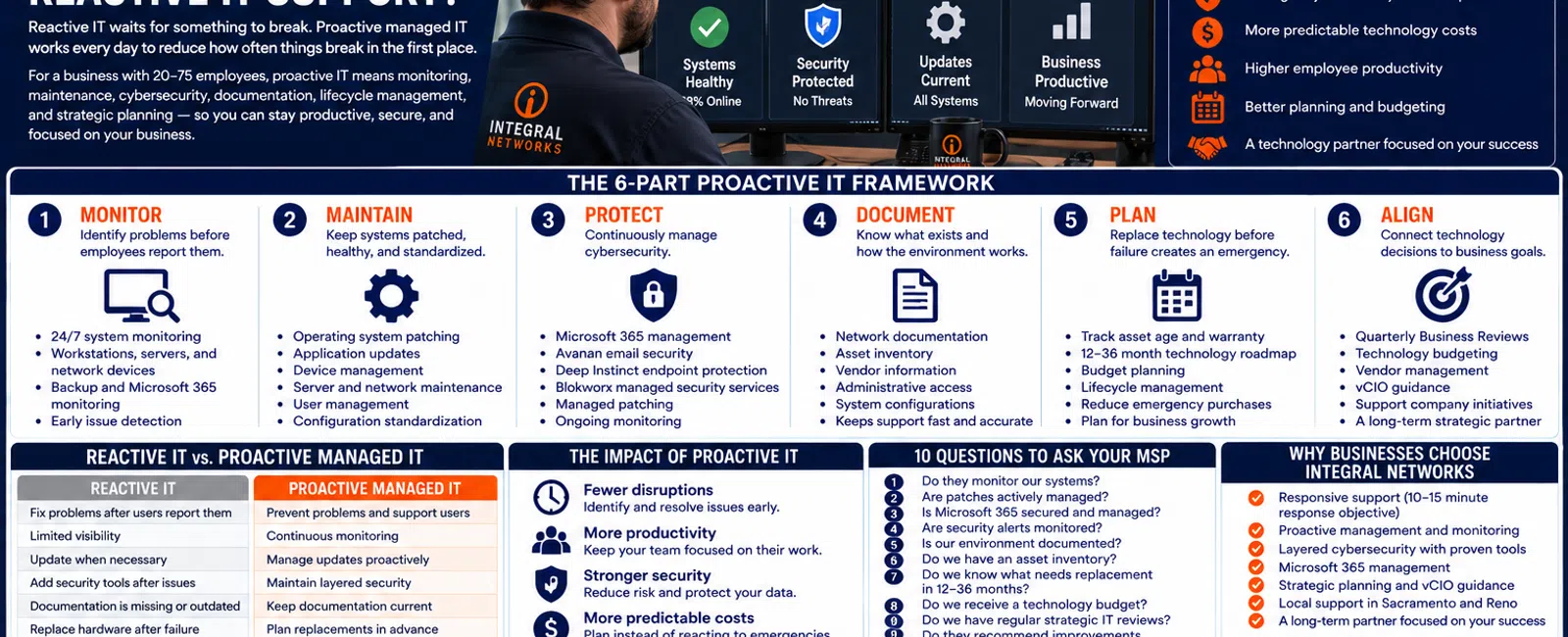
Reactive IT waits for something to break. Proactive managed IT works every day to reduce how often things break in the first place.
For a business with 20 to 75 employees, that difference should be visible in at least six areas: monitoring, maintenance, cybersecurity, documentation, lifecycle management, and strategic planning.
You will still have support tickets.
Computers still fail. Software still has problems. Employees still need help.
The difference is that a proactive Managed Service Provider shouldn't spend 100% of its relationship with you reacting to those problems.
At Integral Networks, the objective is straightforward:
Support today's business while actively preparing the technology environment for tomorrow.
For growing organizations throughout the Greater Sacramento region and Northern Nevada, here's what that actually means.
The 6-Part Proactive IT Framework
Use these six areas to determine whether your current IT relationship is truly proactive:
1. MONITOR — Identify problems before employees report them.
2. MAINTAIN — Keep systems patched, healthy, and standardized.
3. PROTECT — Continuously manage cybersecurity.
4. DOCUMENT — Know what exists and how the environment works.
5. PLAN — Replace technology before failure creates an emergency.
6. ALIGN — Connect technology decisions to business goals and budgets.
If your provider is doing only one of these—responding after an employee calls—you don't have the complete managed IT model.
1. MONITOR: Don't Wait for Employees to Discover Every Problem
Reactive IT often begins with an employee.
Something stops working.
They call IT.
Only then does someone investigate.
Proactive IT uses monitoring and management tools to maintain visibility into supported systems.
Depending on the environment, that can include:
- Workstations
- Servers
- Network equipment
- Backup systems
- Microsoft 365
- Security systems
- Patching
- Device health
The objective is to identify certain problems before an employee discovers them through downtime.
A Simple Example
Imagine a server is running low on available storage.
Reactive Approach
Nobody notices.
Storage eventually becomes critically low.
An application stops functioning properly.
Employees call support.
IT discovers the storage problem during the outage.
Proactive Approach
Monitoring identifies the capacity issue earlier.
The provider investigates.
Leadership receives a recommendation.
The problem is addressed before it becomes an employee-facing outage.
That's proactive IT in practical terms.
Monitoring Doesn't Mean Nothing Will Ever Break
This distinction is important.
No MSP can monitor its way to zero technology problems.
Hardware can fail unexpectedly.
Software can malfunction.
Internet providers can experience outages.
Employees can make mistakes.
Cybersecurity incidents can occur despite strong controls.
The goal of monitoring isn't perfection.
It's visibility.
The sooner your provider knows something is wrong, the sooner it can begin determining what needs to happen next.
2. MAINTAIN: Technology Needs Attention Before It Fails
Technology environments change constantly.
Microsoft releases updates.
Software vendors release patches.
Devices age.
Applications change.
Employees come and go.
Reactive IT deals with those changes when they create problems.
Proactive management establishes repeatable processes.
That may include:
- Operating-system patching
- Application patching
- Device management
- Server maintenance
- Network management
- Microsoft 365 administration
- User management
- Backup monitoring
Why Patching Matters
Many security vulnerabilities eventually receive vendor updates.
But an available update provides little value if nobody deploys it.
For a 50-person business, relying on each employee to manage updates independently isn't a mature IT process.
Someone needs to own it.
Standardization Is Part of Maintenance
Imagine supporting 50 computers where:
- Everyone has different security software.
- Employees install whatever they want.
- Everyone has administrator rights.
- Software versions vary wildly.
- Nobody knows which devices are current.
Every support request becomes more difficult.
Standardization reduces unnecessary variation.
At Integral Networks, we standardize managed environments wherever practical.
That helps our technicians understand:
- What should be installed
- How devices should be configured
- Which security controls should exist
- What normal looks like
Consistency makes both support and security more manageable.
3. PROTECT: Cybersecurity Is an Ongoing Process
Reactive cybersecurity sounds like this:
"Call us if you think you've been hacked."
That's not enough.
Security needs ongoing management.
For businesses with 20-75 employees, a modern security strategy may need to address:
- Identity
- Endpoints
- Microsoft 365
- Administrative access
- Patching
- Backup
- Monitoring
At Integral Networks, our standardized managed security approach includes technologies and services such as:
- Microsoft 365 Business Premium
- Deep Instinct endpoint protection
- Avanan email security
- Blokworx managed security services
- Managed patching
- Microsoft 365 security configuration
- Ongoing monitoring
The point isn't the number of security products.
It's that someone is actively managing the security environment.
Microsoft 365 Is a Good Example of Proactive vs. Reactive
Many organizations use Microsoft 365 every day.
A reactive provider may help when:
- Outlook stops working.
- An employee can't log in.
- A mailbox needs configuration.
Those things matter.
But proactive Microsoft 365 management goes further.
It asks:
- Is MFA properly enforced?
- Who has administrator access?
- Are unnecessary permissions present?
- Has Microsoft Secure Score been reviewed?
- Are former employees being offboarded correctly?
- Are appropriate security recommendations being addressed?
Integral Networks requires Microsoft 365 Business Premium for managed clients because it gives us security and management functionality we use to establish a stronger baseline.
During onboarding, we review Microsoft Secure Score and remediate appropriate recommendations based on the client's environment.
That's management—not simply support.
4. DOCUMENT: Your Environment Shouldn't Be a Mystery
One of the recurring problems we encounter when taking over IT environments is poor documentation.
Sometimes documentation exists but is outdated.
Sometimes it's scattered.
Sometimes almost nothing exists.
That's a major problem for proactive IT.
Your provider should understand important information such as:
- Network configuration
- Servers
- Firewalls
- Internet providers
- Microsoft 365
- Backup systems
- Business applications
- Vendors
- Assets
- Administrative access
Documentation Makes Support Faster
Suppose an application stops communicating with a server.
Without documentation, the technician first needs to discover:
- Which server
- Where it is
- How it's configured
- Who supports the application
- Which vendor to contact
With good documentation, troubleshooting starts much further ahead.
Documentation doesn't just make IT organized.
It improves response quality.
Documentation Also Protects the Business
Ask this:
What happens if the technician who knows our environment leaves tomorrow?
Does the knowledge leave too?
It shouldn't.
A business shouldn't become dependent on critical technology information existing inside one person's head.
That applies whether IT is internal or outsourced.
5. PLAN: Replace Technology Before Failure Makes the Decision
Reactive IT replaces equipment like this:
"The server died. We need a new one."
"This computer won't start. We need another one."
"The firewall is end-of-life. We need to replace it immediately."
Some unexpected failures are unavoidable.
But many hardware replacements can be forecast.
A proactive MSP should maintain an asset inventory and help leadership understand:
- What equipment exists
- How old it is
- Warranty status
- Business purpose
- Expected replacement timing
- Estimated future investment
That creates a 12-36 month technology roadmap.
Planned Expense vs. Emergency Expense
Suppose 10 computers need replacement.
Reactive Environment
Leadership discovers the problem after employees start complaining.
The company suddenly needs money for 10 computers.
Proactive Environment
The systems have been tracked for years.
Leadership knows replacements are coming.
The expense is included in next year's budget.
Same computers.
Completely different business experience.
6. ALIGN: IT Should Follow the Business Plan
This is the part that separates mature managed IT from technical maintenance.
Your business has plans.
Maybe you're:
- Hiring employees
- Opening another location
- Expanding into another market
- Implementing new software
- Changing business processes
- Increasing cybersecurity requirements
- Moving offices
Technology needs to follow those plans.
Your IT provider should be asking:
Where is the business going?
not simply:
What broke today?
At Integral Networks, strategic IT management includes:
- Quarterly Business Reviews
- Asset lifecycle management
- Technology budgeting
- Vendor management
- Technology roadmaps
- vCIO guidance
The objective is to align technology decisions with what leadership is trying to accomplish.
What Does a Quarterly Business Review Actually Do?
A Quarterly Business Review shouldn't simply be a meeting where the MSP tells leadership:
"We closed 147 tickets."
Ticket counts can be useful operational information.
But leadership needs something different.
A strategic review should discuss areas such as:
- Current technology health
- Security
- Aging equipment
- Upcoming replacements
- Current projects
- Future projects
- Budget
- Business changes
- Priorities
The meeting should answer:
Where are we now, where are we going, and what technology decisions are coming?
Reactive vs. Proactive IT: Side-by-Side
Here's the practical difference.
| Area | Reactive IT | Proactive Managed IT |
|---|---|---|
| Support | Fix problems after users report them | Support users while reducing recurring problems |
| Monitoring | Limited visibility until something fails | Continuously monitor supported systems |
| Patching | Update when necessary or requested | Manage updates through defined processes |
| Security | Add tools after problems occur | Maintain layered security continuously |
| Documentation | Information gathered when needed | Maintain current environment documentation |
| Hardware | Replace after failure | Forecast replacements 12-36 months ahead |
| Budget | Spend when something becomes urgent | Plan expected technology investments |
| Strategy | Focus on today's tickets | Align technology with business goals |
That's the difference you're paying for.
What About Response Time?
Proactive management doesn't eliminate the need for excellent reactive support.
When an employee has a problem, they still need help.
At Integral Networks, whenever possible, a technician answers the phone live.
If someone isn't immediately available, our general response objective is 10-15 minutes.
Proactive IT and responsive support aren't competing ideas.
You need both.
React quickly when something breaks.
Work proactively so fewer things break.
That's the model.
Example: A 40-Person Business
Consider a hypothetical company with 40 employees.
Its IT provider receives recurring complaints about several aging computers.
Reactive Provider
Each time an employee complains:
- Technician troubleshoots.
- Performance improves temporarily.
- Ticket closes.
- Employee calls again next month.
The provider is technically responding.
But the underlying problem remains.
Proactive Provider
The devices are already listed in the asset-management system.
The provider knows:
- Their age
- Their specifications
- Their warranty status
- Their expected replacement date
During the Quarterly Business Review, leadership is shown that the devices are approaching replacement.
The replacements are included in the technology budget.
The recurring support problem disappears.
That's the difference between closing tickets and managing technology.
Another Example: Repeated Network Problems
Suppose employees experience intermittent network problems three times in two months.
A reactive model treats those as:
Ticket 1. Ticket 2. Ticket 3.
A proactive model asks:
Why have we had three related incidents?
Maybe the answer is:
- Aging network hardware
- Configuration
- Connectivity
- Cabling
- Internet provider
- Something else entirely
The important part is looking for the pattern.
A good MSP should want to eliminate recurring tickets.
The Economics of Proactive IT
Imagine 10 employees each lose 30 minutes per week to recurring technology problems.
That's:
10 × 0.5 hours = 5 employee-hours per week.
Across 50 working weeks:
250 employee-hours per year.
And that's from relatively small recurring problems.
Proactive IT creates value by reducing avoidable productivity loss—not simply by lowering the number of IT invoices.
The 10-Question Proactive IT Test
Ask these questions about your current provider:
- Do they monitor our supported systems?
- Are patches actively managed?
- Is Microsoft 365 actively secured and managed?
- Are cybersecurity alerts monitored?
- Is our environment documented?
- Do we have an accurate asset inventory?
- Do we know which hardware needs replacement in the next 12-36 months?
- Does leadership receive a technology budget?
- Do we have regular strategic IT reviews?
- Does our provider regularly recommend improvements before we ask?
Give yourself one point for every:
"No"
or:
"I'm not sure."
0-2 Points
Your provider appears to be delivering many proactive-management functions.
3-5 Points
There are meaningful gaps worth discussing.
6-10 Points
Your IT relationship is probably more reactive than managed.
This isn't a technical audit.
It's a simple way to determine whether you're buying managed IT or primarily buying outsourced troubleshooting.
Five Signs Your MSP Is Still Operating Reactively
Watch for these patterns:
1. You Only Hear From Them When Something Breaks
No strategic conversations.
No roadmap.
No planning.
2. The Same Problems Keep Returning
Tickets close, but root causes aren't addressed.
3. Hardware Replacement Is Always an Emergency
Nobody warned leadership it was coming.
4. Nobody Can Explain Your Security Strategy
You have products, but not a clear plan.
5. Your IT Budget Is Mostly Surprises
Technology spending is driven by urgent events instead of a roadmap.
If several of those sound familiar, ask your provider what proactive management they're actually performing.
Proactive IT for Greater Sacramento Businesses
Integral Networks supports growing organizations throughout the Greater Sacramento region, including Sacramento, Roseville, Rocklin, Folsom, Elk Grove, Woodland, Stockton, Modesto, and surrounding communities.
Our primary managed IT focus is businesses with 20 or more employees that depend on technology and want a more structured approach to support, security, management, and planning.
Sacramento, CA: (916) 626-4000
Proactive IT for Northern Nevada Businesses
Our second primary service area is Northern Nevada, including Reno, Sparks, Carson City, and surrounding communities.
Our approach combines responsive remote support, local onsite capabilities, proactive management, cybersecurity, and strategic technology planning.
Reno, NV: (775) 446-4100
Final Thoughts
Proactive managed IT doesn't mean nothing ever breaks.
It means your IT provider has responsibilities before, during, and after something breaks.
Use the six-part framework:
Monitor.
Maintain.
Protect.
Document.
Plan.
Align.
Monitor the environment.
Maintain the technology.
Protect the business.
Document what exists.
Plan future investments.
Align technology with where the company is going.
And when something still goes wrong?
Respond quickly and take ownership.
That's what proactive managed IT should look like for a growing business.
Ready for a Second Opinion?
If your current IT relationship feels like an endless cycle of tickets, recurring problems, surprise hardware purchases, and emergency projects, Integral Networks can review your environment and help identify where a more proactive approach could make the biggest difference.
We provide flat-rate managed IT, cybersecurity, Microsoft 365 management, asset lifecycle planning, vendor management, responsive support, and strategic IT guidance for growing businesses throughout the Greater Sacramento region and Northern Nevada.
Related Articles
What Does Flat-Rate Managed IT Really Mean—and What Should Be Included?
What's Included in Flat-Rate Managed IT Services? Everything Your Business Should Expect
How Long Should It Take Your IT Provider to Respond to a Support Request?
How Much Should a 20-75 Employee Business Budget for IT Each Year?
How Do You Know When It's Time to Fire Your IT Provider?
Sacramento, CA — (916) 626-4000
Reno, NV — (775) 446-4100.


