
What Should Happen During a Quarterly Business Review With Your IT Provider?
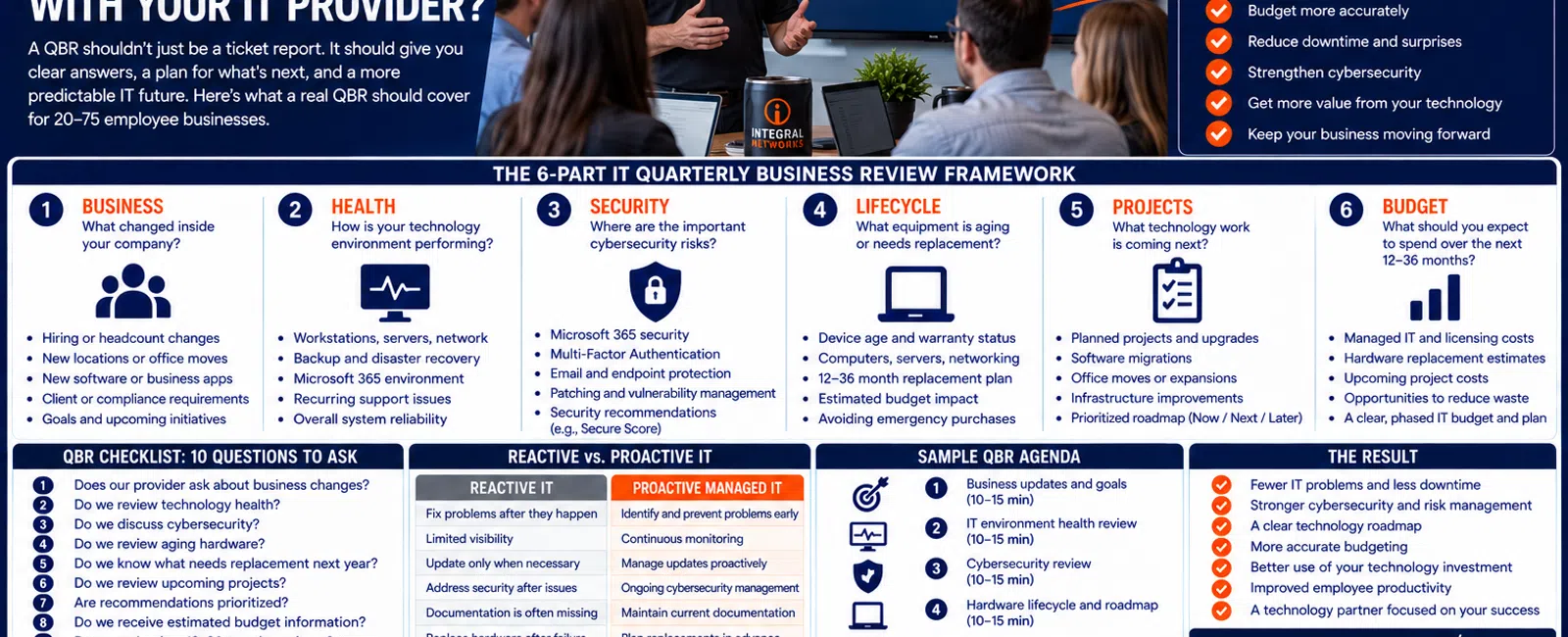
For a business with 20 to 75 employees, a Quarterly Business Review with your Managed Service Provider should cover at least six areas: business changes, technology health, cybersecurity, hardware lifecycle, upcoming projects, and budget and roadmap planning.
It shouldn't simply be a meeting where your MSP tells you how many tickets it closed.
Support metrics can be useful, but leadership needs something more valuable:
What changed? What's at risk? What's coming next? What decisions do we need to make? And what should we budget for?
At Integral Networks, the purpose of strategic IT planning is to make technology more predictable.
Use this six-part framework to evaluate whether your QBR is actually helping your business.
The 6-Part IT Quarterly Business Review Framework
A useful QBR should address:
1. BUSINESS — What changed inside the company?
2. HEALTH — How is the technology environment performing?
3. SECURITY — Where are the important cybersecurity risks?
4. LIFECYCLE — What equipment is aging or approaching replacement?
5. PROJECTS — What technology work is coming next?
6. BUDGET — What should leadership expect to spend over the next 12-36 months?
The order matters.
Start with the business.
Then determine what technology needs to do to support it.
1. BUSINESS: Start With What's Changing
One of the biggest mistakes an IT provider can make during a strategic review is talking only about technology.
Technology exists to support the business.
So start there.
Your MSP should be asking questions such as:
- Are you hiring?
- Are employee counts changing?
- Are you opening or closing a location?
- Is the company moving?
- Are employees working differently?
- Are you adopting new software?
- Are business applications changing?
- Are you entering a new market?
- Are client requirements changing?
- Are there major initiatives coming?
Those answers affect the technology roadmap.
Example: Growing From 30 to 45 Employees
Suppose leadership expects the company to grow from 30 employees to 45 employees during the next 12 months.
That's a 50% increase in headcount.
IT planning may need to account for:
- 15 additional computers
- Microsoft 365 licensing
- Application licenses
- User onboarding
- Security
- Network capacity
- Office space
- Phone requirements
- Storage
- Support demand
If your MSP learns about those 15 hires only after people begin arriving, planning has already failed.
2. HEALTH: Review the Technology Environment
Next, discuss the current state of the environment.
This shouldn't become a 60-page technical report leadership can't understand.
Focus on meaningful information.
Depending on the organization, that may include:
- Workstation health
- Server health
- Network infrastructure
- Backup status
- Microsoft 365
- Patching
- Recurring support problems
- Capacity
- Reliability
- Documentation
The provider should translate technical information into business impact.
Instead of:
"Switch 3 has interface errors."
leadership needs to understand:
"We have an aging network device showing reliability concerns, and we're recommending replacement before it becomes a larger operational issue."
That's actionable.
Support Metrics Can Still Be Useful
Ticket information isn't worthless.
Look for patterns.
For example:
- Are ticket volumes increasing?
- Are several employees reporting the same problem?
- Is one application generating repeated support requests?
- Are recurring issues consuming employee time?
- Are certain departments experiencing more problems?
The important question isn't:
"How many tickets did you close?"
It's:
"What are the tickets telling us about the environment?"
3. SECURITY: Review the Current Cybersecurity Posture
Cybersecurity should be part of every strategic technology conversation.
That doesn't mean leadership needs a deep technical presentation every quarter.
It means decision-makers should understand significant risks and improvements.
Areas might include:
- Microsoft 365 security
- Multi-Factor Authentication
- Administrative access
- Endpoint protection
- Email security
- Patching
- Backup
- Security monitoring
- Employee access
- Outstanding recommendations
At Integral Networks, our managed security approach includes technologies and services such as:
- Microsoft 365 Business Premium
- Deep Instinct endpoint protection
- Avanan email security
- Blokworx managed security services
- Managed patching
- Microsoft 365 security configuration
- Ongoing monitoring
The QBR should help answer:
Are there security decisions leadership needs to make?
Microsoft Secure Score Can Be Part of the Discussion
For Microsoft 365 environments, Secure Score can provide useful context for recommended security improvements.
But the QBR shouldn't become:
"Your score is X, therefore you're secure."
Secure Score is a framework for reviewing Microsoft's recommended controls.
The provider still needs to determine which recommendations are appropriate for the organization.
The useful conversation is:
What should we improve next, why does it matter, and what impact could the change have on employees?
4. LIFECYCLE: Know What's Getting Old
This is one of the most valuable parts of proactive IT planning.
Every technology asset has a lifecycle.
That includes:
- Workstations
- Servers
- Firewalls
- Switches
- Wireless access points
- Backup infrastructure
- Other critical equipment
Leadership shouldn't discover aging equipment only after it fails.
What Should the QBR Show?
At minimum, discuss:
- Equipment approaching replacement
- Warranty status
- End-of-support concerns
- Reliability issues
- Expected replacement timing
- Estimated budget impact
This allows the organization to spread technology spending across multiple budget periods.
Example: 10 Aging Workstations
Suppose 10 computers should be replaced next year.
If leadership learns about that after failures begin, it feels like an emergency.
If those systems appear on the QBR roadmap 12 months in advance, they're a planned investment.
Same equipment.
Same eventual cost.
Completely different experience.
That's one of the primary benefits of proactive IT management.
5. PROJECTS: Discuss What's Coming Before It Becomes Urgent
A good QBR should include both provider-recommended projects and business-driven projects.
Examples might include:
- Hardware replacements
- Network upgrades
- Microsoft 365 improvements
- Office moves
- New locations
- Application migrations
- Wireless improvements
- Security projects
- Cloud initiatives
- Business application changes
Each project should answer several questions.
Why Are We Doing It?
What problem or business requirement does it address?
When Should It Happen?
Is it urgent, important, or simply something to plan for later?
What's the Expected Cost?
Leadership needs a planning range before approving work.
What Happens If We Wait?
Not every recommendation needs to happen immediately.
A good roadmap prioritizes.
Use a Now / Next / Later Framework
A simple way to organize recommendations is:
NOW
Issues that need prompt attention because of meaningful risk, reliability, or business impact.
NEXT
Important improvements that should be planned within the upcoming budget cycle.
LATER
Longer-term opportunities that leadership should know about but doesn't need to address immediately.
This prevents the technology roadmap from becoming a giant list where everything appears equally urgent.
6. BUDGET: Turn the Roadmap Into Dollars
Eventually, the QBR needs to answer:
What should we expect to spend?
A useful technology budget should account for categories such as:
- Managed IT
- Microsoft 365
- Business software
- Hardware replacements
- Cybersecurity
- Projects
- Business growth
At Integral Networks, managed IT typically starts around $135-$185 per user per month, excluding Microsoft 365 licensing.
That recurring expense is only one part of the technology budget.
The QBR should help leadership forecast the rest.
Build a 12-36 Month Technology Roadmap
A mature technology roadmap should extend beyond the next quarter.
We generally want leadership to have visibility across approximately 12-36 months.
The further into the future you go, the less precise individual costs may become.
That's fine.
The goal isn't predicting the exact price of a workstation three years from now.
The goal is knowing:
"We expect a significant workstation refresh during that period."
or:
"This server will likely need replacement."
or:
"We're planning a network upgrade next year."
That visibility improves budgeting.
What Should Leadership Leave the QBR Knowing?
After a good Quarterly Business Review, leadership should be able to answer these seven questions:
- What are our biggest current technology risks?
- Are there significant cybersecurity concerns?
- Which equipment needs replacement?
- What projects are coming?
- Which recommendations are most important?
- What should we budget over the next 12-36 months?
- What decisions does leadership need to make now?
If the meeting ends and nobody knows the answers, the QBR probably wasn't strategic enough.
What a QBR Should NOT Be
A Quarterly Business Review shouldn't be:
A Ticket Reading Session
Leadership doesn't need someone reading every support request from the previous quarter.
A Sales Pitch
The meeting shouldn't exist solely to sell another product.
Recommendations should connect to a documented business or technology need.
A Technical Lecture
Leadership shouldn't need networking certifications to understand the presentation.
A Surprise List of Emergencies
If every quarterly meeting reveals several unexpected urgent expenses, ask why they weren't identified earlier.
A Meeting With No Decisions
Every QBR should result in clear next steps.
Example: A QBR for a 50-Person Company
Consider a hypothetical 50-person professional services company.
During the quarterly review, the MSP identifies:
BUSINESS
The company expects to hire eight employees during the next six months.
HEALTH
Several workstations are aging and one network component is approaching replacement.
SECURITY
Microsoft 365 security is generally healthy, but an additional access-control improvement is recommended.
LIFECYCLE
Six computers should be replaced during the next budget cycle.
PROJECTS
The company wants to improve conference-room technology before expanding its office.
BUDGET
Leadership receives estimated ranges and recommended timing for each item.
Now technology is part of the business plan.
That's dramatically different from waiting for:
"Something broke. We need money."
QBRs Should Reduce Surprise IT Expenses
A major purpose of strategic IT planning is predictability.
Not every technology expense can be predicted.
Equipment can fail unexpectedly.
Business priorities can change.
Vendors can change pricing.
Unexpected projects happen.
But if your provider is maintaining:
- Asset information
- Warranty information
- Hardware ages
- Security recommendations
- Project plans
- Business requirements
then many future expenses shouldn't be surprises.
QBRs Should Also Reduce Recurring Problems
Strategic planning isn't only about spending money.
It should also identify recurring operational problems.
Suppose employees reported the same issue 18 times during the quarter.
The QBR shouldn't celebrate:
"We closed all 18 tickets."
It should ask:
"Why did this happen 18 times?"
Maybe there's a permanent fix.
That's proactive management.
What If Your MSP Doesn't Offer QBRs?
Ask what strategic planning process replaces them.
The exact meeting name doesn't matter.
It could be called:
- Quarterly Business Review
- Technology Business Review
- Strategic Technology Review
- IT Planning Meeting
The important thing is that someone is regularly reviewing the environment with leadership.
If your only interaction with your provider is through support tickets and invoices, strategic management is probably missing.
The 10-Question QBR Scorecard
Give your current IT planning process one point for every yes:
- Does our provider ask about business changes?
- Do we review technology health?
- Do we discuss cybersecurity?
- Do we review aging hardware?
- Do we know which equipment needs replacement next year?
- Do we review upcoming projects?
- Are recommendations prioritized?
- Do we receive estimated budget information?
- Do we maintain a 12-36 month technology roadmap?
- Does every review end with documented next steps?
8-10 Points
Your strategic planning process appears strong.
5-7 Points
There are meaningful opportunities to make the review more useful.
0-4 Points
You're probably receiving more technical reporting than strategic IT planning.
This isn't a formal assessment.
It's a framework for making the meeting more useful to leadership.
Our Quarterly Planning Philosophy
At Integral Networks, we don't want technology planning to happen only when something fails.
Our managed IT approach incorporates areas such as:
- Quarterly Business Reviews
- Asset lifecycle management
- Technology budgeting
- Vendor management
- Technology roadmaps
- vCIO guidance
The objective is straightforward:
Fewer surprises. Better decisions. More predictable technology.
Quarterly IT Planning for Greater Sacramento Businesses
Integral Networks supports growing organizations throughout the Greater Sacramento region, including Sacramento, Roseville, Rocklin, Folsom, Elk Grove, Woodland, Stockton, Modesto, and surrounding communities.
Our primary managed IT focus is businesses with 20 or more employees that want responsive support combined with proactive management and strategic planning.
Sacramento, CA: (916) 626-4000
Quarterly IT Planning for Northern Nevada Businesses
Our second primary service area is Northern Nevada, including Reno, Sparks, Carson City, and surrounding communities.
We provide the same combination of responsive support, cybersecurity, proactive IT management, budgeting, lifecycle planning, and strategic guidance across both markets.
Reno, NV: (775) 446-4100
Final Thoughts
A Quarterly Business Review shouldn't answer:
"What did IT do last quarter?"
It should answer:
"What does the business need from technology next?"
Use the six-part framework:
Business.
Health.
Security.
Lifecycle.
Projects.
Budget.
Start with what's changing in the company.
Review the health and security of the environment.
Identify aging equipment.
Prioritize upcoming projects.
Build those decisions into a 12-36 month roadmap.
And give leadership enough information to budget before technology becomes an emergency.
That's what a strategic relationship with an MSP should look like.
Ready for a Second Opinion?
If your current IT meetings consist primarily of ticket reports, invoices, and technical jargon—with little discussion about budgeting, hardware lifecycle, cybersecurity, or future business plans—Integral Networks can show you what a more strategic IT relationship looks like.
We provide flat-rate managed IT, cybersecurity, Microsoft 365 management, Quarterly Business Reviews, asset lifecycle planning, vendor management, technology budgeting, and vCIO guidance for growing businesses throughout the Greater Sacramento region and Northern Nevada.
Related Articles
What Is Proactive Managed IT—and How Is It Different From Reactive IT Support?
What Does Flat-Rate Managed IT Really Mean—and What Should Be Included?
How Much Should a 20-75 Employee Business Budget for IT Each Year?
When Should a 20-75 Employee Business Hire an MSP Instead of Internal IT?
How Do You Know When It's Time to Fire Your IT Provider?


