
What Should Your IT Provider Do During a Cybersecurity Incident?
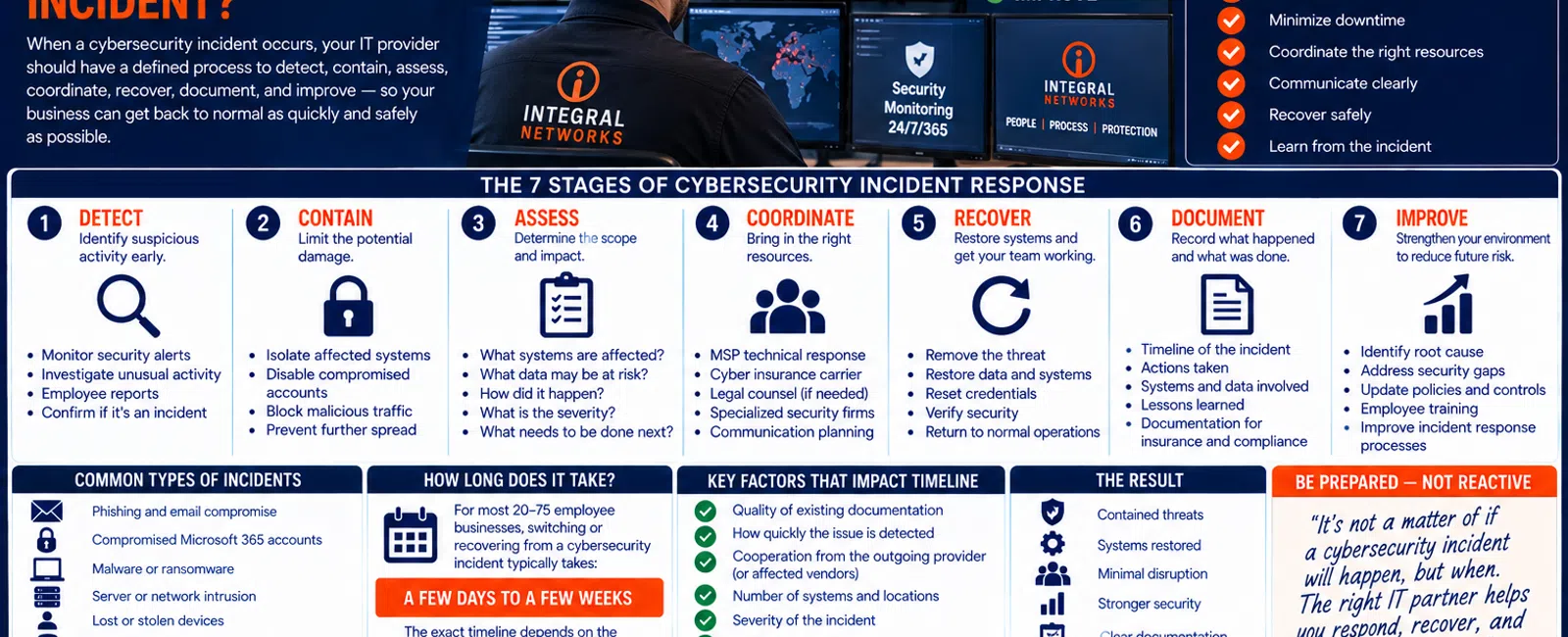
When a cybersecurity incident occurs, your IT provider should have a defined process for identifying what happened, containing the problem, protecting unaffected systems, coordinating the response, recovering operations, documenting the incident, and reducing the chance of it happening again.
For a business with 20 to 75 employees, leadership shouldn't be trying to invent that process while employees are unable to work.
A practical incident-response framework has 7 stages: Detect, Contain, Assess, Coordinate, Recover, Document, and Improve.
Not every suspicious email or security alert becomes a major incident.
But when something serious does happen, everyone should know:
Who takes ownership?
What happens first?
Who needs to be contacted?
How do we keep the business operating?
Here's what that process should look like.
The 7-Stage Cybersecurity Incident Response Framework
Use these seven stages:
1. DETECT — Determine whether something suspicious is actually happening.
2. CONTAIN — Limit the potential damage.
3. ASSESS — Understand what's affected and how serious it may be.
4. COORDINATE — Bring in the appropriate technical, business, insurance, legal, or specialized resources.
5. RECOVER — Restore systems and employees to safe operation.
6. DOCUMENT — Record what happened and what was done.
7. IMPROVE — Correct weaknesses and reduce the chance of recurrence.
The exact response depends on the incident.
A compromised Microsoft 365 account is different from ransomware.
A lost laptop is different from a compromised server.
But the framework remains useful.
1. DETECT: Is This Actually a Security Incident?
The first step is determining what's happening.
Security incidents can begin in many ways.
An employee might report:
- A suspicious Microsoft login
- An unexpected MFA request
- A phishing email
- Files behaving strangely
- A missing laptop
- An unusual message sent from their account
- A computer displaying a security warning
Or a security platform may generate an alert before the employee notices anything.
Monitoring Matters
At Integral Networks, our managed security approach includes technologies and services such as:
- Microsoft 365 Business Premium
- Deep Instinct endpoint protection
- Avanan email security
- Blokworx managed security services
- Managed patching
- Microsoft 365 security configuration
- Ongoing monitoring
Different layers provide visibility into different parts of the environment.
The objective is to identify suspicious activity as early as practical.
Employees Are Also Part of Detection
Technology won't identify every problem first.
Sometimes an employee notices something unusual.
That's why employees should know:
If something looks wrong, report it.
Don't worry about whether it technically qualifies as a cybersecurity incident.
Let the appropriate technical resource determine that.
An employee reporting something suspicious that turns out to be harmless is much better than an employee ignoring something serious because they didn't want to bother IT.
2. CONTAIN: Stop the Problem From Spreading
Once a credible security issue is identified, the next priority may be containment.
The exact action depends entirely on the situation.
It could involve steps such as:
- Isolating an affected endpoint
- Restricting account access
- Resetting credentials
- Revoking sessions
- Blocking malicious email
- Disabling a compromised account
- Separating affected systems from the network
The objective is simple:
Limit additional damage while the incident is being understood.
Don't Improvise Without Understanding the Situation
Incident response requires judgment.
Randomly shutting down systems or deleting evidence can potentially make investigation more difficult.
That's why businesses need a defined response process rather than employees independently trying to "fix" a security incident.
3. ASSESS: Determine the Scope
After immediate containment, the response team needs to understand the situation.
Questions may include:
- Which employee or account is affected?
- Which computer is involved?
- Are multiple devices affected?
- Is Microsoft 365 involved?
- Is email involved?
- Is sensitive information potentially affected?
- Are servers involved?
- Are backups affected?
- Is the threat still active?
- Are employees able to work?
This stage is important because the scope determines what happens next.
Example: Compromised Microsoft 365 Account
Suppose an employee enters credentials into a fake Microsoft login page.
The incident isn't simply:
"Change the password."
The response may need to consider:
- Whether the account was accessed
- Existing sessions
- MFA
- Mailbox activity
- Administrative permissions
- Email forwarding or other changes
- Other affected accounts
- The employee's device
The appropriate response depends on what actually occurred.
4. COORDINATE: Your MSP May Not Be the Only Party Involved
This is extremely important.
Your Managed Service Provider may play a central technical role during an incident.
But it shouldn't pretend to replace every professional your organization may need.
Depending on the nature and severity of the incident, other parties may include:
- Cybersecurity specialists
- Cyber insurance carrier
- Incident-response firm
- Legal counsel
- Forensic investigators
- Application vendors
- Microsoft
- Other technology vendors
- Business leadership
Your organization may also have contractual, regulatory, insurance, or legal obligations that need to be evaluated by the appropriate professionals.
Your MSP Should Know Its Role
A mature provider should be able to help answer:
What can we handle?
What needs escalation?
Who else needs to become involved?
That's much better than pretending one IT company should handle every possible aspect of a serious cybersecurity event.
Cyber Insurance Can Affect the Response
If your organization carries cyber insurance, understand the policy's incident-reporting requirements before something happens.
Some policies may specify:
- Who to contact
- Which incident-response providers can be used
- Notification requirements
- Other procedures
Your MSP shouldn't make insurance or legal decisions for you.
But your technology documentation should make it easier to identify the appropriate contacts when necessary.
5. RECOVER: Get the Business Operating Safely
Containment isn't the same as recovery.
Eventually employees need to return to work.
The recovery process may involve:
- Restoring affected systems
- Restoring data
- Rebuilding devices
- Resetting credentials
- Reconfiguring accounts
- Verifying security
- Reconnecting systems
- Coordinating application vendors
The priority should be:
Restore operations safely—not simply as fast as possible.
Why Backups Matter
A serious incident may make backup and recovery capabilities critical.
But the important question isn't:
"Do we have backups?"
It's:
"Can we recover the systems and information the business actually needs?"
That's why backup monitoring and recovery planning should happen before an incident.
Prioritize Recovery
Not every system has equal business importance.
A useful framework is:
TIER 1 — CRITICAL
Systems employees need to perform essential work.
TIER 2 — IMPORTANT
Systems that significantly affect productivity but may have temporary workarounds.
TIER 3 — NON-CRITICAL
Systems that can remain unavailable longer without preventing core business operations.
Those priorities should be understood before the company is in crisis.
6. DOCUMENT: Record What Happened
Once immediate operations are stable, don't simply close the ticket and move on.
Document the incident.
Depending on the event, useful information may include:
- What was detected
- When it was detected
- Who reported it
- Systems involved
- Accounts involved
- Actions taken
- Vendors involved
- Recovery steps
- Outstanding concerns
- Recommended follow-up
This information can be valuable for:
- Internal review
- Technical remediation
- Insurance
- Legal counsel
- Future incident response
- Training
The level and type of documentation required depends on the situation.
7. IMPROVE: Ask Why the Incident Was Possible
This is the stage businesses sometimes skip.
Everything is working again.
Everyone is exhausted.
The natural reaction is:
"Great. Let's move on."
But this is when the organization should ask:
What did we learn?
Maybe the incident revealed:
- MFA wasn't properly enforced.
- An employee had unnecessary administrator access.
- Email protection needs improvement.
- An old account still existed.
- Patching wasn't consistent.
- Documentation was incomplete.
- Backup recovery wasn't well understood.
- Employees didn't know who to contact.
Those findings belong on the technology and security roadmap.
Incident Response Isn't Just an IT Ticket
This distinction matters.
Imagine an employee reports a phishing email.
It was blocked.
Nothing happened.
That's probably a routine security event.
Now imagine an attacker gained access to an executive's Microsoft 365 account and used it to impersonate the executive during financial conversations.
That's potentially a much larger business event.
Your provider needs a process for recognizing when something has moved beyond ordinary technical support.
What Should Leadership Be Doing?
During a serious incident, leadership shouldn't be troubleshooting computers.
Leadership should focus on business decisions.
That may include:
- Who needs to be informed?
- What business operations are affected?
- Are employees able to work?
- Should the cyber insurer be contacted?
- Does legal counsel need involvement?
- Are customers or vendors potentially affected?
- What decisions require executive approval?
The MSP handles its technical responsibilities.
Leadership manages the business.
The two need to communicate.
Communication Matters During an Incident
Silence creates anxiety.
Employees wonder what's happening.
Leadership wonders whether the situation is improving.
Vendors may be waiting for information.
A good incident-response process should establish:
- Who is coordinating
- Who receives updates
- How often updates are provided
- Which communication channels should be used
You may not have complete answers immediately.
That's okay.
A useful update can simply be:
What we know.
What we're doing.
What we don't know yet.
What happens next.
Example: A 40-Person Company
Consider a hypothetical 40-person professional services company.
At 8:15 AM, an employee reports repeated unexpected MFA prompts.
8:20 AM — DETECT
The issue is investigated.
Suspicious account activity is identified.
CONTAIN
Appropriate account-access controls are applied.
ASSESS
The provider reviews the affected identity, device, Microsoft 365 activity, and other relevant information.
COORDINATE
If the event exceeds normal MSP capabilities or meets the organization's escalation criteria, additional cybersecurity, insurance, or legal resources are contacted.
RECOVER
Credentials and access are secured and the employee is returned to a safe working state.
DOCUMENT
Actions and findings are recorded.
IMPROVE
The organization identifies any security changes needed afterward.
The specific technical actions will vary.
The important part is having a process.
What Does Downtime Cost During an Incident?
Suppose a security incident prevents 20 employees from working normally for four hours.
That's:
20 employees × 4 hours = 80 employee-hours
of disrupted productivity.
And that doesn't include:
- Management time
- Recovery costs
- Vendor costs
- Lost revenue
- Client impact
- Legal or insurance costs
- Reputation impact
This is why incident response isn't simply a cybersecurity issue.
It's a business continuity issue.
The 10 Questions to Ask Your MSP About Incident Response
Ask your current provider:
- What happens when you receive a serious security alert?
- Who takes ownership?
- How do you determine whether an event is actually an incident?
- How do you contain affected accounts or devices?
- What security systems are actively monitored?
- When do you escalate to a specialized incident-response firm?
- How do you work with our cyber insurance carrier or legal counsel?
- How would we recover affected systems?
- How is the incident documented?
- What happens after recovery to prevent recurrence?
You don't need your MSP to predict every possible incident.
You do need them to have a process.
Five Warning Signs Your Incident Response Isn't Ready
1. Nobody Knows Who to Call
Employees and leadership should know how to report a suspected security problem.
2. Nobody Knows Who Owns the Response
Responsibility shouldn't be decided during the crisis.
3. Your Cyber Insurance Information Is Hard to Find
Critical contact information should be documented and accessible.
4. Recovery Has Never Been Discussed
Backups alone aren't a response plan.
5. Your MSP Can't Explain When It Would Escalate
No provider should pretend it has unlimited expertise.
Knowing when to involve specialists is a strength.
Incident Response Starts Before the Incident
The best incident-response work often happens months before anything goes wrong.
That includes:
SECURITY
Implement layered protection.
MONITORING
Watch for suspicious activity.
DOCUMENTATION
Know the environment and vendors.
BACKUP
Maintain recovery capabilities.
PLANNING
Define responsibilities and escalation.
TRAINING
Make sure employees know how to report something suspicious.
Preparation doesn't guarantee an incident won't happen.
It makes the organization better prepared when one does.
How Our Layered Security Approach Supports Incident Readiness
At Integral Networks, we don't view cybersecurity as one product.
Our managed approach includes multiple technologies and processes designed to provide different layers of protection and visibility.
Those include:
Microsoft 365 Business Premium for security and management capabilities.
Avanan for email security.
Deep Instinct for endpoint protection.
Blokworx managed security services.
Managed patching to reduce exposure to known vulnerabilities.
Microsoft 365 security management to improve cloud configuration.
Ongoing monitoring to maintain visibility.
No individual layer stops every possible threat.
Together, they create more opportunities to prevent, identify, and respond to problems.
Cybersecurity Incident Support for Greater Sacramento Businesses
Integral Networks supports growing organizations throughout the Greater Sacramento region, including Sacramento, Roseville, Rocklin, Folsom, Elk Grove, Woodland, Stockton, Modesto, and surrounding communities.
Our primary managed IT focus is businesses with 20 or more employees that need responsive support, layered cybersecurity, proactive management, and strategic technology planning.
Sacramento, CA: (916) 626-4000
Cybersecurity Incident Support for Northern Nevada Businesses
Our second primary service area is Northern Nevada, including Reno, Sparks, Carson City, and surrounding communities.
Our approach combines remote management and monitoring with local onsite capabilities when physical assistance is required.
Reno, NV: (775) 446-4100
Final Thoughts
Your cybersecurity strategy shouldn't end with:
"We have security software."
Eventually, leadership needs to ask:
"What happens if something gets through?"
Use the seven-stage framework:
Detect.
Contain.
Assess.
Coordinate.
Recover.
Document.
Improve.
Know who's responsible.
Know when specialists need to become involved.
Know how systems will be recovered.
Know how leadership will receive information.
And once the immediate incident is over, use what you learned to strengthen the environment.
Because the real test of cybersecurity isn't only whether you can prevent every incident.
You can't promise that.
It's also whether your organization is prepared to respond effectively when something happens.
Ready for a Second Opinion?
If you're not sure what your current IT provider would actually do during a cybersecurity incident—or who would take ownership if your Microsoft 365 account, workstation, email, or other critical system were compromised—Integral Networks can help you evaluate your current readiness.
We provide flat-rate managed IT, layered cybersecurity, Microsoft 365 management, security monitoring, backup oversight, documentation, vendor coordination, and strategic technology planning for growing businesses throughout the Greater Sacramento region and Northern Nevada.
Related Articles
What Does Good Cybersecurity Look Like for a 20-75 Employee Business?
How Secure Should Microsoft 365 Be for a 20-75 Employee Business?
How Long Does It Take to Switch Managed IT Providers?
What Is Proactive Managed IT—and How Is It Different From Reactive IT Support?
What Should Happen During a Quarterly Business Review With Your IT Provider?


