
How Long Does It Take to Switch Managed IT Providers?
For a business with 20 to 75 employees, switching Managed Service Providers should generally be treated as a structured onboarding project rather than a single-day event.
The exact timeline depends on the size and complexity of the environment, the quality of existing documentation, how cooperative the outgoing provider is, the number of locations and vendors involved, and how much remediation the new provider discovers.
At Integral Networks, we don't view a successful transition as:
"We got the passwords. We're done."
The objective is to discover, document, secure, standardize, and take ownership of the environment without unnecessarily disrupting employees.
Use this seven-stage framework to understand what should happen.
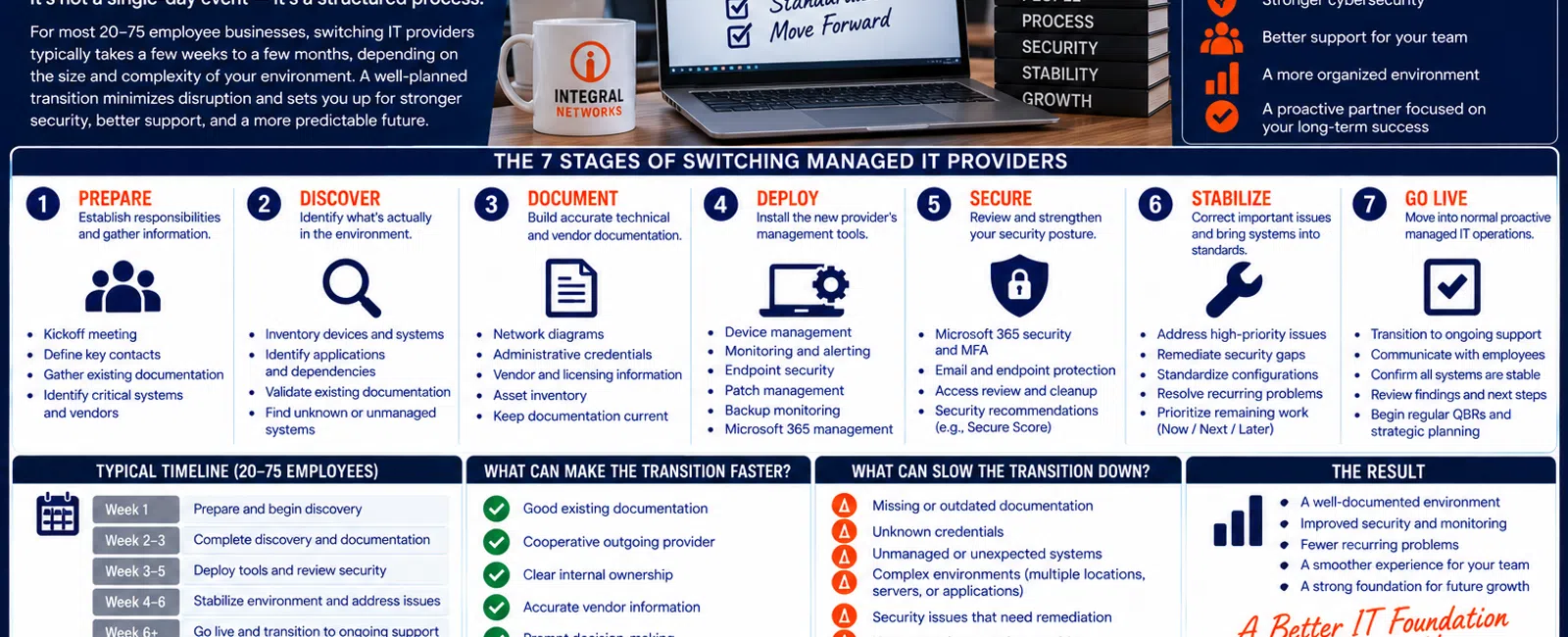
The 7 Stages of Switching Managed IT Providers
A structured transition should include:
1. PREPARE — Establish responsibilities and gather information.
2. DISCOVER — Identify what's actually in the environment.
3. DOCUMENT — Build accurate technical and vendor documentation.
4. DEPLOY — Install the new provider's management and security tools.
5. SECURE — Review Microsoft 365, endpoints, access, and cybersecurity.
6. STABILIZE — Correct important issues and bring systems into standards.
7. GO LIVE — Move into normal proactive managed IT operations.
Some stages overlap.
That's fine.
The important thing is that none of them gets ignored.
1. PREPARE: Start Before the Old Provider Disappears
One of the worst approaches to changing MSPs is:
Fire the old provider first. Figure everything else out afterward.
A smoother transition begins with planning.
Before the change, identify:
- Who is leading the transition internally
- Current IT provider
- Important vendors
- Microsoft 365 information
- Business applications
- Internet providers
- Phone providers
- Backup systems
- Locations
- Key employees
- Known technology problems
The new MSP should also understand the business.
We Want to Know More Than Your Passwords
During kickoff, useful questions include:
- How many employees do you have?
- Which applications are critical?
- Which employees work remotely?
- Which systems cause the most frustration?
- Are major projects already underway?
- Are there known cybersecurity concerns?
- Is the business growing?
- Are there upcoming office moves or expansions?
Technology onboarding should begin with business context.
2. DISCOVER: Don't Assume the Existing Documentation Is Correct
Existing documentation is valuable.
But it shouldn't automatically be treated as complete.
One of the recurring issues we find when taking over an environment is missing or outdated information.
A discovery process may identify:
- Workstations
- Laptops
- Servers
- Network equipment
- Firewalls
- Wireless infrastructure
- Microsoft 365
- Backup systems
- Applications
- Security tools
- Vendors
- Other technology dependencies
This gives the new provider a much clearer understanding of what it's actually taking responsibility for.
Why Discovery Can Affect the Timeline
Imagine being told:
"We have 40 computers and one server."
Then discovery finds:
- 52 active endpoints
- Two servers
- An undocumented firewall
- Several old computers still connecting
- Multiple unmanaged applications
- A backup system nobody mentioned
The onboarding scope just changed.
That's not necessarily a problem.
It's exactly why discovery exists.
3. DOCUMENT: Rebuild What Is Missing
A new MSP needs reliable documentation.
That may include:
- Network configuration
- Administrative credentials
- Microsoft 365
- Servers
- Firewalls
- Internet connections
- Backup systems
- Business applications
- Vendors
- Hardware inventory
- Security tools
If the outgoing provider supplies excellent documentation, this stage can move more smoothly.
If little documentation exists, the new provider needs to rebuild it.
Documentation Isn't Busywork
Good documentation affects:
- Support speed
- Security
- Vendor coordination
- Troubleshooting
- Disaster recovery
- Future planning
The new MSP shouldn't need to rediscover the environment every time an employee calls.
4. DEPLOY: Install the New Provider's Management Tools
The new MSP needs visibility.
That typically requires deploying its management, monitoring, and security tools to supported systems.
At Integral Networks, onboarding involves bringing the client into our standardized managed environment.
Depending on the system and scope, this can include areas such as:
- Device management
- Monitoring
- Patch management
- Endpoint security
- Email security
- Managed security
- Backup monitoring
- Microsoft 365 management
The goal is establishing consistent management across the environment.
What Happens to the Old MSP's Tools?
This requires coordination.
You don't necessarily want competing:
- Endpoint security products
- Management agents
- Monitoring systems
- Patch-management tools
running indefinitely.
The outgoing provider's tools need to be identified and removed appropriately while the new provider's systems are deployed.
Sequence matters.
You don't want to accidentally create a security or management gap during the transition.
5. SECURE: Review the Environment You're Inheriting
Changing MSPs is an opportunity to evaluate security.
Don't assume:
"The old provider handled security, so everything must already be configured correctly."
Review it.
At Integral Networks, our standardized managed security approach includes technologies and services such as:
- Microsoft 365 Business Premium
- Deep Instinct endpoint protection
- Avanan email security
- Blokworx managed security services
- Managed patching
- Microsoft 365 security configuration
- Ongoing monitoring
We require Microsoft 365 Business Premium for managed clients because it provides important security and management capabilities.
Microsoft 365 Deserves Its Own Review
During onboarding, Microsoft 365 should receive specific attention.
Areas may include:
- Multi-Factor Authentication
- Administrative access
- User accounts
- Security configuration
- Microsoft Secure Score
- Licensing
- Former employees
- Appropriate security recommendations
At Integral Networks, we review Microsoft Secure Score and remediate appropriate recommendations based on the client's environment.
The objective isn't chasing a perfect score.
It's establishing an appropriate security baseline.
6. STABILIZE: Fix What Needs Attention First
Discovery often uncovers problems.
The important thing is prioritizing them.
Not everything needs to be fixed immediately.
A useful framework is:
NOW
Issues presenting meaningful security, reliability, or operational risk.
NEXT
Important improvements that should be addressed during the upcoming planning period.
LATER
Longer-term improvements that belong on the technology roadmap.
This prevents onboarding from becoming:
"We found 47 things and they all need to happen tomorrow."
That's not strategic.
Common Issues Found During Takeovers
Depending on the environment, a new provider may discover:
- Aging hardware
- Missing documentation
- Excessive administrator access
- Inconsistent security
- Unmanaged devices
- Old employee accounts
- Backup concerns
- Patching issues
- Vendor confusion
- Microsoft 365 configuration opportunities
The point isn't criticizing the previous provider.
The point is understanding the environment you're inheriting.
7. GO LIVE: Transition Into Normal Managed Services
Eventually, onboarding needs to end.
The organization transitions into normal proactive management.
Employees should know:
- How to contact support
- What number to call
- How tickets work
- Who handles IT
- What to expect
Leadership should understand:
- What was discovered
- What was corrected
- What remains
- Which projects are recommended
- What future spending may be required
At Integral Networks, we use a wrap-up meeting to help establish that transition.
So How Long Does Switching MSPs Actually Take?
There isn't one universal number.
Be cautious if someone gives you a guaranteed timeline without understanding your environment.
A simple 20-person single-location company with excellent documentation is very different from a 75-person organization with:
- Multiple locations
- Servers
- Complex networking
- Specialized applications
- Poor documentation
- Multiple vendors
- Security remediation requirements
The correct timeline depends on scope.
What leadership should ask for is a clear onboarding plan with milestones, responsibilities, and communication.
What Can Make the Transition Faster?
Several things help.
Good Existing Documentation
Current credentials, network information, vendor information, and asset data save discovery time.
Cooperative Outgoing Provider
A professional handoff makes everyone's job easier.
Clear Internal Ownership
One person inside the business should help coordinate questions and decisions.
Accurate Vendor Information
Knowing who supports your internet, phones, applications, copiers, and other systems reduces confusion.
Prompt Decisions
If leadership needs to approve a security or infrastructure change, quick decisions keep onboarding moving.
What Can Slow the Transition Down?
The opposite conditions create delays.
Missing Credentials
Nobody knows the firewall password.
Nobody knows the backup credentials.
Nobody knows who owns an account.
Poor Documentation
The new provider needs to rediscover everything.
Unknown Vendors
Employees know:
"Some company handles that."
but nobody knows which company.
Unmanaged or Unexpected Systems
Discovery finds technology nobody knew existed.
Security Problems
Important issues may need remediation before the environment can be considered stable.
Uncooperative Outgoing Provider
Information transfer becomes more difficult than necessary.
What Should the Old MSP Provide?
Your outgoing provider may possess important information about your business environment.
The transition process should identify what information needs to be transferred.
Examples can include:
- Administrative credentials
- Network documentation
- Microsoft 365 information
- Vendor contacts
- Hardware information
- Backup information
- Application details
- Licensing information
- Other technical documentation
Exactly what exists depends on the relationship.
The key principle is:
Your business shouldn't be held hostage by its own technology information.
Should You Tell Employees You're Switching IT Providers?
Yes.
Employees need to know what's changing.
They don't need every technical detail.
They do need practical instructions.
For example:
Starting Monday, contact Integral Networks for IT support.
Then give them:
- Support phone number
- Support email/process
- Effective date
- What to expect
The simpler the employee communication, the better.
Will Switching MSPs Cause Downtime?
A properly planned transition should be designed to minimize unnecessary disruption.
Most onboarding work can occur while employees continue normal operations.
But no responsible provider should promise that every transition is completely risk-free.
Changes to:
- Security tools
- Infrastructure
- Microsoft 365
- Networks
- Servers
- Applications
need to be planned appropriately.
The objective is controlled change—not reckless speed.
Should You Change Everything During Onboarding?
Usually, no.
This is another mistake.
A new MSP takes over and immediately wants to replace:
- Firewall
- Server
- Network
- Computers
- Security
- Applications
Sometimes major changes genuinely are necessary.
But onboarding should distinguish:
What must happen now
from:
What should happen later.
That's why the Now / Next / Later framework matters.
Example: A 40-Person Professional Services Company
Consider a hypothetical company with 40 employees.
The new MSP begins onboarding.
Discovery finds:
- 43 active workstations
- One server
- Aging firewall
- Microsoft 365
- Several business applications
- Incomplete vendor documentation
- Four former employee accounts
- Inconsistent MFA configuration
- Five computers approaching replacement
Instead of attempting everything simultaneously:
NOW
- Secure former employee accounts
- Correct important MFA gaps
- Deploy management/security tools
- Verify backup
- Establish support
NEXT
- Replace aging firewall
- Improve documentation
- Address remaining Microsoft 365 recommendations
LATER
- Replace five aging computers according to budget
- Evaluate longer-term infrastructure improvements
That's a controlled transition.
The 10-Question MSP Transition Checklist
Before switching providers, ask:
- Who will manage the transition?
- What information does the outgoing provider need to supply?
- How will the new provider discover undocumented systems?
- When will new management tools be deployed?
- How will old MSP tools be removed?
- How will Microsoft 365 security be reviewed?
- How will backups be verified?
- How will employees know where to get support?
- How will discovered problems be prioritized?
- What marks the end of onboarding and beginning of normal service?
If a prospective MSP can't explain these clearly, ask for more detail before making the change.
Five Signs an MSP Has a Real Onboarding Process
Look for these characteristics.
1. There's a Defined Sequence
They're not improvising from day one.
2. Discovery Is Part of the Process
They verify the environment rather than trusting assumptions.
3. Security Is Reviewed
They don't simply inherit existing settings.
4. Employees Receive Clear Support Instructions
The transition considers the user experience.
5. Leadership Gets a Wrap-Up
You learn what was found, corrected, and recommended.
Onboarding should have a beginning, middle, and end.
What Should the First 30 Days Accomplish?
The first month should establish momentum toward:
- Visibility
- Documentation
- Support ownership
- Security
- Standardization
- Vendor understanding
- Future planning
Not every long-term project needs to be finished.
But the new provider should increasingly understand the environment and be able to support it confidently.
Switching MSPs for Greater Sacramento Businesses
Integral Networks supports growing organizations throughout the Greater Sacramento region, including Sacramento, Roseville, Rocklin, Folsom, Elk Grove, Woodland, Stockton, Modesto, and surrounding communities.
Our primary managed IT focus is businesses with 20 or more employees that need responsive support, cybersecurity, proactive management, and strategic planning.
Sacramento, CA: (916) 626-4000
Switching MSPs for Northern Nevada Businesses
Our second primary service area is Northern Nevada, including Reno, Sparks, Carson City, and surrounding communities.
We combine remote onboarding and management with local onsite capabilities when physical assistance is required.
Reno, NV: (775) 446-4100
Final Thoughts
How long does it take to switch managed IT providers?
The answer depends on your environment.
But the process shouldn't be mysterious.
Use the seven-stage framework:
Prepare.
Discover.
Document.
Deploy.
Secure.
Stabilize.
Go Live.
The objective isn't switching providers as fast as humanly possible.
It's transferring responsibility without losing visibility, security, documentation, or employee support along the way.
A good transition should leave you with more than a new company answering the help desk.
It should leave you with a better-understood, better-documented, more consistently managed technology environment.
Ready for a Second Opinion?
If you're unhappy with your current IT provider but worried that switching will create disruption, Integral Networks can explain our onboarding process, what information we'd need, how we'd approach discovery, and what the transition would look like for your environment.
We provide flat-rate managed IT, cybersecurity, Microsoft 365 management, structured onboarding, asset lifecycle planning, vendor management, and strategic IT guidance for growing businesses throughout the Greater Sacramento region and Northern Nevada.
Related Articles
How to Switch IT Providers Without Downtime: A Business Owner's Guide
What Happens During Your First 30 Days with a New IT Provider?
How Do You Know When It's Time to Fire Your IT Provider?
What Is Proactive Managed IT—and How Is It Different From Reactive IT Support?
What Should Happen During a Quarterly Business Review With Your IT Provider?


