
How Much Should a 20-75 Employee Business Budget for IT Each Year?
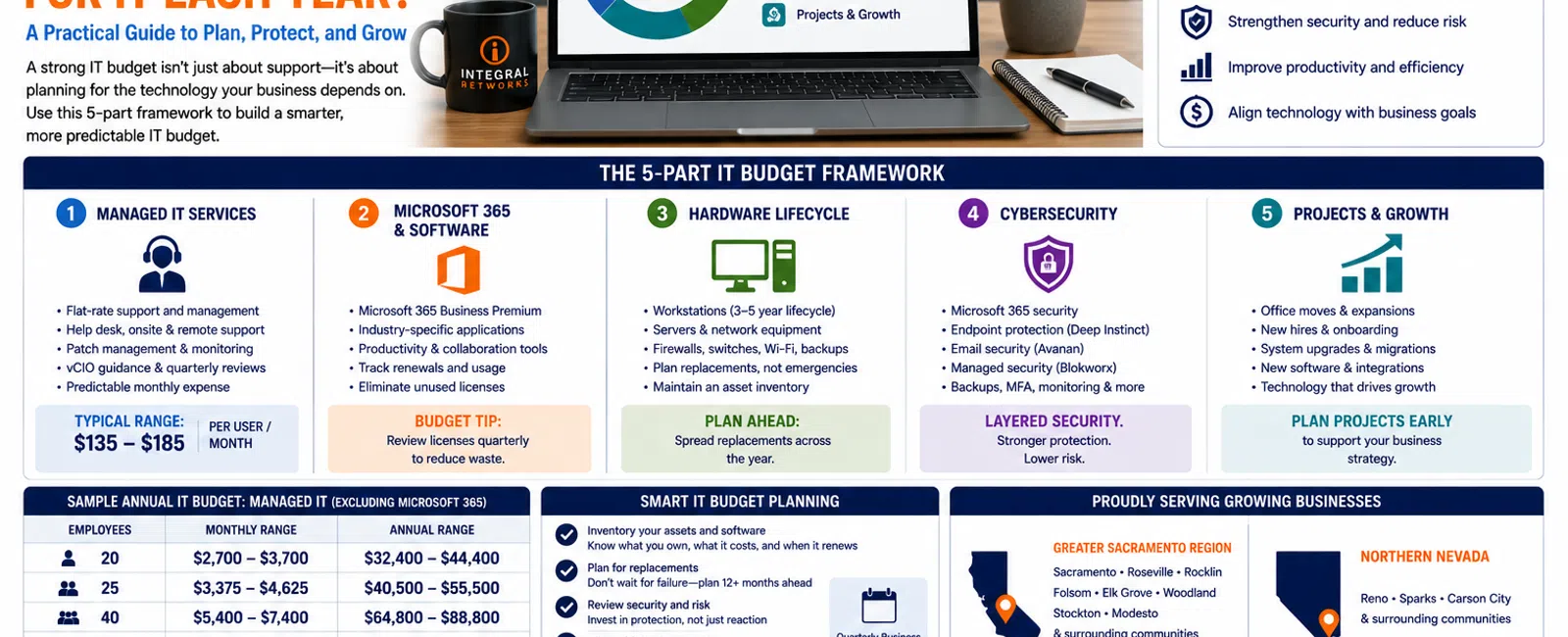
For a business with 20 to 75 employees, a practical annual IT budget should account for at least five categories: managed IT services, Microsoft 365 and software licensing, hardware replacement, cybersecurity, and planned technology projects.
Managed IT alone typically starts around $135 to $185 per user per month with Integral Networks, excluding Microsoft 365 licensing.
That means a 25-person organization could spend approximately $40,500 to $55,500 per year on managed IT, while a 50-person organization could spend approximately $81,000 to $111,000 per year.
But managed services are only one part of the technology budget.
The real objective is to understand what your business is likely to spend before equipment fails, licenses renew, employees are hired, or major projects become urgent.
For growing businesses throughout the Greater Sacramento region and Northern Nevada, we recommend building the annual IT budget using a five-part framework.
The 5-Part IT Budget Framework
A useful IT budget separates technology spending into five categories:
- Managed IT services
- Microsoft 365 and software
- Hardware lifecycle
- Cybersecurity
- Projects and growth
This makes technology spending easier to understand and helps leadership distinguish predictable operating expenses from larger capital or project expenses.
Let's look at each category.
1. Managed IT Services
For most organizations outsourcing their IT, managed services become the foundation of the technology budget.
At Integral Networks, typical managed IT pricing starts around $135-$185 per user per month, with Microsoft 365 licensing separate.
For example:
| Employees | Monthly Managed IT | Annual Managed IT |
|---|---|---|
| 20 | $2,700-$3,700 | $32,400-$44,400 |
| 25 | $3,375-$4,625 | $40,500-$55,500 |
| 40 | $5,400-$7,400 | $64,800-$88,800 |
| 50 | $6,750-$9,250 | $81,000-$111,000 |
| 75 | $10,125-$13,875 | $121,500-$166,500 |
Those numbers are useful for budgeting, but the monthly price shouldn't be evaluated without understanding what's included.
Our flat-rate managed services model includes ongoing support and management such as:
- Help desk
- Remote support
- Onsite support
- Device management
- Patch management
- Microsoft 365 administration
- Cybersecurity management
- Backup monitoring
- Asset management
- Vendor management
- Quarterly Business Reviews
- Technology budgeting
- vCIO guidance
The objective is predictable spending.
Employees shouldn't avoid calling IT because they're worried that every support request will create another bill.
2. Microsoft 365 and Software Licensing
Microsoft 365 licensing should be budgeted separately from managed IT.
Integral Networks requires Microsoft 365 Business Premium for managed clients because it provides security and management functionality we use to establish a stronger technology baseline.
But Microsoft 365 may only be the beginning of your software budget.
A law firm might also depend on:
- NetDocuments
- Worldox
- Adobe
- Practice-specific applications
An engineering or architectural firm may rely on:
- AutoCAD
- Revit
- Bluebeam
- SolidWorks
- Other specialized design applications
Your accounting, CRM, phone system, backup platforms, and other business applications may add additional recurring costs.
The important budgeting principle is simple:
Know what you own, what it costs, when it renews, and whether employees are actually using it.
Software subscriptions have a tendency to accumulate.
Someone purchases an application.
An employee leaves.
Nobody removes the license.
Another department buys a similar product.
Three years later, leadership is paying for software nobody remembers approving.
Good asset and vendor management helps reduce that waste.
3. Hardware Replacement
This is where many IT budgets fail.
Businesses budget for support and software but treat hardware replacement as an emergency.
A computer dies.
A server reaches end of life.
A firewall needs replacement.
Suddenly there's an unexpected technology expense.
Most hardware replacements aren't actually surprises.
They can be forecast.
Workstations
Computers have a useful lifecycle.
The exact replacement timing depends on the employee, application requirements, hardware quality, and business environment.
An administrative employee primarily using Microsoft 365 may have different requirements from an engineer running Revit or SolidWorks.
That's why replacement schedules should be based on both age and business use.
Your IT provider should maintain an asset inventory showing:
- Device
- Assigned employee
- Purchase date
- Warranty status
- Age
- Expected replacement date
That allows leadership to spread replacements across several budget cycles.
Engineering Workstations
Hardware planning becomes particularly important for engineering and architectural firms.
Replacing 10 high-performance workstations at once can create a substantial expense.
Knowing those replacements are coming 12 months ahead makes the expense manageable.
Servers and Network Equipment
The same principle applies to:
- Servers
- Firewalls
- Switches
- Wireless access points
- Backup infrastructure
- Other network equipment
Technology shouldn't have to fail before someone thinks about replacing it.
4. Cybersecurity
Cybersecurity should be part of the regular technology budget—not an emergency expense after something happens.
A modern cybersecurity strategy for a growing business may include:
- Microsoft 365 security
- Multi-Factor Authentication
- Endpoint protection
- Email security
- Security monitoring
- Patch management
- Backup and recovery
- User access management
- Security awareness
- Managed security services
At Integral Networks, our standardized managed security approach includes technologies and services such as:
- Microsoft 365 Business Premium
- Deep Instinct endpoint protection
- Avanan email security
- Blokworx managed security services
- Managed patching
- Microsoft 365 security configuration
- Ongoing monitoring
Many of these protections are integrated into our managed IT approach rather than treated as optional extras.
The goal is to create multiple security layers without forcing leadership to purchase and manage a collection of unrelated products.
5. Projects and Business Growth
The fifth category is the one businesses frequently forget.
What is changing next year?
Are you:
- Hiring 15 employees?
- Opening another office?
- Relocating?
- Replacing a server?
- Moving applications to the cloud?
- Improving wireless coverage?
- Changing phone systems?
- Implementing new business software?
- Expanding into another market?
Those projects should appear in the IT budget before they happen.
Technology planning needs to follow the business plan.
If leadership expects the organization to grow from 30 employees to 45 next year, the IT roadmap should reflect that growth.
Example: Annual IT Budget for a 25-Person Business
Let's use a hypothetical 25-person professional services company.
Managed IT at $135-$185 per user would be approximately:
$40,500-$55,500 per year
Then leadership would separately budget for:
Microsoft 365 licensing
25 Business Premium licenses plus any additional Microsoft services.
Business applications
Industry-specific applications, Adobe, accounting software, phone systems, and other platforms.
Hardware lifecycle
Perhaps five workstations are scheduled for replacement during the year.
Projects
Maybe the business is upgrading wireless infrastructure or opening another office.
Instead of asking:
"How much does IT cost?"
leadership now has a much more useful question:
"What technology investments are required to operate and grow the business next year?"
That's the question an effective IT budget should answer.
Example: Annual IT Budget for a 50-Person Business
For a 50-person organization, managed IT alone would typically fall around:
$81,000-$111,000 per year
Then add:
- Microsoft 365 licensing
- Industry-specific software
- Hardware replacements
- Planned projects
- Other technology subscriptions
The larger the organization becomes, the more important planning becomes.
At 50 employees, buying computers only after they fail is no longer a reasonable hardware strategy.
Neither is managing software licenses in a spreadsheet nobody reviews.
Technology has become a meaningful operating expense and should be managed accordingly.
Why Cheap IT Can Become Expensive
Businesses naturally want to control expenses.
That's good management.
But there's a difference between controlling technology costs and simply buying the cheapest technology.
Consider an engineering firm.
Saving $500 on a workstation may seem smart.
But if that workstation causes an engineer to lose 15 minutes per day for four years, the productivity loss can dwarf the original savings.
The same applies to IT support.
A lower-cost provider may look attractive until employees regularly wait hours for assistance.
The correct question isn't:
"What's the cheapest option?"
It's:
"What gives us the best business outcome for the investment?"
Budget for Downtime Too
There's another technology cost that rarely appears as a line item.
Downtime.
If 30 employees can't work for two hours, you've lost 60 employee-hours before considering lost billable work, delayed projects, or customer impact.
That's why proactive monitoring, reliable backups, good cybersecurity, and responsive support have economic value.
You're not simply paying someone to maintain computers.
You're investing in keeping the business operating.
Build the Budget Before the Year Begins
A strong technology budgeting process should start before leadership finalizes the company's annual budget.
Your IT provider should be able to tell you:
What needs replacement?
Which workstations, servers, and network devices are approaching the end of their useful lifecycle?
What needs improvement?
Where are the biggest technology or security gaps?
What's changing?
Are Microsoft, software vendors, or other providers changing licensing or technology requirements?
What projects are coming?
What technology investments will support company growth?
What can wait?
Not everything needs to happen immediately.
A good roadmap prioritizes investments based on risk, business impact, and budget.
What Should Your IT Provider Bring to a Budget Meeting?
Your IT provider shouldn't arrive at a strategic meeting with nothing but a ticket report.
Leadership should have visibility into:
- Asset inventory
- Hardware age
- Upcoming replacements
- Security recommendations
- Software and vendor considerations
- Current projects
- Future projects
- Budget estimates
- Business priorities
That's the difference between technical support and strategic IT management.
Why Quarterly Reviews Matter
An annual budget isn't enough.
Things change.
Employees get hired.
Projects move.
Equipment fails earlier than expected.
Business priorities change.
That's why we use Quarterly Business Reviews as part of our managed IT process.
The technology roadmap should be a living plan.
Quarterly reviews allow leadership and the IT provider to ask:
- Are we still on budget?
- Have priorities changed?
- Are new risks emerging?
- Do projects need to move?
- Has company growth changed our requirements?
This keeps technology aligned with the business throughout the year.
IT Budgeting for Greater Sacramento Businesses
Integral Networks works with growing organizations throughout the Greater Sacramento region, including:
- Sacramento
- Roseville
- Rocklin
- Folsom
- Elk Grove
- Woodland
- Stockton
- Modesto
- Surrounding communities
Our primary managed IT focus is businesses with 20 or more employees, particularly law firms, engineering and architectural firms, manufacturers, financial services organizations, and other technology-dependent businesses.
We can support smaller organizations when the technology requirements make sense, but businesses above approximately 20 employees typically receive the greatest value from structured IT management and budgeting.
IT Budgeting for Northern Nevada Businesses
Our second primary service area is Northern Nevada, including:
- Reno
- Sparks
- Carson City
- Surrounding communities
Growing Northern Nevada companies face the same budgeting challenge:
As the organization becomes larger and more dependent on technology, IT spending becomes increasingly difficult to manage reactively.
A technology roadmap converts those surprise expenses into planned business investments.
Final Thoughts
For a 20-75 employee organization, there isn't one universal number that represents the "correct" annual IT budget.
But there is a correct way to build one.
Start with five categories:
1. Managed IT
2. Microsoft 365 and software
3. Hardware lifecycle
4. Cybersecurity
5. Projects and growth
Then build a 12-36 month technology roadmap around them.
The goal isn't necessarily to spend less on technology.
It's to know what you're spending, why you're spending it, and what's coming next.
When leadership can see technology investments coming a year or more in advance, IT stops feeling like a series of expensive surprises and starts becoming part of normal business planning.
Ready for a Second Opinion?
If your current IT budget consists mostly of last year's invoices plus whatever breaks next, Integral Networks can help you build a more predictable technology roadmap.
We provide flat-rate managed IT, cybersecurity, Microsoft 365 management, asset lifecycle planning, technology budgeting, and strategic IT guidance for growing organizations throughout the Greater Sacramento region and Northern Nevada.
Related Articles
How Secure Should Microsoft 365 Be for a 20-75 Employee Business?
What Does Good Cybersecurity Look Like for a 20-75 Employee Business?
What's Included in Flat-Rate Managed IT Services? Everything Your Business Should Expect
How Much Does Managed IT Cost for Engineering & Architectural Firms? 2026 Pricing Guide
How to Switch IT Providers Without Downtime: A Business Owner's Guide


