
What Does Good Cybersecurity Look Like for a 20-75 Employee Business?
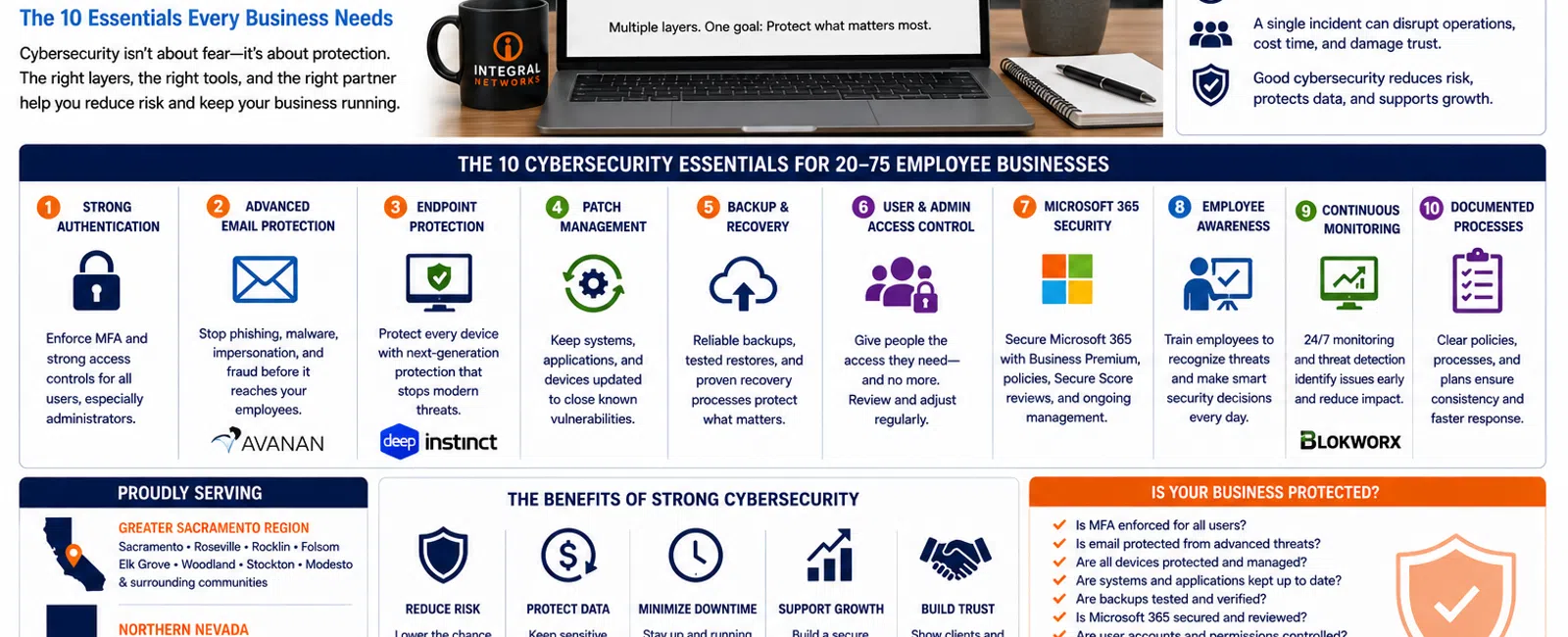
For a business with 20 to 75 employees, good cybersecurity should include at least 10 core protections: strong authentication, email security, endpoint protection, patch management, reliable backups, controlled user access, Microsoft 365 security, employee awareness, continuous monitoring, and documented security processes.
The goal isn't to buy as many security products as possible.
It's to build multiple layers of protection around the people, devices, identities, email, and data your business depends on.
For growing organizations throughout the Greater Sacramento region and Northern Nevada, cybersecurity also needs to be manageable. Employees still need to work, leadership needs predictable costs, and security can't make everyday business unnecessarily difficult.
Here's what a practical cybersecurity program should look like.
1. Strong Authentication
Passwords are no longer enough to protect business accounts.
Employees reuse passwords. Passwords get phished. Credentials appear in data breaches. Even complicated passwords can be stolen.
That's why Multi-Factor Authentication (MFA) should be enforced wherever practical, particularly for Microsoft 365 and other critical business applications.
MFA adds another verification step when someone attempts to access an account.
For a 20-75 employee organization, this shouldn't depend on employees choosing whether to enable it. Authentication standards should be centrally managed and consistently enforced.
Administrative accounts deserve even stronger attention because compromising one can give an attacker significantly more control over your environment.
2. Advanced Email Protection
Email remains one of the easiest ways to attack a business because attackers don't have to defeat your firewall if they can convince an employee to click the wrong link.
Common threats include:
- Phishing
- Credential theft
- Malicious attachments
- Fake Microsoft login pages
- Executive impersonation
- Payment fraud
- Vendor impersonation
Good cybersecurity attempts to stop suspicious messages before employees ever see them.
At Integral Networks, we use Avanan for email security as part of our standardized managed security approach.
Technology can't eliminate every malicious email, which is why email protection needs to work alongside authentication, endpoint protection, monitoring, and employee awareness.
3. Endpoint Protection
Every workstation and laptop represents another potential entry point into your business.
Traditional antivirus alone isn't enough for a modern business environment.
Endpoints need advanced protection capable of identifying and preventing malicious activity before it spreads.
Integral Networks uses Deep Instinct endpoint protection for managed clients as part of our layered security stack.
But installing endpoint protection isn't the end of the job.
Someone also needs to make sure:
- Protection is deployed everywhere it should be.
- Devices are checking in.
- Alerts are being reviewed.
- Problems are investigated.
- New devices are added promptly.
- Old devices are removed appropriately.
A security product that nobody manages creates a false sense of confidence.
4. Consistent Patch Management
Many cyberattacks exploit vulnerabilities for which updates already exist.
That makes patch management one of the least glamorous—but most important—parts of cybersecurity.
A managed environment should have a repeatable process for updating:
- Windows
- Servers
- Business applications
- Third-party applications
- Network infrastructure when appropriate
The objective is to reduce the amount of time known vulnerabilities remain exposed.
For a 50-person organization, relying on every employee to install updates themselves isn't a security strategy.
It needs to be centrally managed.
5. Reliable Backup and Recovery
Cybersecurity isn't only about preventing an incident.
It's also about being able to recover when something goes wrong.
Backups protect businesses from more than ransomware.
They can help recover from:
- Hardware failures
- Accidental deletions
- Data corruption
- Software problems
- Cyber incidents
- Other unexpected events
But simply having backup software isn't enough.
Backups need to be:
- Automated
- Monitored
- Verified
- Documented
- Recoverable
The most important question isn't:
"Do we have backups?"
It's:
"When did we last verify that we could restore them?"
If nobody knows the answer, that's a problem worth addressing.
6. Controlled User and Administrator Access
Employees should have access to what they need to perform their jobs.
They shouldn't automatically have access to everything else.
One of the common issues we discover during onboarding is excessive administrative access.
Sometimes everyone has local administrator rights because it was convenient.
Sometimes former employees still have accounts.
Sometimes administrative permissions were granted years ago and never reviewed.
Good cybersecurity follows a simple principle:
Give people the access they need—and no more than they need.
Your IT provider should also maintain repeatable onboarding and offboarding procedures so access changes when employees join, leave, or change roles.
7. Microsoft 365 Security
For many businesses, Microsoft 365 contains some of their most valuable information.
That's why we consider Microsoft 365 part of the security environment.
Integral Networks requires Microsoft 365 Business Premium for managed clients because it provides important security and management capabilities.
A properly managed Microsoft 365 environment should include areas such as:
- MFA
- Identity security
- Administrative controls
- Security policies
- User management
- Device management where appropriate
- Secure Score review
- Ongoing security remediation
During onboarding, we review Microsoft Secure Score and remediate appropriate recommendations based on the client's environment.
The objective isn't chasing a perfect score.
It's reducing meaningful risk.
8. Employee Security Awareness
Technology can stop many attacks.
It can't stop every attack.
Eventually, someone will receive a convincing phishing email.
Employees therefore need to understand basic cybersecurity behaviors.
That includes knowing how to recognize:
- Suspicious login requests
- Unexpected attachments
- Fake password reset messages
- Unusual payment requests
- Impersonation attempts
The objective isn't turning employees into cybersecurity professionals.
It's creating enough awareness that something unusual causes them to stop and ask before taking action.
A five-second question can prevent a very expensive mistake.
9. Continuous Monitoring and Managed Security
Cybersecurity doesn't operate from 8:00 AM to 5:00 PM.
Threats can occur at any time.
That's why monitoring matters.
Integral Networks utilizes Blokworx managed security services as part of our overall security approach.
Combined with Microsoft 365 security, Deep Instinct, Avanan, patch management, and ongoing IT management, this creates multiple layers designed to identify and respond to different types of risk.
No individual tool stops everything.
That's exactly why good cybersecurity is layered.
10. Documentation and Planning
This is the cybersecurity control nobody gets excited about.
It's also extremely important.
Your organization should know:
- What technology it owns
- Which devices are being managed
- Who has administrative access
- Which security tools are deployed
- What data is being backed up
- Who to contact during an incident
- How critical systems would be recovered
Cybersecurity shouldn't exist only inside the head of one technician.
Processes should be documented.
That becomes increasingly important as a business grows beyond 20 employees.
The Layered Security Model
Good cybersecurity doesn't depend on one product.
Think of security as a series of layers.
Layer 1: Identity
Protect accounts with MFA and appropriate access controls.
Layer 2: Email
Filter phishing, malware, impersonation, and other email-based threats.
Layer 3: Endpoints
Protect workstations and laptops from malicious activity.
Layer 4: Microsoft 365
Secure the cloud environment where employees communicate and collaborate.
Layer 5: Data
Maintain reliable backups and recovery capabilities.
Layer 6: Monitoring
Continuously watch for security events and abnormal activity.
Layer 7: People
Teach employees how to recognize suspicious activity.
If one layer fails, another may still stop the attack.
That's the purpose of defense in depth.
How Much Security Does a 20-Person Business Really Need?
This is where businesses sometimes make a dangerous assumption.
They believe they're too small to be interesting to attackers.
Attackers don't necessarily care whether you have 20 employees or 20,000.
Automated attacks can target enormous numbers of organizations simultaneously.
A 20-person law firm may possess confidential client information.
A 30-person engineering firm may possess valuable intellectual property.
A 40-person manufacturer may depend on technology to keep operations moving.
A 50-person financial services company may hold sensitive financial information.
Smaller organizations still have valuable data and business operations worth protecting.
The cybersecurity program simply needs to be appropriate for the organization's size, risk, and operational needs.
What Should Leadership Ask Their IT Provider?
You don't need to be a cybersecurity expert to evaluate whether your provider is taking security seriously.
Ask these questions:
- Is MFA enforced for our users?
- What protects our email?
- What protects our computers?
- Who monitors security alerts?
- How are patches managed?
- When were our backups last tested?
- Who has administrative access?
- Is Microsoft 365 actively secured and managed?
- What happens if we experience a security incident?
- How often do we review our security posture?
Your provider should be able to answer these clearly.
If the answer to several questions is:
"I'm not sure."
That's useful information.
Why Standardization Matters
At Integral Networks, we standardize managed clients wherever practical.
That includes requiring Microsoft 365 Business Premium and deploying a consistent security stack.
Why?
Because supporting 50 completely different security environments makes it harder to maintain consistent protection.
Standardization allows our team to know:
- What should be installed
- How systems should be configured
- What normal looks like
- What needs attention
- How to respond
Consistency improves both cybersecurity and support.
Good Cybersecurity Shouldn't Destroy Productivity
There's another side to this conversation.
Security that's so restrictive employees can't work effectively isn't necessarily good security.
Employees need access to applications.
Engineers need project files.
Attorneys need documents.
Remote employees need secure access.
Leadership needs flexibility.
The objective is to reduce risk while still allowing the business to operate.
That's why security recommendations need to consider both technical risk and business requirements.
Cybersecurity for the Greater Sacramento Region
Integral Networks supports businesses throughout the Greater Sacramento region, including:
- Sacramento
- Roseville
- Rocklin
- Folsom
- Elk Grove
- Woodland
- Stockton
- Modesto
- Surrounding communities
Our primary managed IT focus is organizations with 20 or more employees, including law firms, engineering and architectural firms, manufacturers, financial services organizations, and other growing businesses.
We combine remote monitoring and support with onsite service when it's needed.
Cybersecurity for Northern Nevada Businesses
Our second primary service area is Northern Nevada, including:
- Reno
- Sparks
- Carson City
- Surrounding communities
Growing Northern Nevada businesses face the same challenge as organizations throughout the Sacramento region:
Technology has become critical to operations, but managing cybersecurity internally can become increasingly difficult as the organization grows.
Our goal is to give those businesses a structured security and IT management model without requiring them to build an entire internal IT department.
Final Thoughts
Good cybersecurity for a 20-75 employee business isn't about buying every security product available.
It's about implementing the right layers and managing them consistently.
That means protecting:
Your people.
Your identities.
Your email.
Your devices.
Your Microsoft 365 environment.
Your data.
And ultimately:
Your ability to operate your business.
Cybersecurity will never eliminate every possible risk.
The objective is to make your organization harder to compromise, easier to monitor, and better prepared to recover if something does happen.
Ready for a Second Opinion?
If you're not sure whether your current cybersecurity strategy provides enough protection, Integral Networks can review your environment, identify gaps, and explain where we'd recommend making improvements.
We provide managed IT, cybersecurity, Microsoft 365 management, and strategic technology planning for growing organizations throughout the Greater Sacramento region and Northern Nevada.
Related Articles
How Secure Should Microsoft 365 Be for a 20-75 Employee Business?
What's Included in Flat-Rate Managed IT Services? Everything Your Business Should Expect
The 7 Biggest IT Problems We Find at Engineering & Architectural Firms
Why Engineering & Architectural Firms Need More Than Just an IT Company
How to Switch IT Providers Without Downtime: A Business Owner's Guide


