
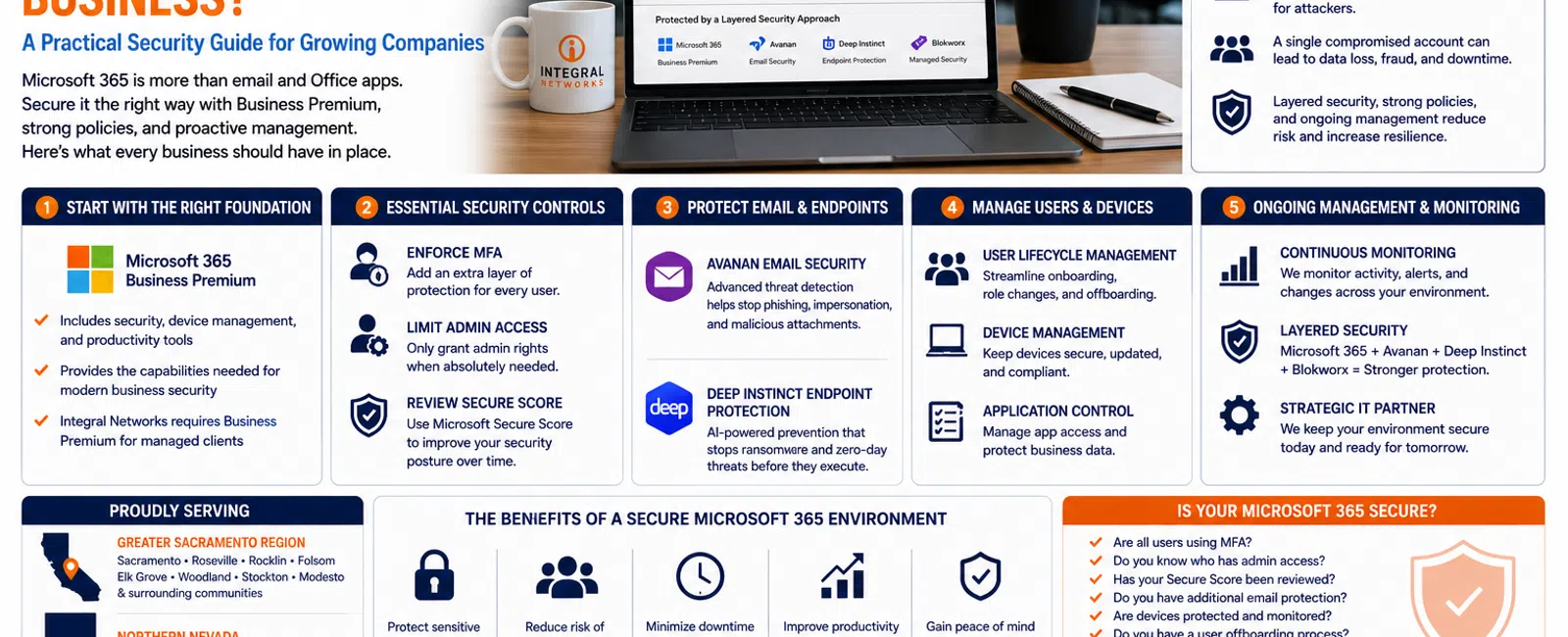
How Secure Should Microsoft 365 Be for a 20-75 Employee Business?
For a business with 20 to 75 employees, Microsoft 365 should be treated as part of your cybersecurity infrastructure—not simply as email and Office applications.
At a minimum, organizations should be using Microsoft 365 Business Premium, enforcing multi-factor authentication, controlling administrative access, securing email, protecting endpoints, reviewing Microsoft Secure Score, and continuously monitoring the environment.
If your company relies heavily on Microsoft 365 but nobody is actively managing its security configuration, there is a good chance you're paying for capabilities you're not fully using.
At Integral Networks, we require Microsoft 365 Business Premium for managed clients because it provides the security and management functionality we need to establish a stronger, more consistent baseline.
For growing businesses throughout the Greater Sacramento region and Northern Nevada, here are the areas we believe matter most.
Why Microsoft 365 Security Matters
Microsoft 365 is often the center of a company's technology environment.
It may contain:
- Contacts
- Calendars
- Teams conversations
- SharePoint files
- OneDrive data
- Employee identities
- Administrative access
- Sensitive business information
That makes Microsoft 365 extremely valuable to your business.
It also makes compromised accounts extremely valuable to attackers.
A successful Microsoft 365 compromise can expose email, allow impersonation of employees, provide access to sensitive files, and create opportunities for phishing or financial fraud.
That's why Microsoft 365 security needs to be actively managed.
1. Start with Microsoft 365 Business Premium
For most organizations with 20-75 employees, Microsoft 365 Business Premium provides an excellent foundation.
It includes more than Word, Excel, Outlook, and Teams.
It also gives businesses access to important security and device-management capabilities.
At Integral Networks, we require Business Premium for managed clients because it allows us to create a more consistent security posture across the organizations we support.
The licensing cost itself is separate from our managed IT pricing, but it provides functionality we consider essential to modern business security.
2. Multi-Factor Authentication Should Be Enforced
Passwords alone are not enough.
Even a strong password can be:
- Stolen
- Phished
- Reused
- Exposed in another data breach
Multi-factor authentication adds another layer of verification before an attacker can access an account.
For most businesses, MFA shouldn't be optional.
It should be part of the standard configuration.
The important word is enforced.
We've encountered environments where MFA technically exists but isn't consistently enabled across every user.
That creates gaps.
A strong Microsoft 365 environment should have clear authentication standards applied consistently.
3. Administrative Access Should Be Limited
One of the most common problems we see during onboarding is excessive administrative access.
Not every employee needs administrative privileges.
In fact, most shouldn't have them.
Administrator accounts can make major changes to Microsoft 365, which makes them especially valuable targets for attackers.
A mature security approach should include:
- Limiting administrator accounts
- Separating administrative access from ordinary daily use where appropriate
- Reviewing who has privileged access
- Removing unnecessary permissions
- Monitoring administrative activity
The fewer unnecessary privileged accounts you maintain, the smaller your attack surface becomes.
4. Microsoft Secure Score Should Be Reviewed Regularly
Microsoft Secure Score provides recommendations designed to help improve your Microsoft 365 security posture.
During onboarding at Integral Networks, we review Secure Score and work through the recommendations that make sense for the client's environment.
The objective isn't simply getting the highest possible score.
Some recommendations may not fit every organization's workflows or needs.
The objective is to identify meaningful security improvements and implement them without unnecessarily disrupting employees.
Areas commonly reviewed include:
- Authentication
- Identity protection
- Administrative access
- Email security
- Device management
- Data protection
Secure Score is useful because it gives your IT provider a structured framework for evaluating your Microsoft environment.
But a score alone isn't a security strategy.
Someone still needs to review it, understand the recommendations, and take action.
5. Email Needs Additional Protection
Email remains one of the most common ways attackers target businesses.
Employees receive:
- Phishing messages
- Fake login alerts
- Malicious attachments
- Impersonation attempts
- Fraudulent payment requests
Microsoft provides native security capabilities, but many organizations benefit from additional protection.
Integral Networks standardizes managed clients on Avanan email security as part of our layered cybersecurity approach.
The objective is to identify suspicious messages before they reach the employee whenever possible.
No email security platform can stop every threat.
But combining technology with strong authentication, endpoint security, and good user practices significantly improves the overall defense.
6. Endpoints Need Protection Too
Securing Microsoft 365 while ignoring employee computers doesn't solve the problem.
Cybersecurity needs to protect both identity and devices.
A compromised workstation can expose:
- Credentials
- Files
- Browser sessions
- Business applications
- Network resources
Integral Networks uses Deep Instinct for endpoint protection as part of our managed security stack.
Combined with Microsoft 365 security and Blokworx managed security services, this creates multiple layers rather than depending on one security product.
That's important because modern cybersecurity isn't about finding one perfect tool.
It's about building layers that reduce the likelihood that one failure becomes a major incident.
7. User Accounts Need a Defined Lifecycle
Employee onboarding and offboarding are security processes.
When someone joins the company, they need the correct:
- Microsoft 365 account
- License
- Security policies
- Permissions
- Applications
When someone leaves, access needs to be removed quickly and consistently.
Poor account management creates unnecessary risk.
Former employees shouldn't retain access.
Unused accounts shouldn't sit indefinitely.
Permissions shouldn't accumulate forever.
A managed environment should have a repeatable process for account creation, role changes, and offboarding.
8. Devices Should Be Managed Consistently
For a business with 20 or more employees, device management becomes increasingly important.
The organization needs visibility into:
- Which devices exist
- Who uses them
- Whether they're patched
- Whether security software is operating
- Whether they're compliant with company standards
- When they should be replaced
Microsoft 365 Business Premium provides capabilities that can support modern device-management strategies.
The specific configuration depends on the business, but the goal should be consistency.
A company shouldn't have 40 employees operating under 40 different security standards.
9. Microsoft 365 Should Be Monitored
Security configuration isn't a one-time project.
Microsoft 365 changes.
Employees change.
Threats change.
Licensing changes.
New applications get connected.
That means the environment needs ongoing attention.
A managed IT provider should periodically review:
- Users
- Administrative access
- Security alerts
- Licensing
- Microsoft recommendations
- Security policies
- General tenant health
Security shouldn't stop when onboarding ends.
10. Microsoft 365 Security Should Fit Into a Larger Security Strategy
One of the biggest mistakes businesses make is treating every security product separately.
Antivirus is over here.
Email security is over there.
Microsoft 365 is somewhere else.
Backups are somebody else's responsibility.
A mature cybersecurity strategy connects these areas.
At Integral Networks, our managed security approach combines technologies and services such as:
- Microsoft 365 Business Premium
- Deep Instinct endpoint protection
- Avanan email security
- Blokworx managed security services
- Managed patching
- Microsoft 365 security configuration
- Monitoring
The goal is layered protection.
No individual security control is perfect.
Together, they create a much stronger environment.
How Secure Is Your Microsoft 365 Environment?
Here is a simple self-assessment.
Ask yourself these questions:
- Are all employees using MFA?
- Do we know exactly who has administrator access?
- Has anyone reviewed our Microsoft Secure Score recently?
- Do we use additional email security?
- Are employee devices actively protected and monitored?
- Do we have a documented onboarding and offboarding process?
- Are former employee accounts disabled promptly?
- Is someone actively managing our Microsoft 365 tenant?
- Do we regularly review security recommendations?
- Can leadership explain our Microsoft 365 security strategy?
If you answered "no" or "I'm not sure" to several of these questions, there may be opportunities to improve your environment.
Why 20+ Employee Businesses Need More Structure
A five-person company can sometimes manage technology informally for a while.
That becomes harder as the organization grows.
At 20, 30, 50, or 75 employees, you're managing more:
- Users
- Devices
- Email accounts
- Permissions
- Business applications
- Security alerts
- Departures
- New hires
The potential impact of inconsistent security also increases.
That's why our primary managed IT focus is businesses with 20 or more employees.
We can work with smaller organizations when their technology needs justify it, but growing companies typically benefit the most from standardized management, cybersecurity, and planning.
Microsoft 365 Security for Greater Sacramento Businesses
Integral Networks supports growing businesses throughout the Greater Sacramento region, including:
- Sacramento
- Roseville
- Rocklin
- Folsom
- Elk Grove
- Woodland
- Stockton
- Modesto
- Surrounding communities
We work with law firms, engineering and architectural firms, manufacturers, financial services organizations, and other businesses that depend heavily on Microsoft 365.
Our approach combines remote management with onsite support when physical presence is necessary.
Microsoft 365 Security for Northern Nevada Businesses
Our second primary service area is Northern Nevada, including:
- Reno
- Sparks
- Carson City
- Surrounding communities
Businesses in these markets face the same Microsoft 365 challenges: phishing, compromised credentials, inconsistent security settings, growing employee counts, and the need for predictable IT management.
A well-managed Microsoft 365 environment helps reduce those risks while giving employees the tools they need to work productively.
Final Thoughts
Microsoft 365 Business Premium gives growing businesses a powerful set of security and management capabilities.
But owning the license doesn't automatically make the environment secure.
Someone has to configure it.
Someone has to review it.
Someone has to maintain it.
Someone has to respond when things change.
For businesses with 20-75 employees, Microsoft 365 should be treated as a critical business platform requiring the same level of proactive management as your servers, network, endpoints, and backups.
If you're not sure whether you're getting the full security value from Microsoft 365 Business Premium, that's worth investigating.
Ready for a Second Opinion?
If you'd like to understand how secure your current Microsoft 365 environment is, Integral Networks can review your configuration, identify opportunities for improvement, and explain what we'd recommend.
We provide managed IT, cybersecurity, Microsoft 365 management, and strategic technology planning for growing organizations throughout the Greater Sacramento region and Northern Nevada.
Related Articles
What's Included in Flat-Rate Managed IT Services? Everything Your Business Should Expect
The 7 Biggest IT Problems We Find When Taking Over a New Law Firm
The 7 Biggest IT Problems We Find at Engineering & Architectural Firms
Why Engineering & Architectural Firms Need More Than Just an IT Company
How to Switch IT Providers Without Downtime: A Business Owner's Guide


