
How Much Is IT Downtime Actually Costing a 20-75 Employee Business?
For a business with 20 to 75 employees, even a relatively short IT outage can cost thousands of dollars in lost productivity.
Here's a simple example:
If 20 employees are unable to work normally for 2 hours, that's:
20 employees × 2 hours = 40 employee-hours affected.
At an estimated fully loaded employee cost of $50 per hour, the direct labor impact alone could be:
40 × $50 = $2,000.
And that doesn't include lost revenue, missed deadlines, recovery expenses, overtime, management time, or client impact.
That's why the cost of downtime isn't simply:
"How much did IT charge us to fix the problem?"
The better question is:
"What did this technology problem cost the business while it wasn't working?"
Use this five-part framework:
People. Productivity. Revenue. Recovery. Reputation.
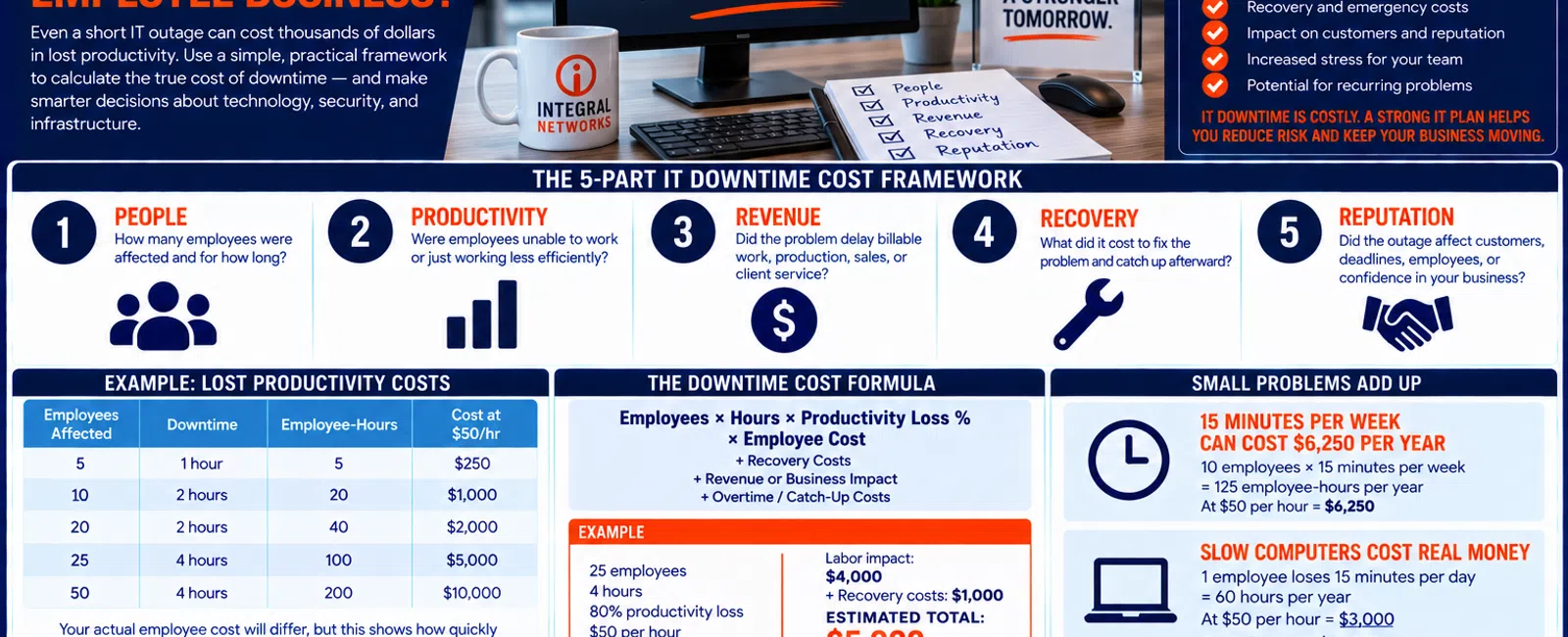
The 5-Part IT Downtime Cost Framework
When evaluating a technology problem, consider five areas:
1. PEOPLE
How many employees were affected and for how long?
2. PRODUCTIVITY
Were employees completely unable to work or simply working less efficiently?
3. REVENUE
Did the problem interfere with billable work, production, transactions, sales, or client service?
4. RECOVERY
What did it cost to repair the problem and catch up afterward?
5. REPUTATION
Did the outage affect customers, deadlines, employees, or confidence in the business?
You don't need a perfect financial model.
You need a useful estimate.
Start With Employee-Hours
The easiest calculation is:
Employees affected × hours affected = employee-hours
For example:
| Employees | Downtime | Employee-Hours |
|---|---|---|
| 5 | 1 hour | 5 |
| 10 | 2 hours | 20 |
| 20 | 2 hours | 40 |
| 25 | 4 hours | 100 |
| 50 | 4 hours | 200 |
Then estimate what an employee-hour costs your organization.
Salary alone may underestimate that amount because employee costs can also include benefits, payroll taxes, insurance, and other expenses.
For a simple example, we'll use $50 per employee-hour.
At that rate:
40 employee-hours = $2,000
100 employee-hours = $5,000
200 employee-hours = $10,000
Your actual employee cost will differ.
The point is to convert downtime into a number leadership can evaluate.
Downtime Isn't Always 100%
Not every technology problem completely prevents employees from working.
Sometimes people can still work—but at reduced productivity.
A simple way to estimate that is:
25% loss: Employees are inconvenienced but can perform most work.
50% loss: Employees can work, but normal productivity is significantly affected.
100% loss: Employees can't perform meaningful work.
So the basic formula becomes:
Employees × Hours × Productivity Loss % × Hourly Employee Cost
Example
Twenty employees experience a network problem for two hours.
You estimate they're operating at 50% normal productivity.
Using a $50 hourly employee cost:
20 × 2 × 50% × $50 = $1,000
That's a much better estimate than assuming every IT problem completely stops the business.
Small Recurring Problems Can Cost More Than One Big Outage
Major outages get everyone's attention.
Recurring problems often don't.
Suppose 10 employees lose 15 minutes every week because of the same technology problem.
That's:
10 × 0.25 hours = 2.5 employee-hours per week
Across approximately 50 working weeks:
125 employee-hours per year
At $50 per hour:
125 × $50 = $6,250 per year
And that's from one problem employees may have simply learned to tolerate.
This is why recurring issues deserve attention even when they never produce a dramatic outage.
Slow Computers Count Too
Consider one employee losing 15 minutes every workday waiting for an aging computer, application, or network resource.
Across approximately 240 working days:
15 minutes × 240 = 60 hours per year
At $50 per hour:
60 × $50 = $3,000 per year
Now imagine five employees have the same problem:
5 × $3,000 = $15,000 per year
At that point, postponing a workstation or infrastructure upgrade to "save money" may actually be costing the business more.
Add the Costs That Happen After the Outage
Employee productivity is only one part of downtime.
You may also incur:
- Emergency IT expenses
- Replacement hardware
- Vendor charges
- Overtime
- Management time
- Lost billable work
- Delayed production
- Missed transactions
- Client-service problems
Be careful not to double-count overlapping costs.
The objective isn't creating the biggest possible number.
It's creating a credible estimate leadership can use.
A Practical Downtime Cost Formula
Start with:
Employees Affected × Downtime Hours × Productivity Loss % × Loaded Hourly Cost
Then add identifiable:
+ Recovery Costs
+ Revenue or Business Impact
+ Overtime / Catch-Up Costs
Example
Suppose:
- 25 employees are affected
- For 4 hours
- Productivity falls 80%
- Loaded employee cost is $50/hour
Calculation:
25 × 4 × 80% × $50 = $4,000
Then assume:
Emergency recovery expense: $1,000
Estimated immediate impact:
$5,000
If the outage also caused a measurable lost sale, delayed shipment, or unrecoverable billable work, that could be considered separately.
Calculate Your Own Downtime Cost
Use this:
Employees affected: _____
Hours affected: _____
Estimated productivity loss: _____%
Estimated employee cost per hour: $_____
Now calculate:
_____ × _____ × % × $ = $_____
Then add:
Recovery expenses: $_____
Identifiable business/revenue impact: $_____
Overtime or catch-up costs: $_____
Estimated Incident Cost:
$__________
It doesn't need to be perfect.
It needs to be useful.
Use Downtime Cost When Making IT Decisions
This calculation becomes especially valuable when leadership is deciding whether to invest in technology.
Suppose an aging network switch needs replacement.
The planned replacement costs:
$3,500
Leadership asks:
"It's still working. Why replace it?"
That's a reasonable question.
Now consider what happens if failure affects:
- 40 employees
- For 4 hours
- At 75% productivity loss
- At $50 per employee-hour
The potential labor impact is:
40 × 4 × 75% × $50 = $6,000
And the switch still needs to be replaced.
That doesn't automatically mean every aging device should be replaced immediately.
It means leadership can compare:
Planned replacement cost
against:
Potential failure impact + emergency replacement cost
That's a much better technology conversation.
Which Systems Create the Biggest Downtime Risk?
Not every system deserves the same level of investment.
A useful framework is:
TIER 1 — BUSINESS CRITICAL
Failure significantly prevents the organization from operating.
Examples could include:
- Internet connectivity
- Critical servers
- Key business applications
- Essential cloud platforms
TIER 2 — IMPORTANT
Failure significantly affects productivity, but temporary workarounds may exist.
TIER 3 — LOWER PRIORITY
Failure is inconvenient but doesn't materially prevent core operations.
Your technology strategy should pay particular attention to Tier 1 systems.
Ask:
What happens if this system fails tomorrow morning?
Then calculate the business impact.
Why Recurring Support Tickets Matter
Ticket counts can hide downtime problems.
Suppose your IT provider reports:
"We closed 18 tickets related to the same application this quarter."
Closing 18 tickets isn't necessarily success.
The better question is:
Why did employees need help with the same problem 18 times?
Recurring problems may indicate:
- Aging hardware
- Configuration problems
- Network issues
- Software issues
- Training needs
- A system that should be replaced
A proactive IT provider should look for patterns—not simply close individual tickets.
How Response Time Affects Downtime
Suppose 20 employees are completely unable to work.
Every additional 30 minutes before meaningful troubleshooting begins represents:
20 × 0.5 = 10 employee-hours
At $50 per hour:
10 × $50 = $500
of additional labor impact.
That's one reason response time matters.
At Integral Networks, whenever possible, a technician answers the phone live.
If someone isn't immediately available, our general response objective is 10-15 minutes.
That doesn't mean every problem will be solved within 15 minutes.
It means we want to begin moving the problem toward resolution quickly.
How Proactive IT Helps Reduce Avoidable Downtime
No Managed Service Provider can promise zero downtime.
Hardware can fail.
Internet providers can have outages.
Software can break.
Cybersecurity incidents can happen.
But proactive IT should reduce avoidable downtime through areas such as:
MONITORING
Identify certain problems before employees report them.
MAINTENANCE
Patch and manage supported technology.
DOCUMENTATION
Make troubleshooting faster.
ASSET MANAGEMENT
Know what equipment exists and how old it is.
LIFECYCLE PLANNING
Replace aging technology deliberately.
BACKUP AND RECOVERY
Prepare for failures that can't be prevented.
ROOT-CAUSE ANALYSIS
Look for recurring problems instead of repeatedly fixing the same symptom.
That's where proactive IT can create business value.
The 10-Question Downtime Audit
Ask leadership:
- What was our most disruptive IT problem during the last 12 months?
- How many employees did it affect?
- How long did it last?
- What recurring technology problem wastes the most employee time?
- Which system would hurt the business most if it failed tomorrow?
- Which critical equipment is approaching replacement?
- Are recurring support problems being permanently addressed?
- Are backups monitored and recovery capabilities understood?
- Do we know how long critical systems might take to recover?
- Does our technology roadmap address our biggest downtime risks?
If several answers are:
"I don't know,"
that's useful information.
Leadership may not have enough visibility into the business impact of its technology.
Put Downtime Risk on the Technology Roadmap
A good technology roadmap shouldn't simply say:
Replace firewall — $_____
It should explain why.
For example:
The firewall is approaching replacement. Failure could interrupt connectivity for approximately 40 employees. We recommend budgeting replacement during the next cycle rather than waiting for an emergency.
Now leadership understands:
Investment
and:
Risk.
That's strategic IT planning.
IT Downtime for Greater Sacramento Businesses
Integral Networks supports growing organizations throughout the Greater Sacramento region, including Sacramento, Roseville, Rocklin, Folsom, Elk Grove, Woodland, Stockton, Modesto, and surrounding communities.
Our primary focus is businesses with 20 or more employees where technology reliability directly affects employee productivity and business operations.
Sacramento, CA: (916) 626-4000
IT Downtime for Northern Nevada Businesses
Our second primary service area is Northern Nevada, including Reno, Sparks, Carson City, and surrounding communities.
We help organizations reduce avoidable technology problems through proactive IT management, responsive support, monitoring, lifecycle planning, cybersecurity, and strategic guidance.
Reno, NV: (775) 446-4100
Final Thoughts
The real cost of IT downtime isn't the invoice from the company that fixes the problem.
It's what the technology problem costs the business while employees can't work normally.
Use the five-part framework:
People.
Productivity.
Revenue.
Recovery.
Reputation.
Then start with this calculation:
Employees × Hours × Productivity Loss % × Employee Cost
Add identifiable recovery and business costs.
You don't need a perfect number.
You need enough information to answer a better question.
Instead of asking:
"How much will it cost to fix this?"
leadership can ask:
"How much is it costing us not to fix it?"
That's a much better way to make technology decisions.
Want to Understand What IT Downtime Is Costing Your Business?
If your 20-75 employee business is dealing with recurring technology problems, aging infrastructure, slow systems, unexpected outages, or employees regularly losing productive time to IT issues, Integral Networks can help identify where those problems are coming from and which ones deserve priority.
We provide proactive managed IT, responsive support, cybersecurity, Microsoft 365 management, infrastructure monitoring, asset lifecycle planning, backup oversight, vendor coordination, and strategic IT guidance throughout the Greater Sacramento region and Northern Nevada.
Sacramento, CA — (916) 626-4000
Reno, NV — (775) 446-4100
Related Articles
What Is Proactive Managed IT—and How Is It Different From Reactive IT Support?
How Do You Know If Your Business Backups Will Actually Work When You Need Them?
What Should Happen During a Quarterly Business Review With Your IT Provider?
How Much Should a 20-75 Employee Business Budget for IT Each Year?
What IT Planning Does a Business Need Before Moving or Opening an Office?


