
What IT Planning Does a Business Need Before Moving or Opening an Office?
If your business is moving its current office or opening an additional location, start IT planning at least 60-90 days before employees are expected to work in the new space—and potentially earlier when internet circuits, construction, cabling, or specialized technology are involved.
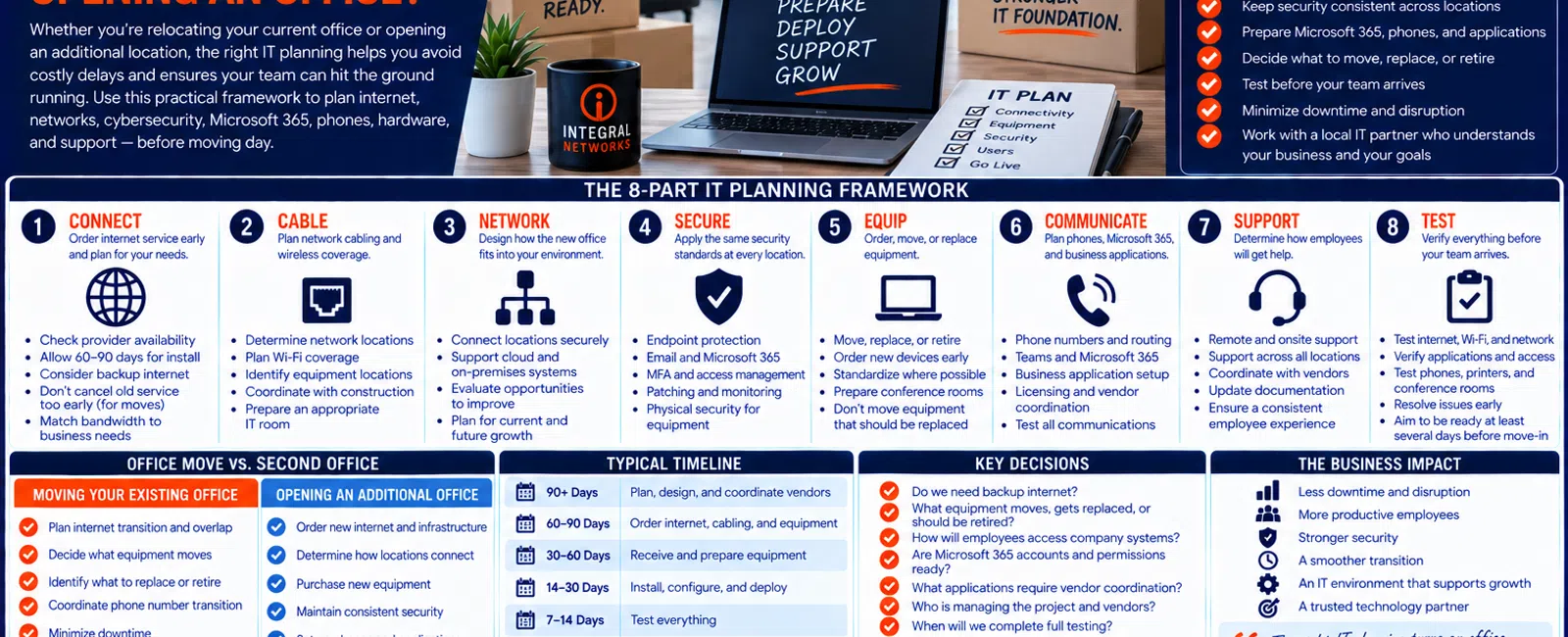
For a business with 20 to 75 employees, an office move or expansion can require coordination across at least eight areas: internet, cabling, network infrastructure, cybersecurity, computers and equipment, Microsoft 365 and business applications, employee support, and final testing.
The biggest mistake is treating IT as something that happens after the lease is signed, construction is finished, and furniture arrives.
By then, a delayed internet circuit, overlooked cabling requirement, missing equipment, or application dependency can potentially delay the move itself.
Use this eight-part framework:
Connect. Cable. Network. Secure. Equip. Communicate. Support. Test.
Moving an Office vs. Opening a Second Location
The technology requirements overlap significantly, but there are some important differences.
If You're Moving Your Existing Office
You need to determine:
- What equipment moves
- What equipment gets replaced
- When the old internet service ends
- When the new internet service begins
- How phones transition
- How employees work during the move
- How existing infrastructure is transported
- When the old office stops operating
- When the new office becomes operational
The objective is a controlled transition from Office A to Office B.
If You're Opening an Additional Office
You need to determine:
- What new infrastructure is required
- How the locations communicate
- Which systems are shared
- Which equipment needs to be purchased
- How employees access company resources
- How security remains consistent
- How onsite support works
- How both locations are documented and managed
The objective is creating one technology environment across multiple locations.
In either case, planning needs to begin well before moving day.
1. CONNECT: Order Internet Service Early
Internet connectivity should be one of the first technology items addressed, not one of the last.
Don't wait until two weeks before moving to ask:
"Can somebody get internet installed?"
Depending on the building, provider, and service requested, installation may require:
- Service availability review
- Building access
- Property-management coordination
- Cabling
- Carrier equipment
- Construction
- Scheduling
- Other site-specific work
That's why we recommend beginning the conversation 60-90 days ahead whenever practical, and earlier when the location has unusual requirements.
Don't Cancel the Old Internet Too Early
For an office relocation, this is particularly important.
Ideally, there should be a planned overlap where the new office has working connectivity before the old office is disconnected.
That gives your IT team an opportunity to test the new location while employees can still work from the old one.
The worst sequence is:
Friday: Shut down old internet.
Monday: Discover the new internet isn't working properly.
Build overlap into the transition whenever practical.
Don't Order Internet Based Only on Price
Ask:
- How many employees will work there?
- Which applications do they use?
- Is the company cloud-dependent?
- Will employees move large files?
- Do phones depend on internet connectivity?
- Will employees connect to another office?
- How damaging would an outage be?
A 10-person professional-services office primarily using Microsoft 365 has different requirements than an engineering office regularly accessing large CAD/BIM files.
The connection should follow the workload.
Do You Need Backup Internet?
Ask a simple question:
What happens if this office loses internet for four hours?
Would employees lose access to:
- Microsoft 365
- Phones
- Cloud applications
- Client systems
- Shared resources?
If the answer is:
"Most employees can't work,"
secondary connectivity deserves discussion.
Not every office requires redundant internet.
But it should be a deliberate business decision.
2. CABLE: Plan the Physical Technology Before Construction Is Finished
Network cabling is much easier to address while the space is being prepared than after everyone has moved in.
Before construction or office setup is complete, determine where you need:
- Network connections
- Wireless access points
- Printers
- Conference-room equipment
- Phones
- Workstations
- Network equipment
- Other connected devices
Someone also needs to determine where the core network equipment will live.
Don't Forget the IT Room
Evaluate:
- Physical space
- Power
- Cooling
- Internet handoff
- Firewall location
- Switches
- Battery backup
- Physical security
- Accessibility
A shelf above the cleaning supplies isn't necessarily the best location for equipment your entire company depends on.
Wi-Fi Should Be Designed, Not Guessed
Modern offices depend heavily on wireless connectivity.
Wi-Fi planning should consider:
- Office size
- Walls
- Construction materials
- Employee density
- Conference rooms
- Device counts
- Coverage requirements
The answer shouldn't simply be:
"We'll put an access point in the middle and see what happens."
Reliable wireless connectivity is business infrastructure.
Treat it that way.
3. NETWORK: Decide How the New Office Fits Into the Company
If you're relocating, ask:
Should we recreate the current network—or improve it?
If you're opening another location, ask:
How does this office connect with the rest of the company?
The answer depends heavily on where your applications and information live.
Your MSP should understand:
- Where business applications live
- Where files live
- Whether servers exist
- Which cloud platforms employees use
- What employees need to access
- Remote-access requirements
- Security requirements
The network architecture should follow the business.
Don't Automatically Rebuild What You Already Have
An office move is a great opportunity to evaluate old infrastructure.
Maybe your current network was designed six years ago.
Maybe equipment is approaching replacement.
Maybe the company has changed how it works.
Instead of automatically recreating everything, ask:
"If we were designing our IT environment today, would we build it the same way?"
If yes, great.
If not, moving is an opportunity to improve it.
4. SECURE: Don't Let the New Office Become a Security Exception
A new office needs the same security standards as the rest of the organization.
Employees still need:
- Secure identities
- Protected workstations
- Email security
- Microsoft 365 security
- Patching
- Appropriate access
- Security monitoring
At Integral Networks, our managed security approach includes technologies and services such as:
- Microsoft 365 Business Premium
- Deep Instinct endpoint protection
- Avanan email security
- Blokworx managed security services
- Managed patching
- Microsoft 365 security configuration
- Ongoing monitoring
The objective is consistency.
Your security standards shouldn't change because someone's desk moved 30 miles away.
Physical Security Matters Too
Consider where technology is physically installed.
Ask:
- Who can access the network equipment?
- Is the firewall in a secure area?
- Are switches exposed?
- Is server equipment appropriately protected?
- Can visitors access areas containing critical infrastructure?
Cybersecurity isn't exclusively software.
Physical access matters.
5. EQUIP: Decide What Moves, What Gets Replaced, and What Gets Retired
This is especially important during an office relocation.
Don't automatically put every piece of IT equipment on the moving truck.
Before the move, inventory:
- Workstations
- Laptops
- Servers
- Firewalls
- Switches
- Wireless access points
- UPS/battery systems
- Printers
- Phones
- Conference-room equipment
- Other infrastructure
Then classify each item:
MOVE
The equipment is appropriate, supported, and worth relocating.
REPLACE
The equipment is aging or no longer appropriate, and the move is a logical time to upgrade it.
RETIRE
The equipment is obsolete, unnecessary, or no longer part of the future environment.
This creates a simple:
MOVE → REPLACE → RETIRE
framework for every major technology asset.
Don't Pay to Move Something You're About to Replace
Suppose a network switch is already approaching replacement.
You could:
- Pay someone to uninstall it.
- Pack it.
- Transport it.
- Reinstall it.
- Troubleshoot it.
- Replace it six months later.
Or you might determine that installing the replacement equipment at the new office before moving makes more sense.
Not every old device needs to make the trip.
Order Employee Equipment Early
If you're opening another location or hiring during the move, determine what employees need.
That may include:
- Workstations
- Laptops
- Monitors
- Docking stations
- Keyboards and mice
- Headsets
- Printers
- Phones
- Conference-room technology
Don't schedule computer delivery for the afternoon before opening.
Give the IT team time to configure and test everything.
Standardize Wherever Practical
Use established standards for:
- Computer models
- Operating systems
- Security
- Microsoft 365
- Network equipment
- Wireless
- Support tools
Standardization makes the new environment easier to manage.
6. COMMUNICATE: Plan Phones, Microsoft 365, and Business Applications
Office changes affect more than computers and internet.
Consider communications.
Ask:
- Are phone numbers changing?
- Does the business use cloud phones?
- Does the main number need rerouting?
- Are employees keeping existing extensions?
- Are conference rooms changing?
- Does Teams need new room equipment?
- Are new Microsoft 365 accounts required?
For a relocation, phone cutover timing can be particularly important.
Clients shouldn't call Monday morning and discover the company disappeared.
Review Business Applications
Employees may depend on applications such as:
- Legal software
- Financial applications
- AutoCAD
- Revit
- Bluebeam
- SolidWorks
- ERP systems
- CRM platforms
- Accounting software
- Other industry applications
Ask whether those systems have:
- Network requirements
- Licensing requirements
- Location restrictions
- Hardware requirements
- Vendor setup requirements
A workstation can connect perfectly to the internet and still be useless if the employee's critical application doesn't work.
7. SUPPORT: Decide Who Owns the Technology Project
An office move can involve:
- Leadership
- Property manager
- General contractor
- Internet carrier
- Cabling company
- Phone provider
- Application vendors
- Movers
- MSP
That's a lot of parties.
Someone needs to own the technology checklist.
Your employees shouldn't spend moving week coordinating seven different technical vendors.
Vendor Coordination Is a Major Part of the Project
Imagine this:
The new internet isn't working.
The carrier says the circuit is active.
The cabling company says its work is complete.
The firewall isn't communicating.
Who coordinates the problem?
A mature MSP should help own the technology side of the transition and work with the appropriate vendors.
How Do You Avoid IT Downtime During an Office Move?
This deserves its own plan.
The goal should be:
Don't make moving day installation day.
Whenever practical, the core technology at the new office should be installed and tested before the old environment is shut down.
A simplified transition might look like this.
BEFORE MOVING WEEKEND
The new office already has:
- Internet
- Firewall
- Network
- Wi-Fi
- Phones or phone connectivity
- Security
- Tested business-system access
FRIDAY AFTERNOON
Employees finish normal work at the old office.
Any equipment that must physically move is shut down according to the transition plan.
FRIDAY EVENING / WEEKEND
The team:
- Moves required equipment
- Installs remaining systems
- Reconnects devices
- Tests connectivity
- Tests applications
- Verifies phones
- Confirms employee access
MONDAY MORNING
Employees arrive.
They sit down.
They sign in.
They work.
That's the objective.
Not:
"Everybody wait while IT figures out whether the internet works."
What If You Need Both Offices Running at the Same Time?
Some moves aren't clean Friday-to-Monday transitions.
Maybe departments move in phases.
Maybe the lease overlaps.
Maybe the company needs both locations operational for several weeks.
Then the plan needs to account for:
- Employees at both locations
- Internet at both offices
- Phones
- Shared applications
- Security
- Network access
- Support
- Equipment availability
That may actually make the move easier because there's less pressure to transition everything simultaneously.
But it needs to be designed.
8. TEST: Opening Day Shouldn't Be the First Full Test
Before employees arrive, conduct a complete technology walkthrough.
Verify:
- Internet
- Network
- Wi-Fi
- Workstations
- Microsoft 365
- Business applications
- Printers
- Phones
- Conference rooms
- Security tools
- Remote access
- Support tools
Then test from the perspective of an actual employee.
Can someone sit down and perform their job?
That's the real test.
Use a 7-Day Readiness Goal
Whenever possible, aim to have core infrastructure operational several days before the move or opening.
That gives you time to discover:
- Bad cabling
- Missing equipment
- Application problems
- Licensing issues
- Wi-Fi gaps
- Phone problems
- Vendor issues
Problems found seven days before the move are manageable.
Problems found at 8:05 Monday morning are emergencies.
A Practical 90-Day Office Move or Expansion Timeline
90+ DAYS BEFORE
Start:
- Internet availability research
- Technology design
- Vendor coordination
- Cabling requirements
- Budget planning
- Infrastructure assessment
For a relocation, also begin deciding:
Move / Replace / Retire
for existing equipment.
60-90 DAYS BEFORE
Finalize:
- Internet orders
- Cabling plan
- Network design
- Wi-Fi design
- Phone requirements
- Hardware requirements
30-60 DAYS BEFORE
Order and prepare:
- Computers
- Network equipment
- Wireless
- Security systems
- Phones
- Conference-room equipment
Coordinate:
- Application vendors
- Internet provider
- Cabling
- Movers
- Property management
14-30 DAYS BEFORE
Begin:
- Internet activation
- Network installation
- Workstation preparation
- Microsoft 365 setup
- Application configuration
- Security deployment
7-14 DAYS BEFORE
Test:
- Internet
- Network
- Wi-Fi
- Applications
- Phones
- Printers
- Conference rooms
- Remote access
- Employee login
MOVING / OPENING WEEK
Execute:
- Final equipment transition
- Employee setup
- Vendor coordination
- Support coverage
- Final testing
FIRST WEEK AFTER
Review:
- Employee issues
- Wi-Fi coverage
- Application performance
- Phones
- Network performance
- Documentation
- Outstanding tasks
Then close the project only when the environment is stable.
Example: A 40-Person Company Moves Offices
Consider a hypothetical 40-person professional services company moving to a larger office.
The current location has:
- 40 workstations
- Firewall
- Network switches
- Wireless access points
- Printers
- Conference-room technology
- Cloud phones
During planning, the MSP discovers:
- The firewall is still appropriate.
- Two switches are approaching replacement.
- Wireless coverage at the new office requires additional access points.
- Five employee computers are scheduled for replacement this year.
- The new office needs two additional conference rooms.
Instead of moving everything blindly:
MOVE
- Firewall
- Appropriate workstations
- Printers
- Reusable conference equipment
REPLACE
- Two aging switches
- Five aging workstations
ADD
- Wireless access points
- Conference-room technology
RETIRE
- Obsolete network equipment
- Unneeded old devices
Now the office move also improves the technology environment.
Example: A 35-Person Company Opens a 12-Person Second Office
Now consider a 35-person business opening another location for 12 employees.
The project requires:
CONNECT
New internet service.
CABLE
Network and wireless infrastructure.
NETWORK
Secure access to company systems.
SECURE
The same security standards as headquarters.
EQUIP
12 employee workstations, monitors, and accessories.
COMMUNICATE
Phones, Microsoft 365, and business applications.
SUPPORT
Remote support plus local onsite capability.
TEST
Full validation before employees arrive.
Same eight-part framework.
Different business event.
What Does Office-Move Downtime Cost?
Suppose 30 employees can't work normally for three hours Monday morning because technology wasn't ready.
That's:
30 employees × 3 hours = 90 employee-hours
of disrupted productivity.
And that doesn't include:
- Management time
- Vendor costs
- Delayed client work
- Employee frustration
- Overtime
- Lost revenue
That's why paying people to plan and test technology before the move can be far less expensive than improvising afterward.
How Much Should You Budget?
There isn't one universal office-move IT budget.
Build it by category.
| Category | Estimated Budget |
|---|---|
| Internet installation | $_____ |
| Cabling | $_____ |
| Firewall/network | $_____ |
| Wi-Fi | $_____ |
| Computers | $_____ |
| Monitors/accessories | $_____ |
| Phones | $_____ |
| Conference rooms | $_____ |
| Software/licensing | $_____ |
| IT deployment/project | $_____ |
| Equipment moving | $_____ |
| Contingency | $_____ |
For a relocation, also identify equipment being replaced rather than moved.
For a second location, include new recurring operating expenses.
Don't Forget Recurring Costs
The project budget isn't the entire financial impact.
A new or larger office may change recurring costs for:
- Internet
- Microsoft 365
- Managed IT
- Software
- Phones
- Security
- Cloud services
- Other subscriptions
Those belong in the ongoing technology budget.
The 20-Question Office Move / New Location Checklist
Before finalizing the move or opening date, ask:
- Which internet providers serve the new building?
- Has internet been ordered?
- When will it be active?
- Do we need backup internet?
- Has network cabling been planned?
- Where will network equipment be installed?
- Has Wi-Fi coverage been designed?
- What existing equipment will move?
- What should be replaced instead?
- What should be retired?
- What new equipment needs to be ordered?
- How will employees access company systems?
- Which applications require vendor coordination?
- Are Microsoft 365 accounts and permissions ready?
- Are all workstations protected and managed?
- How will phones and existing numbers transition?
- Who is coordinating the internet, cabling, phone, application, and IT vendors?
- When will the new environment be completely tested?
- What's the contingency plan if something isn't ready?
- Who owns the final technology go/no-go decision before employees arrive?
If several of those answers are:
"We'll figure that out during the move,"
you're not ready yet.
The goal is to answer these questions while there is still time to change the plan.
Five Office-Move IT Mistakes That Create Avoidable Problems
1. Ordering Internet Too Late
This is one of the biggest risks because your IT provider doesn't control the carrier's installation schedule.
You can have:
- Computers
- Network equipment
- Furniture
- Phones
- Employees
all ready to go.
If the internet circuit isn't active, the office may still be unable to operate normally.
Start connectivity planning early.
2. Moving Aging Equipment Just Because You Already Own It
Moving equipment costs time and money.
Before packing an old firewall, switch, server, wireless access point, or UPS, ask:
Would we be replacing this within the next 12-18 months anyway?
If yes, the office move may be the better time to replace it.
Use the:
MOVE → REPLACE → RETIRE
framework before moving day.
3. Assuming the New Office Can Copy the Old Office
The new building may have:
- Different internet options
- Different cabling
- Different square footage
- Different wireless requirements
- Different employee density
- Different conference rooms
- Different physical security
And your business may have changed since the original office was designed.
Build for what the company needs now and over the next several years, not simply what existed at the old address.
4. Forgetting About Business Applications
A workstation that turns on and connects to Wi-Fi isn't necessarily ready.
Employees need to actually perform their jobs.
Test:
- Microsoft 365
- Business applications
- File access
- Printers
- Remote systems
- Industry-specific applications
- Shared resources
Opening-day testing should replicate real employee workflows.
5. Making Moving Day the Installation Day
This is the one to avoid whenever possible.
Your new office shouldn't be a collection of unopened boxes and untested equipment on the morning employees arrive.
Install early.
Configure early.
Test early.
Then move.
Who Should Coordinate All the Technology Vendors?
This is where an office move can become unnecessarily frustrating.
You may have:
- Internet carrier
- Cabling contractor
- General contractor
- Property manager
- Phone provider
- Copier company
- Application vendors
- Moving company
- Managed IT provider
When something doesn't work, those vendors may need to communicate with one another.
Your employees shouldn't become the technical project managers.
A mature MSP should help coordinate the technology side of the project, maintain the checklist, and help determine which vendor needs to address each issue.
The objective is ownership.
Not necessarily doing every piece of work internally.
What If You're Moving From Sacramento to Another Sacramento-Area Office?
This is where local IT support becomes particularly valuable.
A business relocating within the Greater Sacramento region may be moving between communities such as:
- Sacramento
- Roseville
- Rocklin
- Folsom
- Elk Grove
- Woodland
- Stockton
- Modesto
- Surrounding communities
The technology project may involve work at both addresses simultaneously.
Equipment may need to be removed from the old office while infrastructure is being prepared at the new office.
Having an IT provider capable of supporting both sides of that transition simplifies coordination.
For Greater Sacramento businesses:
Integral Networks — Sacramento, CA
(916) 626-4000
What If You're Moving or Expanding in Northern Nevada?
The same principle applies throughout Northern Nevada, including:
- Reno
- Sparks
- Carson City
- Surrounding communities
A Reno company moving across town still needs to coordinate internet, infrastructure, phones, equipment, applications, security, and testing.
A Reno company opening a second office in Sparks or Carson City now needs to manage technology across multiple locations.
For Northern Nevada businesses:
Integral Networks — Reno, NV
(775) 446-4100
What If You're Expanding Between Sacramento and Reno?
This is one scenario particularly aligned with Integral Networks' service footprint.
Suppose your headquarters is in the Greater Sacramento region and the company opens a Northern Nevada location.
Or your company is based in Reno and establishes an office in Greater Sacramento.
You now have employees operating across both of our primary markets.
The goal should be to maintain one consistent IT environment, including:
- Support
- Cybersecurity
- Microsoft 365
- Device management
- Monitoring
- Documentation
- Vendor coordination
- Strategic planning
Employees shouldn't experience completely different technology standards because they're working in another state.
Leadership should still have one view of the overall environment.
Don't Forget to Update Your Documentation After the Move
The project isn't finished just because employees can work.
Your documentation needs to reflect the new environment.
Update:
- Office address
- Internet provider
- Circuit information
- Network configuration
- Firewall
- Switches
- Wireless access points
- Printers
- Phone systems
- Assets
- Vendors
- Equipment locations
- Support information
If equipment was retired, remove it from the active inventory.
If equipment was replaced, document the new assets.
If a second location was added, make sure the provider can clearly distinguish which equipment exists at each office.
Documentation should describe the environment as it exists now, not as it existed before the move.
Update the 12-36 Month Technology Roadmap Too
Moving or opening an office changes future technology planning.
Leadership may now have:
- Additional network equipment
- New warranties
- New internet contracts
- More workstations
- Additional software licenses
- Additional phone expenses
- New equipment replacement dates
- More vendors
- Another location to support
Those changes should appear in future technology budgeting and Quarterly Business Reviews.
For a second location, you now have two technology lifecycles to manage.
For a relocation, some lifecycle dates may have changed because equipment was replaced during the move.
Don't finish the project and forget about what was installed.
Put it on the roadmap.
A Simple Office-Move Readiness Score
Give yourself one point for every statement that's true:
- Internet has not been ordered.
- We don't have a cabling plan.
- We haven't decided where network equipment will go.
- We haven't designed Wi-Fi coverage.
- We don't know which existing equipment will move.
- We haven't identified equipment that should be replaced.
- Application vendors haven't been contacted.
- Phone cutover hasn't been planned.
- Nobody owns the overall technology checklist.
- We don't have a date for full pre-move testing.
0-2 Points
Your technology planning appears to be well underway.
3-5 Points
Several important items deserve attention before the move gets closer.
6-10 Points
Technology could become a significant risk to the move or opening schedule.
This isn't a formal project assessment.
It's a simple framework for identifying whether critical technology decisions are being left too late.
What Should Your MSP Be Doing During the Project?
A Managed Service Provider supporting an office move or expansion should help across the entire lifecycle.
BEFORE THE MOVE
PLAN
Understand business requirements and timing.
ASSESS
Evaluate the old and new environments.
DESIGN
Plan connectivity, network, Wi-Fi, security, and employee technology.
COORDINATE
Work with carriers, cabling companies, application vendors, and other technology providers.
DURING THE MOVE
DEPLOY
Install and configure systems.
SECURE
Apply the organization's security standards.
TEST
Verify connectivity, applications, phones, and employee workflows.
SUPPORT
Help employees through the transition.
AFTER THE MOVE
DOCUMENT
Update the environment and asset information.
STABILIZE
Resolve issues discovered after employees begin working.
PLAN
Add new infrastructure and lifecycle requirements to the technology roadmap.
That's a managed technology project.
The Goal: Make Monday Morning Boring
A successful office move doesn't need a dramatic IT story.
In fact, the best outcome is boring.
Employees arrive Monday morning.
They connect their laptops or sit at their workstations.
They sign in.
Microsoft 365 works.
Their applications work.
Phones work.
Printers work.
Conference rooms work.
The internet works.
And everyone gets back to business.
That's success.
The complicated work should happen before employees arrive, not while they're waiting.
Final Thoughts
Whether you're moving an existing office or opening another location, technology needs to be part of the project from the beginning.
Start 60-90 days ahead whenever practical, and earlier when carrier lead times, construction, cabling, or complex systems require it.
Use the eight-part framework:
Connect.
Cable.
Network.
Secure.
Equip.
Communicate.
Support.
Test.
For an office relocation, also use:
Move. Replace. Retire.
Decide which technology should make the trip before somebody puts it on the truck.
And remember the most important operational principle:
Don't make moving day installation day.
Whenever practical, get the new environment operational and tested before shutting down the old one.
Because the objective isn't simply moving technology from one building to another.
It's making sure the business can keep operating while its physical location changes.
Planning an Office Move or New Location?
If your 20-75 employee business is moving, opening another office, or expanding between the Greater Sacramento region and Northern Nevada, Integral Networks can help plan and coordinate the technology portion of the project.
We provide managed IT, network and infrastructure management, cybersecurity, Microsoft 365 management, workstation deployment, vendor coordination, onsite support, documentation, and strategic technology planning.
Sacramento, CA — (916) 626-4000
Reno, NV — (775) 446-4100
Related Articles
What Should Happen During a Quarterly Business Review With Your IT Provider?
What Is Proactive Managed IT—and How Is It Different From Reactive IT Support?
How Much Should a 20-75 Employee Business Budget for IT Each Year?
How Do You Compare Two Managed IT Service Proposals Without Just Comparing Price?


