
What Should a Financial Services Firm Expect From Its Managed IT Provider?
A financial services firm with 20 to 75 employees should expect much more from its Managed Service Provider than help when a computer stops working.
At a minimum, your MSP should deliver across six areas: responsive support, layered cybersecurity, proactive technology management, Microsoft 365 management, documentation and vendor coordination, and strategic IT planning.
Your provider should also understand an important distinction:
Managing technology that supports your organization's security and compliance requirements isn't the same as declaring your organization compliant.
Your legal, regulatory, contractual, insurance, and industry obligations depend on your specific business.
But your IT provider should be able to clearly explain what technology it manages, what controls are in place, what it documents, and where its responsibilities end.
For financial services firms throughout the Greater Sacramento region and Northern Nevada, use this six-part framework to evaluate your current MSP.
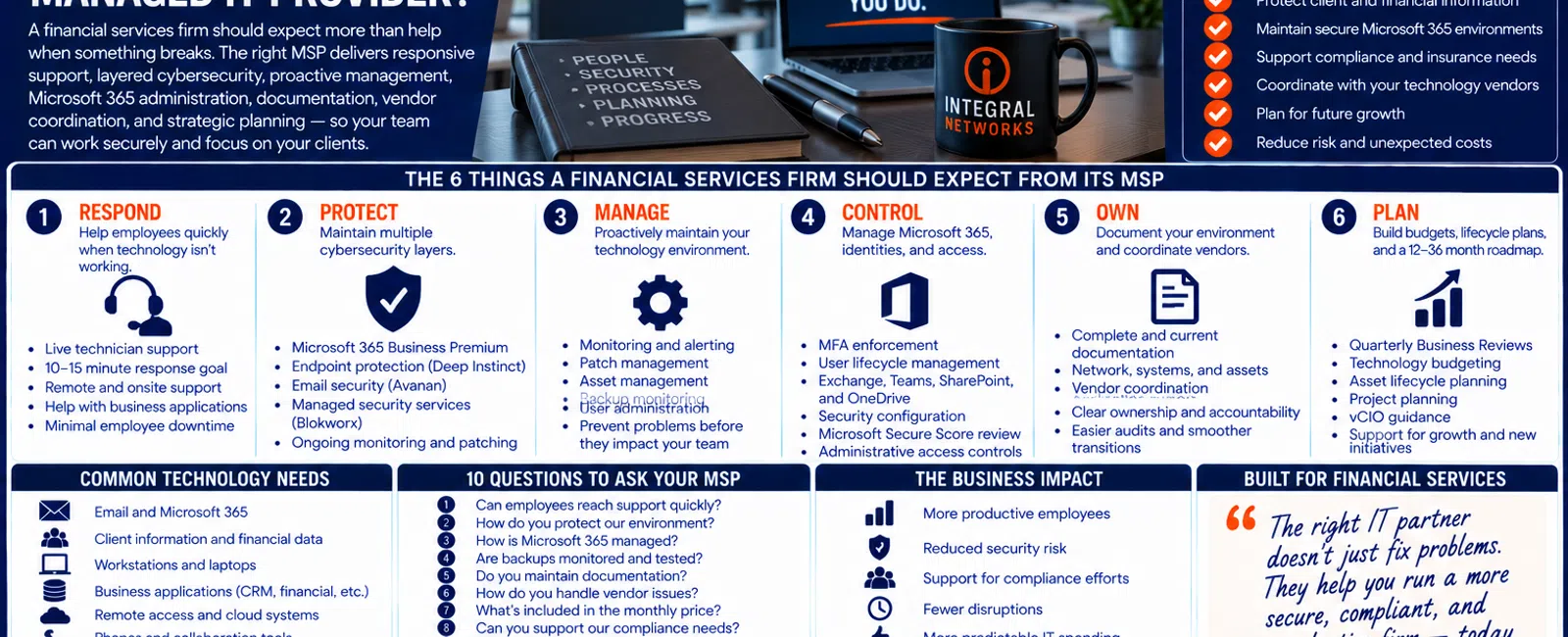
The 6 Things a Financial Services Firm Should Expect From Its MSP
A mature managed IT relationship should provide:
1. RESPOND — Help employees quickly when technology isn't working.
2. PROTECT — Maintain multiple cybersecurity layers.
3. MANAGE — Proactively maintain the technology environment.
4. CONTROL — Manage Microsoft 365, identities, and access.
5. OWN — Document the environment and coordinate technology vendors.
6. PLAN — Build budgets, lifecycle plans, and a 12-36 month technology roadmap.
Let's look at what each one means.
1. RESPOND: Employees Should Be Able to Get Help Quickly
Financial services employees often depend on technology for nearly every part of their work.
That can include:
- Microsoft 365
- Workstations
- Client information
- CRM platforms
- Financial applications
- Document systems
- Cloud applications
- Phones
- Printers
- Remote access
When technology stops working, employees shouldn't spend hours trying to troubleshoot it themselves.
What Should Response Look Like?
At Integral Networks, whenever possible, a technician answers the phone live.
If someone isn't immediately available, our general response objective is 10-15 minutes.
That's a response objective.
It doesn't mean every technology problem will be resolved in 15 minutes.
A complicated business-application problem may require escalation or coordination with another vendor.
The important thing is that someone begins taking ownership.
Response Time Isn't the Same as Resolution Time
This distinction matters.
Suppose an employee can't access a financial application.
8:00 AM
Employee contacts support.
8:10 AM
Technician begins troubleshooting.
8:30 AM
The issue appears to involve the application's vendor.
8:40 AM
The MSP begins coordinating with the vendor.
The problem may take longer to completely resolve.
But the employee isn't spending the morning wondering whether anyone saw the request.
That's a better support experience.
2. PROTECT: Cybersecurity Should Be Part of Managed IT
Financial services firms may possess or access information attackers find valuable.
That can include:
- Client information
- Financial records
- Employee information
- Credentials
- Payment information
- Confidential business documents
Cybersecurity therefore shouldn't be treated as an optional add-on to basic computer support.
At Integral Networks, our managed security approach includes technologies and services such as:
- Microsoft 365 Business Premium
- Deep Instinct endpoint protection
- Avanan email security
- Blokworx managed security services
- Managed patching
- Microsoft 365 security configuration
- Ongoing monitoring
The objective isn't collecting security products.
It's creating multiple managed layers.
Your MSP Should Be Able to Explain the Security Strategy
Ask:
"Can you explain our cybersecurity strategy to leadership in five minutes?"
The answer shouldn't be:
"You have antivirus."
Leadership should understand how the provider addresses areas such as:
IDENTITY
How are employee accounts protected?
How are phishing and impersonation addressed?
ENDPOINTS
How are workstations protected and monitored?
MICROSOFT 365
How is the cloud environment secured?
DATA
How is critical information protected and recoverable?
ACCESS
Who has elevated privileges?
MONITORING
Who is watching for security issues?
Those are the seven layers we covered in Article #32.
3. MANAGE: Your MSP Should Work Between Support Tickets
This is one of the biggest differences between managed IT and outsourced break/fix support.
If the only time your provider works on your environment is after an employee reports a problem, the relationship is still largely reactive.
Proactive management should include work such as:
- Device monitoring
- Patch management
- Server management
- Network monitoring
- Backup monitoring
- Asset management
- Documentation
- Security management
- User administration
- Vendor coordination
Employees may never see much of this work.
That's the point.
The goal is to prevent avoidable problems from becoming employee-facing disruptions.
Example: Aging Hardware
Imagine a firewall is approaching replacement.
Reactive IT
Nobody notices until the device fails or becomes an urgent concern.
Leadership receives an unexpected recommendation:
"We need to replace this immediately."
Proactive Managed IT
The firewall exists in the asset-management system.
Its lifecycle is tracked.
Leadership sees the replacement on the technology roadmap months in advance.
The expense becomes part of the budget.
Same hardware.
Completely different management experience.
4. CONTROL: Microsoft 365 Needs Active Management
Microsoft 365 can be central to a financial services organization's technology environment.
Employees may depend on:
- Exchange Online
- Outlook
- Teams
- SharePoint
- OneDrive
- Microsoft identities
- Office applications
Simply purchasing Microsoft 365 licenses isn't enough.
Someone needs to manage the environment.
Integral Networks requires Microsoft 365 Business Premium for managed clients because it provides important security and management capabilities we use to establish a stronger baseline.
What Should Microsoft 365 Management Include?
Depending on the environment, your MSP should be addressing areas such as:
- Multi-Factor Authentication
- User accounts
- Administrative access
- Exchange Online
- Teams
- SharePoint
- OneDrive
- Device management where appropriate
- Security configuration
- Microsoft Secure Score
During onboarding, Integral Networks reviews Microsoft Secure Score and evaluates appropriate recommendations based on the client's environment.
The objective isn't achieving a magical score.
It's improving the environment using appropriate security controls.
User Onboarding Should Be Controlled
When a new employee joins a financial services organization, they may need access to:
- Microsoft 365
- Workstation
- Client information
- Business applications
- Shared files
- Cloud systems
That access should follow a repeatable process.
The employee should receive the access required for their role.
Not:
"Give them whatever the last employee had."
Offboarding Matters Even More
When an employee leaves, access needs to be addressed promptly.
That may involve:
- Microsoft 365
- Remote access
- Business applications
- Shared information
- Administrative privileges
- Company equipment
Former employees shouldn't retain unnecessary access because someone forgot about an account.
This is where repeatable processes and documentation become security controls.
5. OWN: Your MSP Should Maintain Documentation
One of the recurring problems we find when taking over an environment is poor documentation.
Sometimes it's incomplete.
Sometimes it's outdated.
Sometimes it lives entirely inside one technician's head.
A financial services organization should have current documentation covering important technology such as:
- Network infrastructure
- Servers
- Firewalls
- Internet services
- Microsoft 365
- Backup systems
- Business applications
- Vendors
- Assets
- Administrative access
Documentation makes support faster.
It also improves continuity.
Your Business Shouldn't Depend on One Technician's Memory
Ask:
"If the person who knows our environment best disappeared tomorrow, could another technician support us?"
If the answer is no, that's a problem.
Good managed IT creates organizational knowledge.
Not individual dependency.
OWN: Your MSP Should Coordinate Vendors
Financial services companies often depend on multiple technology vendors.
Examples might include:
- Financial applications
- CRM systems
- Internet providers
- Phone systems
- Microsoft
- Copier vendors
- Cloud platforms
- Cybersecurity vendors
- Other business applications
Eventually, something will break between vendors.
The application provider says:
"It's the network."
The internet provider says:
"Our connection is fine."
The network appears healthy.
Meanwhile, the employee still can't work.
Your Employees Shouldn't Be the Referees
A mature MSP should help coordinate the technology issue.
That means:
- Investigate.
- Identify the likely area of responsibility.
- Contact or coordinate with the appropriate vendor.
- Provide technical information.
- Stay involved until there's a path toward resolution.
The MSP doesn't need to replace every software vendor.
It needs to help own the problem.
Where Does Compliance Fit Into the MSP Relationship?
This needs to be handled carefully.
Financial services organizations may have regulatory, contractual, insurance, or industry requirements.
Those requirements vary.
Your MSP shouldn't casually tell you:
"Don't worry. You're compliant."
Technology is only one part of many compliance programs.
Instead, your provider should be able to explain:
- Which technical controls it manages
- Which systems it monitors
- What documentation it maintains
- What reports or information it can provide
- Which responsibilities belong to someone else
Ask This Question Instead
Rather than:
"Does our MSP make us compliant?"
ask:
"Which technology controls required by our organization are you responsible for implementing, maintaining, and documenting?"
Then document the answer.
That creates clearer accountability.
Cyber Insurance Requires the Same Clarity
Cyber insurance applications may ask about controls such as:
- MFA
- Endpoint protection
- Email security
- Backup
- Administrative access
- Security monitoring
Your MSP may provide technical information about systems it manages.
But leadership needs to ensure representations to insurers are accurate.
If an answer requires legal, insurance, or compliance interpretation, involve the appropriate advisor.
6. PLAN: Your MSP Should Help Leadership Look Ahead
Managed IT shouldn't be limited to:
"What's broken today?"
Your provider should also be asking:
"What's coming next?"
That means discussing:
- Company growth
- New employees
- New offices
- Software changes
- Hardware replacements
- Security improvements
- Vendor changes
- Upcoming projects
- Technology budget
At Integral Networks, strategic IT management includes:
- Quarterly Business Reviews
- Asset lifecycle planning
- Technology budgeting
- Vendor management
- Technology roadmaps
- vCIO guidance
The goal is visibility across approximately 12-36 months.
What Should a Quarterly Business Review Cover?
A useful QBR should address six areas:
BUSINESS
What's changing?
HEALTH
How is the technology environment performing?
SECURITY
What risks or improvements need attention?
LIFECYCLE
Which equipment is aging?
PROJECTS
What work is coming?
BUDGET
What should leadership expect to spend?
That's much more valuable than reviewing ticket counts for an hour.
Example: A 40-Person Financial Services Firm
Consider a hypothetical firm with 40 employees.
During a strategic review, leadership learns:
- Five workstations should be replaced next year.
- A network component is approaching replacement.
- Microsoft 365 security has two recommended improvements.
- One business application vendor is planning a major upgrade.
- The company expects to hire six employees.
- Backup recovery testing should be scheduled.
None of those items is necessarily an emergency today.
That's exactly why they belong on the roadmap.
Leadership can plan.
What Should a 40-Person Firm Be Paying?
At Integral Networks' typical managed IT range of $135-$185 per user per month, a 40-person organization would budget approximately:
$5,400-$7,400 per month
or:
$64,800-$88,800 per year
for managed IT.
Microsoft 365 licensing is additional.
At that investment level, the organization should expect much more than a help desk.
It should receive value across all six areas:
Respond. Protect. Manage. Control. Own. Plan.
The 12-Question Financial Services MSP Scorecard
Give your current provider one point for every yes:
- Can employees normally reach support quickly?
- Does someone take ownership of support issues?
- Is cybersecurity actively managed?
- Is Microsoft 365 actively secured and managed?
- Are employee endpoints protected and monitored?
- Are patches actively managed?
- Are backups monitored?
- Is our environment documented?
- Does the MSP coordinate our technology vendors?
- Are technology-control responsibilities clearly defined?
- Do we receive regular strategic reviews?
- Do we maintain a 12-36 month technology roadmap?
10-12 Points
Your provider appears to be delivering many elements of a mature managed IT relationship.
6-9 Points
There are meaningful opportunities to improve the relationship.
0-5 Points
You're likely receiving considerably less than a growing financial services organization should expect from managed IT.
This isn't a formal technical, security, or compliance assessment.
It's a framework for evaluating the relationship based on business outcomes.
Five Warning Signs You're Mostly Buying IT Support
1. You Only Hear From the MSP When Something Breaks
There's little proactive management.
2. Leadership Doesn't Know the Cybersecurity Strategy
You have products, but nobody can explain the plan.
3. Technology Expenses Are Constantly a Surprise
There's no effective lifecycle or budgeting process.
4. Employees Coordinate Technology Vendors Themselves
Nobody owns the problem.
5. There Is No Technology Roadmap
The relationship is focused almost entirely on today's tickets.
Those are signs that you may be buying outsourced support rather than mature managed IT.
What Should the Relationship Feel Like?
Good managed IT should make technology less chaotic.
Employees should know where to get help.
Leadership should know what technology risks exist.
Security responsibilities should be understood.
Vendors should be coordinated.
Hardware replacements should be planned.
Future projects should be visible.
Technology spending should become more predictable.
That's the objective.
Managed IT for Greater Sacramento Financial Services Firms
Integral Networks supports financial services organizations throughout the Greater Sacramento region, including Sacramento, Roseville, Rocklin, Folsom, Elk Grove, Woodland, Stockton, Modesto, and surrounding communities.
Our primary managed IT focus is businesses with 20 or more employees that need responsive support, layered cybersecurity, Microsoft 365 management, proactive IT, and strategic planning.
Sacramento, CA: (916) 626-4000
Managed IT for Northern Nevada Financial Services Firms
Our second primary service area is Northern Nevada, including Reno, Sparks, Carson City, and surrounding communities.
We combine remote monitoring and support with local onsite capabilities when physical assistance is required.
Reno, NV: (775) 446-4100
Final Thoughts
A financial services firm shouldn't judge its Managed Service Provider solely by whether support tickets eventually get closed.
Use six standards:
Respond.
Protect.
Manage.
Control.
Own.
Plan.
Employees should receive responsive support.
Cybersecurity should be actively managed.
Microsoft 365 should be secured and administered.
The technology environment should be documented.
Vendors should be coordinated.
Leadership should know what's coming over the next 12-36 months.
That's what managed IT should look like.
Because the real value of an MSP isn't simply fixing technology after something breaks.
It's creating a technology environment that's more secure, more predictable, easier to support, and better aligned with the business.
Ready for a Second Opinion?
If your financial services organization is paying for managed IT but you're unsure whether you're receiving enough proactive management, cybersecurity, documentation, vendor coordination, or strategic planning, Integral Networks can help you evaluate the current relationship.
We provide flat-rate managed IT, layered cybersecurity, Microsoft 365 management, responsive support, backup oversight, documentation, vendor management, asset lifecycle planning, and strategic IT guidance for financial services organizations throughout the Greater Sacramento region and Northern Nevada.
Related Articles
How Much Does Managed IT Cost for a Financial Services Company? 2026 Pricing Guide
What Cybersecurity Does a Financial Services Company Actually Need?
What Is Proactive Managed IT—and How Is It Different From Reactive IT Support?
What Should Happen During a Quarterly Business Review With Your IT Provider?
What Should Your IT Provider Do During a Cybersecurity Incident?


