
How Do You Compare Two Managed IT Service Proposals Without Just Comparing Price?
If you're comparing two Managed Service Provider proposals, don't start by comparing the monthly totals.
First determine whether you're actually buying the same thing.
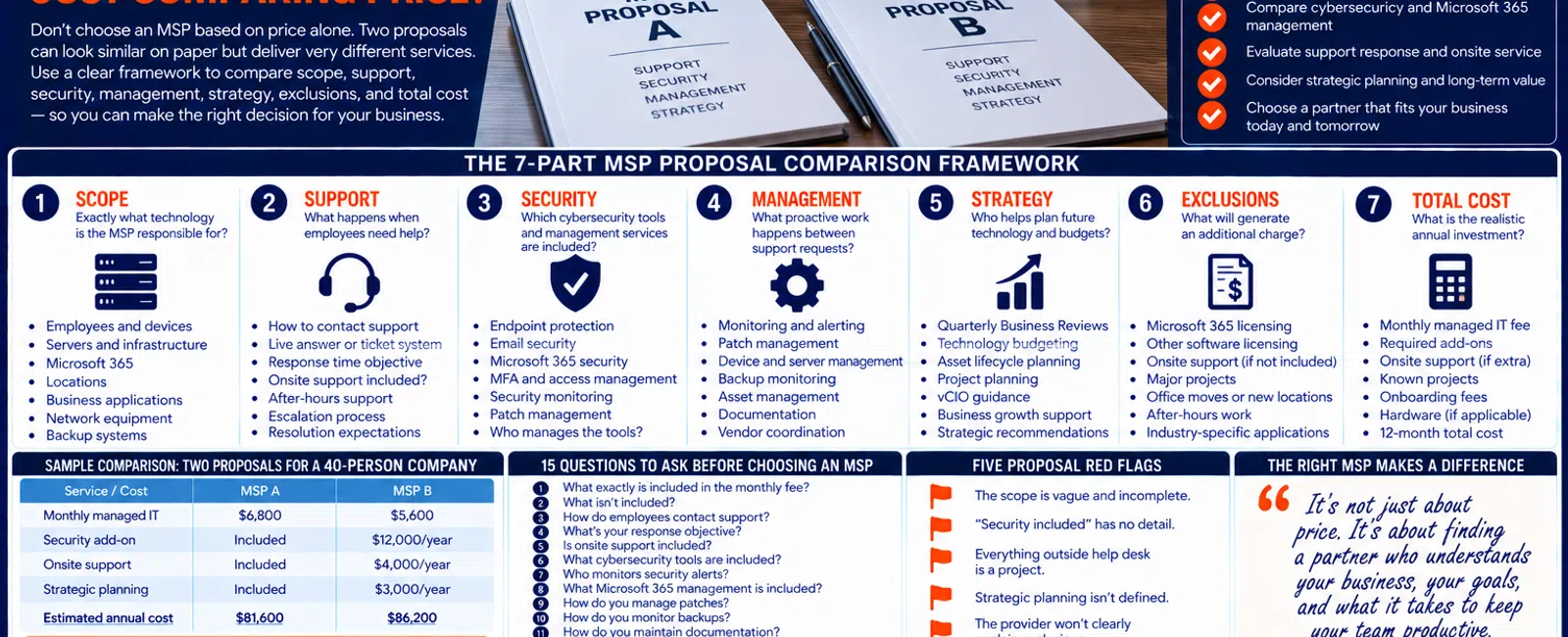
For a business with 20 to 75 employees, two MSP proposals can differ significantly in support coverage, cybersecurity, Microsoft 365 management, onsite service, backup responsibilities, strategic planning, and additional charges—even when their per-user prices look similar.
A proposal that's $1,000 less per month isn't necessarily less expensive if it leaves out services you'll need to purchase separately or regularly bills additional labor.
Use this seven-part framework:
Scope. Support. Security. Management. Strategy. Exclusions. Total Cost.
Only after you've normalized those seven areas should you compare price.
The 7-Part MSP Proposal Comparison Framework
Put the two proposals side by side and compare:
1. SCOPE
Exactly what technology is the MSP responsible for?
2. SUPPORT
What happens when employees need help?
3. SECURITY
Which cybersecurity tools and management services are included?
4. MANAGEMENT
What proactive work happens between support requests?
5. STRATEGY
Who plans future technology and budgets?
6. EXCLUSIONS
What will generate an additional charge?
7. TOTAL COST
What is the realistic annual investment—not simply the monthly recurring fee?
This turns a price comparison into a service comparison.
1. SCOPE: Make Sure Both MSPs Are Pricing the Same Environment
Before comparing prices, compare assumptions.
Imagine you have 50 employees.
Proposal A covers:
- 50 employees
- 55 computers
- Two servers
- Two locations
- Network infrastructure
- Microsoft 365 management
Proposal B says:
Managed IT for 50 users.
Those proposals may not be equivalent.
Ask both providers to clearly identify what they're taking responsibility for.
That can include:
- Employees
- Workstations
- Laptops
- Servers
- Firewalls
- Switches
- Wireless infrastructure
- Microsoft 365
- Backup systems
- Locations
- Business applications
- Other supported technology
If one provider discovered infrastructure the other provider didn't even know existed, the pricing comparison is already questionable.
Ask How the MSP Built the Proposal
Was the quote based on:
- A phone conversation?
- Employee count?
- A questionnaire?
- Existing documentation?
- Technical discovery?
- An onsite assessment?
The more complex your environment, the more important discovery becomes.
A very precise-looking price based on incomplete information is still based on incomplete information.
2. SUPPORT: What Happens When an Employee Needs Help?
Nearly every MSP proposal says:
Help Desk Included.
That doesn't tell you enough.
Ask what the support experience actually looks like.
Compare These Questions
How do employees contact support?
Phone?
Email?
Portal?
Does Someone Answer the Phone?
At Integral Networks, whenever possible, a technician answers the phone live.
If someone isn't immediately available, our general response objective is 10-15 minutes.
Other MSPs may have different processes.
That's fine.
You need to understand them.
Is Onsite Support Included?
This is a major proposal difference.
Provider A may include onsite support in its monthly agreement.
Provider B may charge:
$175 per hour + travel
every time someone visits the office.
The monthly fee alone won't reveal that difference.
What About After-Hours Support?
Ask:
- Is it available?
- Is it included?
- What qualifies as an emergency?
- Are there additional charges?
Don't assume.
Response Time vs. Resolution Time
Be careful when comparing SLA language.
An MSP might advertise:
15-minute response time.
Another says:
One-hour response.
Ask what "response" means.
Does it mean:
"We received your ticket."
Or:
"A technician has begun engaging with the problem."
Those are very different experiences.
Also remember:
Response time isn't resolution time.
Some technical problems require investigation, escalation, or vendor involvement.
3. SECURITY: Compare the Actual Security Stack
One proposal says:
Cybersecurity Included.
The other says:
Advanced Security Suite Included.
Neither statement tells you much.
Ask what's actually included.
For a modern 20-75 employee organization, areas worth comparing can include:
- Endpoint protection
- Email security
- Microsoft 365 security
- MFA
- Security monitoring
- Patch management
- Administrative access management
- Backup responsibilities
Ask Who Manages the Security Tools
This is important.
There's a difference between:
Security software is installed.
and:
Security is actively managed.
Ask:
- Who reviews alerts?
- Who investigates problems?
- Who verifies agents are installed?
- Who handles new employees?
- Who removes old devices?
- Who manages Microsoft 365 security?
At Integral Networks, our managed security approach includes technologies and services such as Microsoft 365 Business Premium, Deep Instinct, Avanan, Blokworx managed security services, managed patching, Microsoft 365 security configuration, and ongoing monitoring.
You don't need another MSP to use our exact stack.
You do need to understand what you're comparing.
The $25 Security Difference That Isn't $25
Suppose:
MSP A
Charges $150 per user and includes a broad managed security stack.
MSP B
Charges $125 per user, but requires another $35 per user for security services.
For a 50-person business:
MSP A
50 × $150 = $7,500/month
MSP B
50 × $125 = $6,250
plus:
50 × $35 = $1,750
Total:
$8,000/month
The $125 provider wasn't actually cheaper.
This is why you normalize scope before comparing price.
4. MANAGEMENT: What Happens When Nobody Is Calling Support?
This is one of the easiest ways to distinguish outsourced help desk from mature managed IT.
Ask each provider:
"What are you doing for us during a month when we submit very few tickets?"
Good answers may include:
- Monitoring
- Patch management
- Device management
- Server management
- Network monitoring
- Backup monitoring
- Microsoft 365 management
- Asset management
- Documentation
- Security management
- Vendor coordination
You're paying an MSP to manage the environment—not simply wait for the phone to ring.
Compare Microsoft 365 Management Carefully
Proposal A may include:
Microsoft 365 Support
while Proposal B includes:
Microsoft 365 Management
Those aren't necessarily the same thing.
Support might mean:
"We'll help when Outlook isn't working."
Management may include:
- User administration
- Security configuration
- Administrative access
- MFA
- Teams
- SharePoint
- OneDrive
- Secure Score review
- Employee onboarding and offboarding
Ask exactly what the phrase means in each proposal.
5. STRATEGY: Are You Buying a Help Desk or an IT Partner?
This category often receives very little attention during proposal comparisons.
Ask:
Who helps leadership plan technology?
A mature managed IT relationship should address areas such as:
- Hardware lifecycle
- Technology budget
- Cybersecurity priorities
- Upcoming projects
- Business growth
- Vendor management
- Technology roadmap
At Integral Networks, this includes:
- Quarterly Business Reviews
- Asset lifecycle planning
- Technology budgeting
- Vendor management
- Technology roadmaps
- vCIO guidance
Again, another provider may structure this differently.
The question is whether the strategic function actually exists.
Ask Who Your Strategic Contact Is
Is it:
- The salesperson?
- Help desk manager?
- Account manager?
- Technical account manager?
- vCIO?
- Owner?
Then ask:
How often will we meet?
and:
What will we actually discuss?
"We provide strategic IT" isn't enough.
6. EXCLUSIONS: This May Be the Most Important Section
One of the best questions you can ask an MSP is:
"What are the five most common things your clients pay for that are NOT included in this monthly fee?"
That question is much better than:
"Is everything included?"
Because almost no managed-services agreement includes literally every technology expense.
Common separate costs may include:
- Microsoft 365 licensing
- Other software licensing
- Hardware
- Major projects
- Office relocations
- Large migrations
- New office deployments
- Certain after-hours work
- Industry-specific applications
The exact exclusions vary by agreement.
You need to understand yours.
Ask for Examples
Don't accept:
"Projects are extra."
Ask:
"Give me three examples of work you consider a project."
One MSP may consider installing five new computers normal managed service.
Another may classify it as billable project labor.
Neither model is automatically wrong.
But they're not equivalent.
7. TOTAL COST: Compare 12 Months, Not One Month
Now you're ready to compare price.
Build a 12-month expected-cost comparison.
Start with:
Recurring Managed IT
Monthly fee × 12.
Then add:
Required Security Add-Ons
Anything necessary but not included.
Microsoft 365
If applicable.
Expected Onsite Charges
Based on the provider's pricing model.
Known Projects
Anything already expected during the first year.
Onboarding Fees
If applicable.
Other Required Services
Backup, security, monitoring, or other services not included in the base fee.
Now compare.
Example: Two MSP Proposals for a 40-Person Company
Consider a hypothetical 40-person business.
MSP A
Managed IT:
$6,800/month
Includes:
- Help desk
- Onsite support
- Monitoring
- Patching
- Security stack
- Microsoft 365 management
- Documentation
- QBRs
- Strategic planning
Annual managed IT:
$81,600
MSP B
Managed IT:
$5,600/month
Annual base:
$67,200
Looks cheaper.
But add:
Security:
$25/user/month × 40 = $12,000/year
Estimated onsite support:
$4,000/year
Strategic consulting:
$3,000/year
Now:
$67,200 + $12,000 + $4,000 + $3,000 = $86,200
MSP B's monthly headline price was $1,200 lower.
Its illustrative annual cost is $4,600 higher.
This example isn't intended to represent every MSP pricing model.
It demonstrates why monthly price alone can mislead.
Build a Simple Proposal Comparison Matrix
Use a table like this:
| Category | MSP A | MSP B |
|---|---|---|
| Monthly managed IT | $_____ | $_____ |
| Help desk | Included? | Included? |
| Onsite support | Included? | Included? |
| Response objective | _____ | _____ |
| Endpoint security | _____ | _____ |
| Email security | _____ | _____ |
| Security monitoring | _____ | _____ |
| Microsoft 365 management | _____ | _____ |
| Backup monitoring | _____ | _____ |
| Patching | _____ | _____ |
| Documentation | _____ | _____ |
| Vendor management | _____ | _____ |
| QBRs | _____ | _____ |
| Technology budgeting | _____ | _____ |
| vCIO / strategic planning | _____ | _____ |
| Projects | _____ | _____ |
| Onboarding fee | $_____ | $_____ |
| Estimated Year 1 cost | $_____ | $_____ |
Once both providers fill the same matrix, the comparison becomes much easier.
Don't Ignore the People Delivering the Service
Not everything fits into a spreadsheet.
You're entering a service relationship.
Ask:
- Who answers support calls?
- Where is the support team located?
- Who comes onsite?
- Who escalates difficult problems?
- Who manages our account?
- Who provides strategic guidance?
- How long have key team members been with the company?
You don't need biographies for every technician.
You need to understand the service model.
Local Support Matters When You Actually Need Someone Onsite
Most modern IT support can happen remotely.
But not all of it.
Servers fail.
Network equipment needs physical attention.
Offices move.
Internet circuits change.
Equipment needs deployment.
That's one reason Integral Networks focuses on two primary service areas.
Greater Sacramento
Including Sacramento, Roseville, Rocklin, Folsom, Elk Grove, Woodland, Stockton, Modesto, and surrounding communities.
Sacramento, CA: (916) 626-4000
Northern Nevada
Including Reno, Sparks, Carson City, and surrounding communities.
Reno, NV: (775) 446-4100
When comparing MSP proposals, ask how onsite service works in your actual location.
The 15 Questions to Ask Before Choosing Between Two MSPs
Use this list during final interviews:
- What exactly is included in the monthly fee?
- What isn't included?
- How do employees contact support?
- What's your response objective?
- Is onsite support included?
- What cybersecurity tools are included?
- Who monitors security alerts?
- What Microsoft 365 management is included?
- How do you manage patches?
- How do you monitor backups?
- How do you maintain documentation?
- How do you coordinate third-party vendors?
- How do you plan hardware replacements?
- What strategic planning is included?
- What are the five most common additional charges your clients encounter?
If the answers are vague, ask for specifics.
Numbers.
Examples.
Actual processes.
Five Proposal Red Flags
1. The Scope Is Vague
You can't tell what's actually being managed.
2. "Security Included" Has No Explanation
You don't know which tools or management services exist.
3. Everything Outside Help Desk Is a Project
The low monthly price may not represent your real cost.
4. Strategic Planning Isn't Defined
Nobody can explain what happens beyond support tickets.
5. The Provider Won't Clearly Explain Exclusions
You shouldn't need to discover those through future invoices.
Don't Automatically Choose the Most Expensive MSP Either
This article isn't an argument for:
Higher price = better provider.
That's no more useful than:
Lower price = better deal.
A more expensive proposal can still be poorly structured.
A less expensive provider can still offer excellent value.
The goal is understanding:
What are we buying?
What aren't we buying?
What will our realistic cost be?
Which service model fits our business?
Then make the decision.
A 30-Minute MSP Proposal Comparison Exercise
Here's a simple process leadership can use.
Minutes 1-5: Normalize Scope
Confirm both proposals cover the same users, devices, locations, and infrastructure.
Minutes 6-10: Compare Support
Review help desk, response expectations, onsite support, and escalation.
Minutes 11-15: Compare Security
List every included security product and management function.
Minutes 16-20: Compare Proactive Management
Review monitoring, patching, Microsoft 365, backup, documentation, and vendor management.
Minutes 21-25: Compare Strategy and Exclusions
Review QBRs, budgeting, projects, licensing, and extra charges.
Minutes 26-30: Calculate Year-One Cost
Add everything together.
Now you have a much better comparison than:
"MSP A is $142 per user and MSP B is $158."
Final Thoughts
When comparing managed IT proposals, price should be the last comparison—not the first.
Use the seven-part framework:
Scope.
Support.
Security.
Management.
Strategy.
Exclusions.
Total Cost.
Normalize the proposals.
Ask both providers the same questions.
Get vague language translated into actual services.
Calculate a realistic 12-month cost.
Then evaluate the people and service model behind the proposal.
Because the objective isn't finding the MSP with the lowest number on page one.
It's finding the provider whose service, responsibilities, costs, and expectations are clear before you sign the agreement.
Ready to Compare Your Options?
If you're evaluating managed IT proposals for a 20-75 employee business, Integral Networks can explain exactly what's included in our managed services model, what isn't, how support works, how cybersecurity is managed, and what we'd recommend for your environment.
No proposal should require guesswork to understand.
Integral Networks provides flat-rate managed IT, cybersecurity, Microsoft 365 management, responsive support, documentation, vendor coordination, lifecycle planning, and strategic IT guidance throughout the Greater Sacramento region and Northern Nevada.
Related Articles
What Does Flat-Rate Managed IT Really Mean—and What Should Be Included?
How Much Should a 20-75 Employee Business Budget for IT Each Year?
What Is Proactive Managed IT—and How Is It Different From Reactive IT Support?


