
How Should a Law Firm Secure Microsoft 365 and Email?
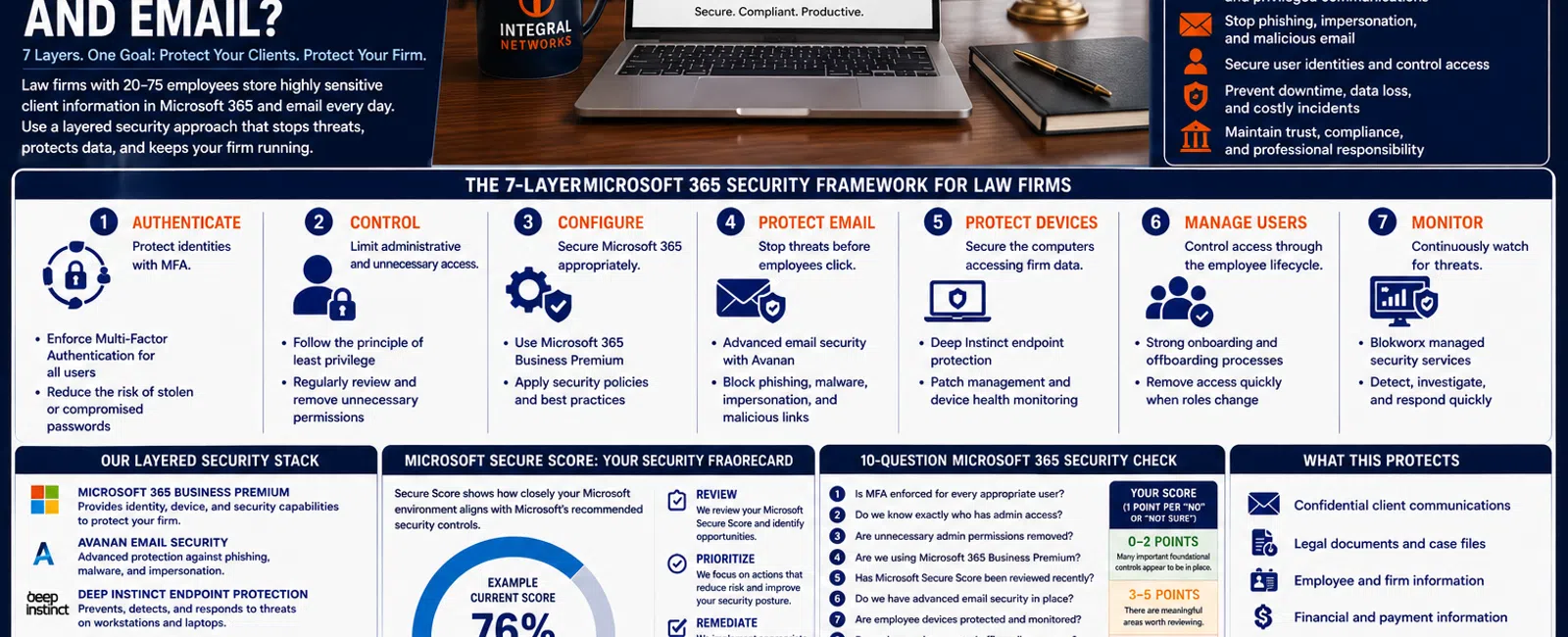
For a law firm with 20 to 75 employees, Microsoft 365 and email security should include at least 7 layers of protection: Multi-Factor Authentication, controlled administrator access, Microsoft 365 Business Premium security features, advanced email protection, endpoint protection, secure employee onboarding and offboarding, and continuous monitoring.
Simply having Microsoft 365 and antivirus isn't enough.
A law firm's email environment can contain confidential client communications, legal documents, financial information, credentials, invoices, calendar information, and years of correspondence.
And because attorneys and staff communicate constantly with clients, courts, opposing counsel, vendors, and other outside parties, email provides attackers with countless opportunities to impersonate someone the recipient already trusts.
At Integral Networks, we approach Microsoft 365 security as part of a layered security system, not as a collection of unrelated products.
Here's what that should look like.
The 7-Layer Microsoft 365 Security Framework for Law Firms
A practical Microsoft 365 security strategy should address seven areas:
1. AUTHENTICATE — Protect identities with MFA.
2. CONTROL — Limit administrative and unnecessary access.
3. CONFIGURE — Secure Microsoft 365 appropriately.
4. PROTECT EMAIL — Stop malicious messages before employees interact with them.
5. PROTECT DEVICES — Secure the computers accessing firm information.
6. MANAGE USERS — Control access throughout the employee lifecycle.
7. MONITOR — Continuously watch for security issues.
The strength comes from the layers working together.
1. AUTHENTICATE: Enforce Multi-Factor Authentication
Passwords aren't enough.
An attorney can have a strong password and still lose it through:
- Phishing
- Credential theft
- Password reuse
- A compromised third-party website
- Social engineering
Multi-Factor Authentication adds another verification requirement before an account can be accessed.
For a law firm, MFA shouldn't simply be available.
It should be enforced.
One of the problems we sometimes encounter when reviewing an environment is inconsistent security.
Some employees use MFA.
Others don't.
An administrator has an exception.
A legacy account was forgotten.
Those exceptions create gaps.
What Better IT Looks Like
Your MSP should be able to tell you:
- Who has MFA enabled
- How MFA is enforced
- Which accounts have exceptions
- Why those exceptions exist
Security shouldn't depend on whether an employee voluntarily enabled a setting.
2. CONTROL: Limit Administrator Access
Administrator accounts deserve special attention because they can make significant changes to your Microsoft 365 environment.
Yet administrative privileges sometimes accumulate over time.
An employee needed temporary access.
A consultant received administrator rights.
Someone changed roles.
Nobody went back and reviewed the permissions.
Eventually, more people have administrative access than necessary.
Follow the Least-Privilege Principle
The concept is straightforward:
Give people the access they need to perform their jobs—and no more.
That applies to Microsoft 365.
It also applies to employee computers.
One of the recurring security problems we find in new environments is excessive local administrator access.
Convenience shouldn't become your firm's security policy.
3. CONFIGURE: Use Microsoft 365 Business Premium as a Security Platform
Many businesses think about Microsoft 365 primarily as:
Outlook + Word + Excel + Teams.
For managed clients, Integral Networks requires Microsoft 365 Business Premium because it provides additional security and management capabilities we can use to establish a stronger baseline.
That can help support areas such as:
- Identity
- Device management
- Access controls
- Security policies
- Threat protection
- Microsoft Secure Score
The important distinction is this:
Buying Business Premium doesn't automatically secure your law firm.
Someone still needs to configure and manage it.
4. REVIEW: Use Microsoft Secure Score as a Framework
Microsoft Secure Score provides recommendations for improving the security posture of a Microsoft 365 environment.
During onboarding, Integral Networks reviews Secure Score and works through appropriate recommendations based on the client's actual environment.
We don't view the goal as:
"Get the highest number possible."
The goal is:
Identify meaningful security improvements and implement the ones appropriate for the business.
Recommendations may involve areas such as:
- Authentication
- Administrative access
- Identity
- Devices
- Data protection
Secure Score gives the provider a useful framework.
It doesn't replace professional judgment.
5. PROTECT EMAIL: Phishing Needs Its Own Security Layer
Email is particularly important for law firms because employees routinely receive messages and documents from people outside the organization.
An attacker doesn't necessarily need to "hack" the firm's network.
They may simply need to send one convincing email.
Examples include:
Fake Microsoft notification
Your password expires today. Sign in here.
Client impersonation
I'm sending the documents we discussed. Please review the attachment.
Executive impersonation
I'm tied up in a meeting. Can you take care of this payment?
Vendor impersonation
Our banking information has changed. Please use the attached instructions.
The attacker is exploiting trust.
Our Email Security Approach
Integral Networks uses Avanan email security as part of our standardized managed security stack.
The objective is to add another layer capable of identifying suspicious messages such as:
- Phishing
- Malware
- Impersonation
- Malicious attachments
- Credential-stealing attempts
No email security platform will stop every malicious message.
That's why it needs to work with the other layers.
6. PROTECT DEVICES: Securing Email Isn't Enough
Suppose your Microsoft 365 configuration is excellent.
But the attorney accessing it is using a compromised computer.
You still have a problem.
Employee devices can provide attackers access to:
- Credentials
- Browser sessions
- Files
- Applications
- Network resources
Integral Networks uses Deep Instinct endpoint protection as part of our managed security approach.
Endpoint protection also needs ongoing management.
Someone should know:
- Which devices are protected
- Whether they're checking in
- Whether alerts exist
- Whether systems are patched
- Whether old devices remain active
- Whether new devices have been properly onboarded
Installing security software once isn't the same as managing endpoint security.
7. MANAGE USERS: Onboarding and Offboarding Are Security Processes
Consider how much access a typical law-firm employee accumulates.
They may have:
- Microsoft 365
- NetDocuments or Worldox
- File access
- Remote access
- Adobe
- Practice applications
- Other cloud services
When that employee leaves, all appropriate access needs to be addressed.
Quickly.
A Repeatable Offboarding Process Should Address
- Microsoft 365 access
- Device access
- Business applications
- Remote access
- Shared data
- Administrative permissions
- Company equipment
Former employees shouldn't retain access simply because nobody remembered an account.
The same principle applies when employees change roles.
Permissions should follow business requirements—not accumulate forever.
8. MONITOR: Somebody Has to Watch the Environment
Security doesn't end when configuration is complete.
Employees change.
Accounts change.
Devices change.
Microsoft changes.
Attack techniques change.
Alerts are generated.
Someone needs to be paying attention.
Integral Networks utilizes Blokworx managed security services as part of our overall layered security approach.
Our managed security model combines technologies and services such as:
- Microsoft 365 Business Premium
- Avanan email security
- Deep Instinct endpoint protection
- Blokworx managed security services
- Managed patching
- Microsoft 365 security configuration
- Ongoing monitoring
No individual layer is perfect.
That's the point.
If one layer fails, another may still prevent an incident from becoming a larger problem.
What Does a Law-Firm Email Attack Actually Look Like?
Consider a hypothetical 35-person law firm.
An employee receives what appears to be a Microsoft 365 notification.
The message looks legitimate.
It says the employee's password is expiring.
The employee clicks the link.
The login page looks like Microsoft.
They enter their credentials.
Without additional controls, the attacker may now have exactly what they wanted.
Layered Security Changes the Scenario
Email protection may identify and remove the phishing message.
If it reaches the employee, MFA may still prevent the stolen password from being enough.
Endpoint protection may identify malicious behavior on the device.
Monitoring may identify suspicious activity.
The employee may recognize the message as unusual and report it.
The objective isn't assuming one layer will always work.
It's giving the attack multiple opportunities to fail.
Why Law Firms Need to Think About Vendor Impersonation
Phishing isn't always obvious.
Some of the most convincing attacks involve existing business relationships.
An attacker who compromises an outside organization's email account may be able to read legitimate conversations.
They can learn:
- Who communicates with whom
- What matters are being discussed
- How invoices are handled
- Which employees approve payments
- How people write
Then they insert themselves into the conversation.
The message isn't coming from a random address claiming to be a Nigerian prince.
It may be coming from an actual compromised account belonging to someone your employee knows.
That's why employees should be cautious when a message unexpectedly requests:
- Banking changes
- Wire transfers
- Credentials
- Sensitive documents
- Urgent financial action
Security technology matters.
So do verification processes.
The 10-Question Microsoft 365 Security Check for Law Firms
Ask these questions about your environment:
- Is MFA enforced for every appropriate Microsoft 365 user?
- Do we know exactly who has administrator access?
- Are unnecessary administrator permissions removed?
- Are we using Microsoft 365 Business Premium?
- Has Microsoft Secure Score been reviewed recently?
- Do we have advanced email security beyond basic filtering?
- Are employee computers protected and monitored?
- Do we have a documented employee offboarding process?
- Are security alerts actively monitored?
- Can our IT provider clearly explain our Microsoft 365 security strategy?
Give yourself one point for every "No" or "I'm not sure."
0-2 Points
Many important foundational controls appear to be in place.
3-5 Points
There are meaningful areas worth reviewing.
6-10 Points
Your Microsoft 365 environment deserves a comprehensive security review.
This isn't a formal security audit.
It's a leadership-level framework for identifying questions your firm should be able to answer.
How Does This Relate to Legal Applications?
Microsoft 365 isn't the only system that matters.
Law firms may also depend on:
- NetDocuments
- Worldox
- Adobe
- Practice-management applications
- Other cloud platforms
Each system may have its own:
- Authentication
- Permissions
- Security controls
- Vendor requirements
Your MSP doesn't necessarily control every application.
But it should understand how those applications fit into the larger environment.
Identity, devices, email, networks, applications, and data shouldn't be treated as completely unrelated security problems.
How Much Security Does a 20-Person Law Firm Really Need?
A common misconception is that cybersecurity becomes important only after an organization becomes large.
That's not how the risk works.
A 20-person law firm can still possess:
- Confidential client data
- Financial information
- Valuable email accounts
- Employee information
- Credentials
- Legal documents
Attackers also use automation.
They don't necessarily research every target individually before attempting phishing or credential attacks.
The objective isn't building enterprise cybersecurity infrastructure for a 20-person firm.
It's implementing controls appropriate for the organization's size and risk.
Security Shouldn't Make Attorneys Unable to Work
There's another side to the conversation.
Cybersecurity that makes everyday work unnecessarily difficult creates its own problems.
Attorneys still need to:
- Access documents
- Communicate with clients
- Work remotely
- Collaborate
- Use legal applications
- Meet deadlines
Security decisions therefore need to balance:
Risk
with:
Usability.
The goal isn't maximum restriction.
It's appropriate protection.
Microsoft 365 Security for Greater Sacramento Law Firms
Integral Networks supports law firms throughout the Greater Sacramento region, including Sacramento, Roseville, Rocklin, Folsom, Elk Grove, Woodland, Stockton, Modesto, and surrounding communities.
Our primary managed IT focus is firms with 20 or more employees, although smaller firms may be appropriate when their technology or security requirements justify a managed approach.
Sacramento, CA: (916) 626-4000
Microsoft 365 Security for Northern Nevada Law Firms
Our second primary service area is Northern Nevada, including Reno, Sparks, Carson City, and surrounding communities.
We provide the same managed IT, Microsoft 365 management, cybersecurity, monitoring, and strategic planning approach across both regions.
Reno, NV: (775) 446-4100
Final Thoughts
Law-firm Microsoft 365 security shouldn't depend on a single product.
Use the seven-layer framework:
Authenticate.
Control.
Configure.
Protect Email.
Protect Devices.
Manage Users.
Monitor.
For a 20-75 employee law firm, those layers create a much stronger security foundation than relying on passwords and antivirus alone.
Microsoft 365 is where a significant portion of your firm's communication, identity, and collaboration happens.
Treat it accordingly.
The goal isn't to make your law firm impossible to attack.
No one can promise that.
The goal is to make the firm harder to compromise, faster to detect problems, and better prepared to respond when something happens.
Ready for a Second Opinion?
If you're not sure whether your law firm's Microsoft 365 and email environment is properly secured, Integral Networks can review the current configuration and identify opportunities to strengthen it.
We provide managed IT, Microsoft 365 management, cybersecurity, email security, endpoint protection, and strategic technology guidance for law firms throughout the Greater Sacramento region and Northern Nevada.
:::
Related Articles
What Should a Law Firm Expect From Its Managed IT Provider?
15 Questions Every Law Firm Should Ask Before Hiring a Managed IT Provider
The 7 Biggest IT Problems We Find When Taking Over a New Law Firm
How Secure Should Microsoft 365 Be for a 20-75 Employee Business?
What Does Good Cybersecurity Look Like for a 20-75 Employee Business?


