
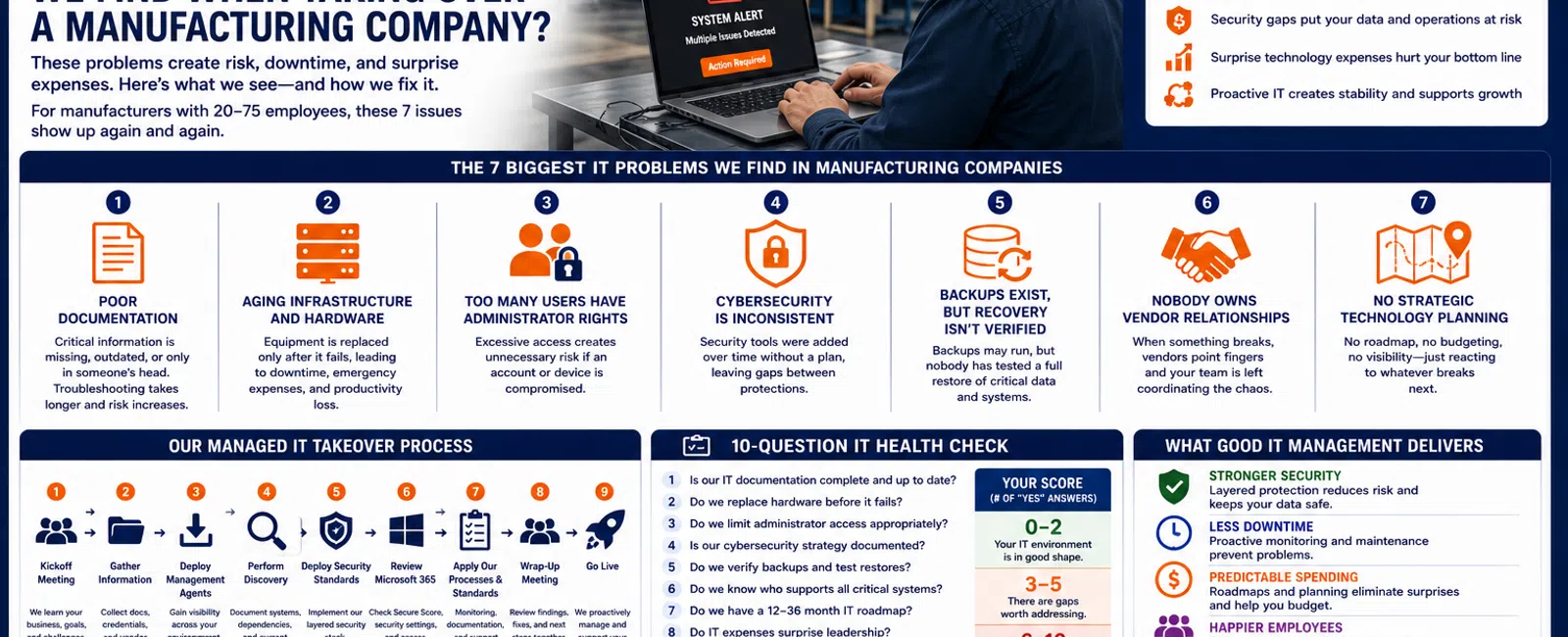
What Are the 7 Biggest IT Problems We Find When Taking Over a Manufacturing Company?
When we evaluate or take over IT for a manufacturing company, the problems usually aren't limited to broken computers.
For manufacturers with 20 to 75 employees, seven issues appear repeatedly: poor documentation, aging infrastructure, excessive administrator access, inconsistent cybersecurity, unverified backups, unmanaged vendor dependencies, and little or no strategic technology planning.
Individually, these problems may seem manageable.
Together, they create an environment where IT becomes reactive, security risk increases, employees lose productive time, and leadership gets surprised by technology expenses.
For manufacturers throughout the Greater Sacramento region and Northern Nevada, here's what these problems look like—and what we believe should happen instead.
Problem #1: Nobody Has Complete IT Documentation
This is one of the first things we look for during a transition.
Where is the documentation?
Sometimes there's a spreadsheet.
Sometimes there are a few old network diagrams.
Sometimes the previous IT provider has information scattered across different systems.
And sometimes almost nothing exists.
That's a problem.
A manufacturing company should have current documentation covering important areas such as:
- Network equipment
- Servers
- Firewalls
- Internet connections
- Microsoft 365
- Workstations
- Backup systems
- Business applications
- Vendors
- Administrative access
- Specialized technology dependencies
Why Poor Documentation Matters
Imagine a production-related application stops communicating with a server.
The technician needs to determine:
- Where the server is
- What network it's connected to
- Which vendor supports the application
- What changed
- How the system communicates
- Who has credentials
Without documentation, troubleshooting starts with discovery.
That wastes time.
Good documentation doesn't eliminate problems.
It makes problems easier to solve.
What Better IT Looks Like
Documentation should be created during onboarding and maintained as the environment changes.
The goal is straightforward:
Your IT environment should not exist only inside someone's head.
Problem #2: Hardware Is Replaced Only After It Fails
Manufacturing companies often keep technology running for a long time.
That's understandable.
If a computer, server, firewall, or switch still works, replacing it can feel unnecessary.
The problem is when:
"It's still working"
becomes the entire hardware lifecycle strategy.
Servers age.
Workstations age.
Firewalls age.
Switches age.
Storage fills.
Warranties expire.
Eventually something fails.
Why This Matters
An unexpected workstation failure affects one employee.
An unexpected server, firewall, or network failure can affect many employees—or potentially disrupt business operations.
Most aging equipment isn't actually a surprise.
The organization simply wasn't planning for its replacement.
What Better IT Looks Like
Your MSP should maintain an asset inventory that identifies:
- Equipment
- Age
- Warranty status
- Business purpose
- Expected replacement period
- Estimated future investment
Then leadership can see upcoming replacements 12-36 months ahead.
Replacing equipment according to a plan is a business expense.
Replacing equipment during an outage is an emergency.
Problem #3: Too Many Employees Have Administrator Rights
This is one of the most common security issues we encounter across businesses.
Employees have administrator access because:
"That's how it's always been."
Or:
"They need to install software."
Or nobody remembers why they were given access in the first place.
In manufacturing environments, this can become especially complicated when specialized applications or vendor-supported systems are involved.
Why Administrator Rights Matter
If an employee's account or computer becomes compromised, unnecessary administrative access can give malicious software or an attacker greater ability to make changes.
Good security follows the principle of least privilege:
Employees should have the access required to perform their jobs—and no more.
What Better IT Looks Like
Administrative access should be:
- Limited
- Documented
- Reviewed
- Removed when unnecessary
This applies to both local computers and cloud platforms such as Microsoft 365.
Convenience shouldn't quietly become your cybersecurity policy.
Problem #4: Cybersecurity Grew One Product at a Time
Another pattern we see is security that evolved without an overall strategy.
The company bought antivirus.
Later someone added email filtering.
Microsoft 365 was implemented.
A backup product was purchased.
Maybe another security tool was added after an insurance questionnaire.
Individually, those products may be perfectly good.
But nobody designed how everything should work together.
What Better IT Looks Like
Cybersecurity should be layered and standardized.
At Integral Networks, our managed security approach includes technologies and services such as:
- Microsoft 365 Business Premium
- Deep Instinct endpoint protection
- Avanan email security
- Blokworx managed security services
- Managed patching
- Microsoft 365 security configuration
- Ongoing monitoring
We require Microsoft 365 Business Premium for managed clients because it gives us important security and management capabilities.
The objective isn't collecting security products.
It's building a security system.
Problem #5: Backups Exist, but Nobody Has Verified Recovery
This is one of the most dangerous assumptions in IT:
"The backup says successful, so we're protected."
A successful backup job is good.
But the real objective is recovery.
Manufacturers need to understand:
- What is being backed up
- How often
- Where backups are stored
- Whether jobs are monitored
- Which systems are most critical
- How recovery would work
Why Recovery Matters
Backups aren't only for ransomware.
They may be needed because of:
- Hardware failure
- Accidental deletion
- Data corruption
- Software failure
- Cyber incidents
- Human error
If critical data disappears tomorrow, leadership shouldn't be learning about the recovery process for the first time.
What Better IT Looks Like
Backups should be monitored.
Recovery expectations should be understood.
And critical restore processes should be verified.
The correct question isn't:
"Do we have backups?"
It's:
"Are we confident we can recover?"
Problem #6: Nobody Owns the Vendor Relationships
Manufacturers often depend on specialized vendors.
You may have separate companies supporting:
- Production software
- Equipment
- ERP or accounting systems
- Internet connectivity
- Phones
- Microsoft licensing
- Printers
- Security systems
- Industry-specific applications
Everything works until something breaks across the boundary between two systems.
Then the finger-pointing begins.
The equipment vendor says it's the network.
The software vendor says it's the server.
The internet provider says their connection is fine.
Meanwhile, employees are waiting.
What Better IT Looks Like
Your MSP shouldn't pretend to be an expert on every proprietary manufacturing system.
But it should help own the technology problem.
That means:
- Understand the environment.
- Know the vendors.
- Maintain contact information.
- Help identify where the problem exists.
- Coordinate with the appropriate vendor.
- Stay involved until there's a path toward resolution.
Your employees shouldn't become the project managers for technical vendors.
Problem #7: There's No Technology Roadmap
This may be the biggest difference between reactive IT and mature managed IT.
Ask leadership:
What are our three biggest technology investments over the next 24 months?
Many businesses can't answer.
Instead, the technology strategy is:
Wait until something becomes urgent.
Then spend money.
That creates unnecessary surprises.
What Better IT Looks Like
Your technology roadmap should identify areas such as:
- Hardware replacements
- Infrastructure upgrades
- Security improvements
- Microsoft 365 changes
- Software projects
- Office expansions
- Business growth
- Vendor changes
- Budget requirements
At Integral Networks, this planning is supported through:
- Quarterly Business Reviews
- Asset lifecycle management
- Technology budgeting
- Vendor management
- Technology roadmaps
- vCIO guidance
The goal isn't predicting everything perfectly.
It's eliminating as many surprises as possible.
The Manufacturing IT Maturity Framework
These seven problems can be simplified into a five-part framework.
1. DOCUMENT
Know what you have and how it works.
2. STANDARDIZE
Create consistent technology and security standards.
3. PROTECT
Implement layered cybersecurity, backups, and access controls.
4. MONITOR
Watch systems, devices, backups, and security continuously.
5. PLAN
Build a 12-36 month technology roadmap.
When these five areas are working together, IT becomes significantly more predictable.
What Happens During an Integral Networks Takeover?
One of the most common questions prospects ask is:
"What does switching IT providers actually look like?"
Our process follows a structured sequence.
Step 1: Kickoff Meeting
We start face-to-face whenever practical.
Before changing technology, we want to understand the business.
We gather information about:
- Employees
- Locations
- Applications
- Vendors
- Current problems
- Business priorities
- Upcoming projects
Step 2: Gather Information
We collect existing:
- Documentation
- Credentials
- Vendor information
- Microsoft 365 information
- Network details
- Application information
If information is missing, discovery helps us rebuild it.
Step 3: Deploy Management Agents
We deploy our tools so we can begin gaining visibility into the environment.
That helps us understand:
- Devices
- Systems
- Patch status
- Hardware
- Configuration
- Overall health
Step 4: Perform Discovery
We document the environment and identify problems requiring attention.
The goal isn't simply taking over what already exists.
It's understanding what we've inherited.
Step 5: Deploy Security Standards
We bring the environment into our managed security model.
That may include:
- Deep Instinct
- Avanan
- Blokworx managed security
- Patch management
- Microsoft 365 security
- Other standardized controls
Step 6: Review Microsoft 365
We review the Microsoft 365 tenant, including Secure Score, administrative access, security configuration, and other appropriate recommendations.
Then we remediate issues based on the client's environment.
Step 7: Apply Our Processes and Standards
Monitoring, documentation, support processes, asset management, and ongoing management are brought into our standard operating model.
Step 8: Wrap-Up Meeting
Once onboarding work is complete, we meet again to review:
- What we found
- What we corrected
- Remaining recommendations
- Future projects
- Support procedures
- Next steps
Step 9: Go Live
The organization transitions into normal proactive managed services.
This structure helps reduce the risk that changing providers becomes a chaotic technology event.
A 10-Question Manufacturing IT Health Check
Give yourself one point for every yes:
- Our IT documentation is incomplete or outdated.
- Hardware is generally replaced after failure.
- Too many employees have administrator rights.
- Our security tools don't follow a clear strategy.
- We're unsure when backups were last tested.
- Vendors frequently point fingers during problems.
- We don't have a 12-36 month technology roadmap.
- IT spending regularly surprises leadership.
- Employees complain about recurring technology problems.
- Leadership doesn't receive regular strategic IT planning.
0-2 Points
Your environment may be reasonably mature.
3-5 Points
There are meaningful areas that deserve attention.
6-10 Points
Your IT environment is probably operating more reactively than it should.
This isn't a formal technical assessment.
It's a practical way to identify whether the problems you're experiencing are isolated issues—or symptoms of a larger management problem.
What Does Poor IT Management Actually Cost?
Consider a 40-person manufacturing company.
Suppose a recurring technology issue affects 10 employees for 30 minutes twice per month.
That's:
10 employees × 0.5 hours × 2 incidents = 10 employee-hours per month.
Over a year:
120 employee-hours.
And that's one recurring problem.
It doesn't include major outages, management time, vendor coordination, delayed production, or emergency hardware purchases.
This is why proactive IT management has value beyond the number of support tickets.
The objective is to reduce the problems employees experience in the first place.
Managed IT for Manufacturers in the Greater Sacramento Region
Integral Networks supports manufacturers throughout the Greater Sacramento region, including Sacramento, Roseville, Rocklin, Folsom, Elk Grove, Woodland, Stockton, Modesto, and surrounding communities.
Our primary focus is businesses with 20 or more employees that depend on technology to keep employees productive and operations moving.
Sacramento, CA: (916) 626-4000
Managed IT for Manufacturers in Northern Nevada
Our second primary service area is Northern Nevada, including Reno, Sparks, Carson City, and surrounding communities.
Our regional approach combines remote management and support with onsite service when physical presence is required.
Reno, NV: (775) 446-4100
Final Thoughts
When we take over a manufacturing environment, the biggest problems usually aren't dramatic.
They're accumulated.
Documentation slowly became outdated.
Hardware replacements were postponed.
Administrator access expanded.
Security products were added without an overall strategy.
Backups weren't tested.
Vendor relationships became fragmented.
Planning disappeared behind daily support requests.
Eventually, the organization becomes dependent on an IT environment nobody is proactively managing.
That's what mature managed IT should change.
Use this five-part framework:
Document.
Standardize.
Protect.
Monitor.
Plan.
For a 20-75 employee manufacturer, getting those five things right can mean fewer surprises, stronger security, faster support, more predictable spending, and technology that supports operations instead of interrupting them.
Ready for a Second Opinion?
If several of these seven problems exist in your manufacturing environment, Integral Networks can review your current technology and help identify where improvements would have the greatest impact.
We provide flat-rate managed IT, cybersecurity, Microsoft 365 management, infrastructure management, asset lifecycle planning, vendor management, and strategic IT guidance for growing manufacturers throughout the Greater Sacramento region and Northern Nevada.
Related Articles
How Much Does Managed IT Cost for a Manufacturing Company? 2026 Pricing Guide
What Are the Biggest Cybersecurity Risks for Small and Mid-Sized Manufacturers?
How Long Should It Take Your IT Provider to Respond to a Support Request?
How Do You Know When It's Time to Fire Your IT Provider?
How Much Should a 20-75 Employee Business Budget for IT Each Year?


