
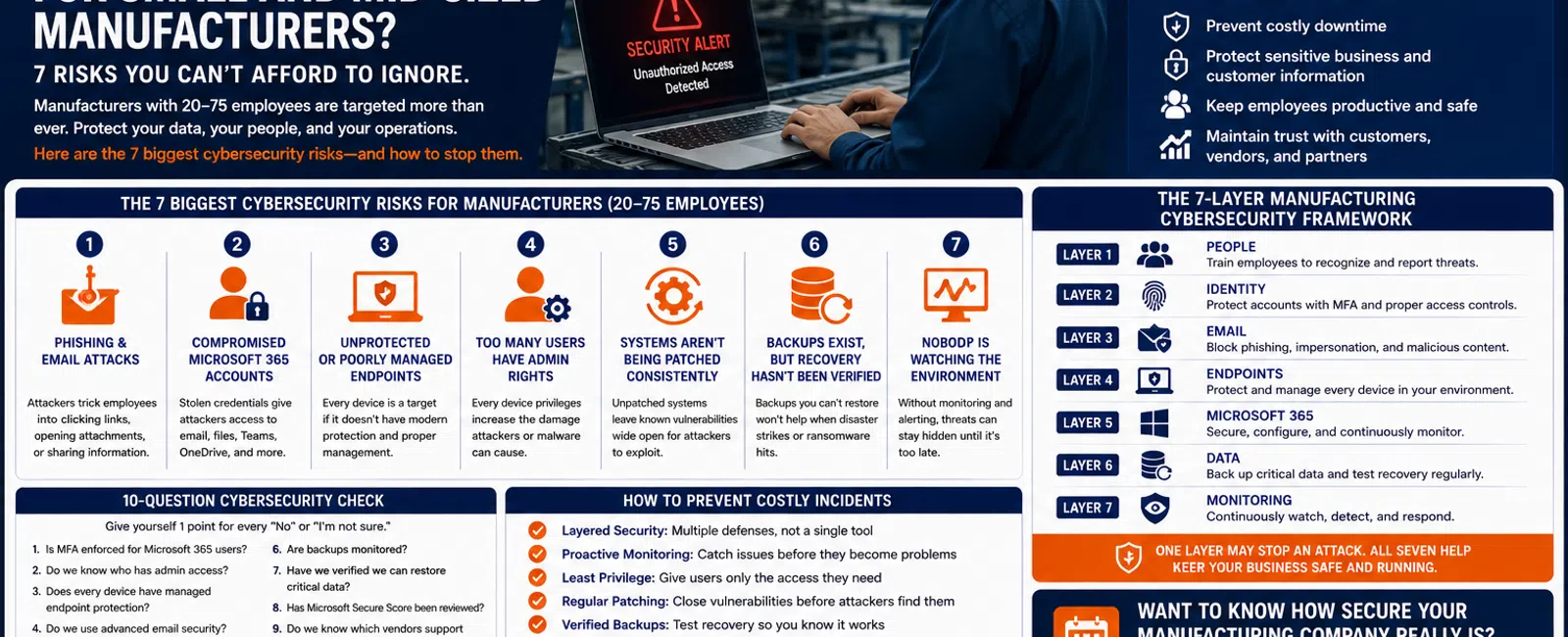
What Are the Biggest Cybersecurity Risks for Small and Mid-Sized Manufacturers?
For manufacturers with 20 to 75 employees, seven cybersecurity risks deserve particular attention: phishing and email attacks, compromised Microsoft 365 accounts, unprotected endpoints, excessive administrator access, unpatched systems, inadequate backup and recovery, and weak security monitoring.
Manufacturers don't need thousands of employees to be attractive targets.
Your business may possess valuable intellectual property, customer information, financial data, employee records, vendor communications, and credentials. More importantly, you depend on technology to keep people and operations moving.
That means a cybersecurity incident doesn't have to steal data to become expensive.
Sometimes simply preventing employees from working is enough to create a serious business problem.
For manufacturers throughout the Greater Sacramento region and Northern Nevada, cybersecurity should therefore focus on two objectives:
Protect the data. Protect the operation.
Here's a practical seven-risk framework for evaluating your environment.
Risk #1: Phishing and Email Attacks
Email remains one of the easiest ways to attack a business because attackers can target employees instead of trying to directly defeat technical security controls.
A convincing email may appear to come from:
- An executive
- A customer
- A supplier
- Microsoft
- A shipping company
- A financial institution
- Another employee
The objective might be to convince someone to:
- Enter Microsoft 365 credentials
- Open a malicious attachment
- Change payment information
- Send sensitive information
- Approve a fraudulent transaction
Manufacturing companies can be particularly vulnerable to vendor impersonation because employees regularly communicate with suppliers, customers, logistics providers, and other outside organizations.
What Better Protection Looks Like
Email protection should include multiple layers.
At Integral Networks, our managed security stack includes Avanan email security, which provides an additional layer designed to identify phishing, impersonation, malware, and other email threats.
But technology isn't enough.
Employees also need to recognize when something doesn't look right.
The goal isn't turning your staff into cybersecurity professionals.
It's creating a simple habit:
When something looks unusual, stop and ask.
Risk #2: Compromised Microsoft 365 Accounts
Microsoft 365 has become central to how many manufacturers operate.
It may contain:
- Contacts
- Calendars
- Teams conversations
- SharePoint files
- OneDrive data
- Employee identities
- Business documents
That makes a compromised Microsoft 365 account extremely useful to an attacker.
Imagine an attacker gaining access to an employee's mailbox.
They may be able to see conversations with customers and vendors.
They may learn how invoices are handled.
They may impersonate the employee.
They may send convincing messages from a legitimate company account.
What Better Protection Looks Like
Integral Networks requires Microsoft 365 Business Premium for managed clients because it gives us access to important security and management capabilities.
A properly managed Microsoft 365 environment should include areas such as:
- Multi-Factor Authentication
- Identity protection
- Administrative controls
- Secure Score review
- User lifecycle management
- Security policies
- Device management where appropriate
- Ongoing monitoring
During onboarding, we review Microsoft Secure Score and remediate appropriate recommendations based on the client's environment.
Microsoft 365 shouldn't simply be licensed.
It should be managed.
Risk #3: Unprotected or Poorly Managed Endpoints
Every computer connected to your environment represents another potential attack surface.
Manufacturing environments may include:
- Office desktops
- Laptops
- Shared computers
- Warehouse workstations
- Production-related computers
- Remote devices
Traditional antivirus alone is no longer an adequate security strategy.
Endpoints need active protection and management.
At Integral Networks, we use Deep Instinct endpoint protection as part of our standardized security approach.
But the software itself is only one piece.
Someone needs to verify that:
- Protection is installed.
- Devices are checking in.
- Security alerts are reviewed.
- New devices are added.
- Old devices are removed.
- Systems remain patched.
A security product that was installed three years ago and forgotten isn't a security program.
Risk #4: Too Many Users Have Administrator Rights
This is one of the recurring problems we discover when evaluating new environments.
Employees have local administrator rights because:
"They've always had them."
Or:
"They need them to install software."
Convenience gradually becomes the security policy.
The problem is that administrative privileges can give malicious software—or an attacker using the employee's account—significantly more control.
What Better Protection Looks Like
Employees should generally receive the access required to perform their jobs.
Nothing more.
Administrative privileges should be:
- Limited
- Documented
- Reviewed
- Removed when unnecessary
- Separated from normal daily use where appropriate
The same principle applies to Microsoft 365.
Not everyone needs administrative access.
The fewer unnecessary privileged accounts you maintain, the smaller your potential attack surface.
Risk #5: Systems Aren't Being Patched Consistently
Software vulnerabilities are continually discovered.
Vendors release updates.
But those updates only help if they're actually installed.
Manufacturing companies can present an additional challenge because some systems may depend on specialized applications or vendor-supported equipment.
Leadership may hesitate to update something because they're concerned an update could affect production.
That's understandable.
But ignoring updates indefinitely creates risk.
What Better Protection Looks Like
Your IT provider should maintain a defined patch-management process for supported systems.
That includes:
- Workstations
- Servers
- Business applications
- Third-party applications
- Network infrastructure where appropriate
Specialized manufacturing systems may require coordination with the equipment or software vendor before changes are made.
That's exactly why documentation and vendor management matter.
The goal isn't:
"Patch everything immediately without thinking."
It's:
"Know what's vulnerable, understand the operational impact, and manage updates deliberately."
Risk #6: Backups Exist, but Recovery Hasn't Been Verified
Ask almost any business:
"Do you have backups?"
Most will say yes.
Ask:
"When did you last verify you could restore critical data?"
The answer is often less certain.
Cybersecurity isn't only about preventing an attack.
It's also about recovering when prevention fails.
Manufacturers should understand:
- What is being backed up
- How frequently
- Where backups are stored
- Whether backup jobs are monitored
- What systems are most critical
- How recovery would work
- How long recovery could take
Backups also protect against problems that have nothing to do with cybercrime.
Hardware fails.
Files get deleted.
Software breaks.
People make mistakes.
The question isn't whether something unexpected will eventually happen.
It's whether you can recover when it does.
Risk #7: Nobody Is Watching the Environment
This is the risk that connects all the others.
Security tools generate information.
Microsoft generates alerts.
Endpoints generate alerts.
Email security generates alerts.
Systems change.
Accounts change.
Devices appear.
Devices disappear.
Someone needs to be watching.
Integral Networks uses Blokworx managed security services as part of our layered security approach.
Combined with Microsoft 365 Business Premium, Deep Instinct, Avanan, patch management, and ongoing IT management, this provides multiple security layers rather than depending on a single product.
No individual tool catches everything.
That's why monitoring and layered security matter.
The 7-Layer Manufacturing Cybersecurity Framework
Rather than thinking about cybersecurity as a collection of products, use this framework.
Layer 1: PEOPLE
Teach employees how to recognize suspicious activity.
Layer 2: IDENTITY
Protect accounts with MFA and appropriate access controls.
Layer 3: EMAIL
Filter phishing, impersonation, malicious attachments, and other email threats.
Layer 4: ENDPOINTS
Protect and manage computers throughout the organization.
Layer 5: MICROSOFT 365
Actively configure, monitor, and manage the cloud environment.
Layer 6: DATA
Maintain monitored backups and a realistic recovery strategy.
Layer 7: MONITORING
Continuously watch the environment for problems requiring investigation.
If one layer fails, another may still prevent the incident from becoming a major business problem.
That's the purpose of layered security.
What About Production Equipment and Operational Technology?
This is an important distinction for manufacturers.
Your MSP may not be the company maintaining the software or controls inside every production machine.
Equipment manufacturers and specialized vendors often need to remain responsible for their proprietary systems.
But that doesn't mean those systems should be ignored.
If specialized equipment connects to your business network, your IT provider should understand:
- What is connected
- Why it's connected
- Who supports it
- What it communicates with
- What dependencies exist
- Who to contact when something goes wrong
The MSP and equipment vendor may need to work together.
Your employees shouldn't be responsible for figuring out where one vendor's responsibility ends and another begins during an incident.
Why Documentation Matters for Cybersecurity
Good documentation isn't simply an IT convenience.
It's part of security.
Your organization should know:
- Which devices exist
- Who uses them
- Which servers exist
- Which vendors support critical systems
- Who has administrative access
- Which security tools are deployed
- What gets backed up
- Which systems are critical
- How to contact important vendors
Without documentation, responding to an incident becomes slower and more chaotic.
During an actual cybersecurity event, that's the worst possible time to start figuring out how the environment works.
A 10-Question Manufacturing Cybersecurity Check
Ask leadership these ten questions:
- Is MFA enforced for Microsoft 365 users?
- Do we know who has administrator access?
- Does every supported workstation have managed endpoint protection?
- Do we use advanced email security?
- Are operating systems and applications patched consistently?
- Are backups monitored?
- Have we verified that critical data can be restored?
- Has Microsoft Secure Score been reviewed?
- Do we know which vendors support production-related technology?
- Is someone actively monitoring security alerts?
Give yourself one point for every "No" or "I'm not sure."
0-2 Points
You appear to have many of the foundational controls in place.
3-5 Points
There are meaningful security gaps worth reviewing.
6-10 Points
Your environment deserves a comprehensive security assessment.
This isn't a formal cybersecurity audit.
It's a simple way to identify questions leadership should be able to answer.
Cybersecurity Shouldn't Stop Production
Manufacturers face a challenge other businesses don't always experience.
Security controls can't be implemented without considering operational requirements.
A policy that makes perfect sense for an office workstation might create problems for a computer supporting specialized equipment.
That doesn't mean the equipment shouldn't be secured.
It means security decisions need to consider both:
Risk
and
Operations.
A good security strategy protects the business without unnecessarily preventing employees or equipment from doing their jobs.
What Does a Security Incident Cost?
Consider a hypothetical manufacturer where a cybersecurity incident prevents 20 employees from working normally for four hours.
That's:
80 employee-hours of lost productivity.
And that calculation doesn't include:
- Production delays
- Overtime
- Missed shipments
- Lost revenue
- Recovery expenses
- Vendor costs
- Customer impact
Cybersecurity investments aren't valuable simply because they reduce the probability of a breach.
They're valuable because they help protect the company's ability to operate.
Cybersecurity for Manufacturers in the Greater Sacramento Region
Integral Networks supports growing manufacturers throughout the Greater Sacramento region, including Sacramento, Roseville, Rocklin, Folsom, Elk Grove, Woodland, Stockton, Modesto, and surrounding communities.
Our primary managed IT focus is businesses with 20 or more employees that depend heavily on technology for daily operations.
For Sacramento-area organizations:
Integral Networks — Sacramento, CA
(916) 626-4000
Cybersecurity for Manufacturers in Northern Nevada
Our second primary service area is Northern Nevada, including Reno, Sparks, Carson City, and surrounding communities.
Manufacturers in Northern Nevada need cybersecurity that protects both their information and their ability to operate.
For Northern Nevada organizations:
Integral Networks — Reno, NV
(775) 446-4100
Final Thoughts
The biggest cybersecurity risk for a manufacturer isn't any single product or attack.
It's having gaps between your defenses that nobody is managing.
That's why we recommend thinking in seven layers:
People.
Identity.
Email.
Endpoints.
Microsoft 365.
Data.
Monitoring.
For manufacturers with 20-75 employees, those layers provide a practical foundation for reducing cyber risk without trying to turn the company into a cybersecurity organization.
Your employees should manufacture products.
Your leadership should run the business.
Your technology and security partners should make sure the systems supporting them are protected, monitored, documented, and ready to recover.
Ready for a Second Opinion?
If you're not sure how well your manufacturing environment is protected, Integral Networks can review your current technology and identify areas where risk could be reduced.
We provide managed IT, cybersecurity, Microsoft 365 management, infrastructure management, and strategic technology planning for growing manufacturers throughout the Greater Sacramento region and Northern Nevada.
Related Articles
How Much Does Managed IT Cost for a Manufacturing Company? 2026 Pricing Guide
What Does Good Cybersecurity Look Like for a 20-75 Employee Business?
How Secure Should Microsoft 365 Be for a 20-75 Employee Business?
How Much Should a 20-75 Employee Business Budget for IT Each Year?
How Long Should It Take Your IT Provider to Respond to a Support Request?


