
How Much Does Managed IT Cost for a Manufacturing Company? 2026 Pricing Guide
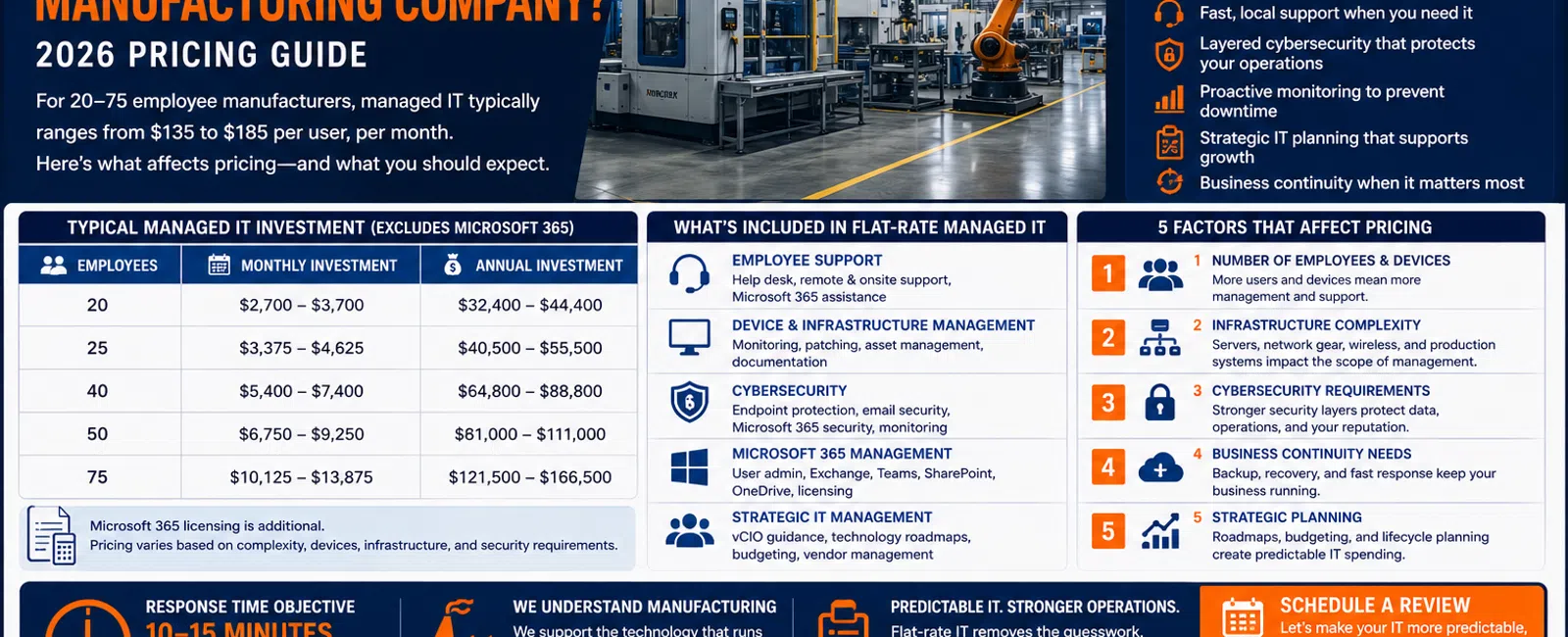
For a manufacturing company with 20 to 75 employees, fully managed IT services typically start around $135 to $185 per user, per month with Integral Networks, excluding Microsoft 365 licensing.
At that range, a 25-person manufacturer could expect approximately $3,375 to $4,625 per month, while a 50-person company could expect approximately $6,750 to $9,250 per month for managed IT.
But manufacturing IT shouldn't be evaluated on price alone.
When your employees depend on computers, Microsoft 365, production-related applications, network connectivity, vendors, and shared business systems to keep operations moving, unreliable technology can quickly become an operational problem.
For manufacturers throughout the Greater Sacramento region and Northern Nevada, we recommend evaluating managed IT using five factors:
Support. Security. Infrastructure. Planning. Business continuity.
Here's what that means—and what you should expect for your investment.
What Does Managed IT Cost at Different Company Sizes?
Using our typical $135-$185 per-user monthly range, here's a practical starting point for budgeting:
| Employees | Approximate Monthly Cost | Approximate Annual Cost |
|---|---|---|
| 20 | $2,700-$3,700 | $32,400-$44,400 |
| 25 | $3,375-$4,625 | $40,500-$55,500 |
| 40 | $5,400-$7,400 | $64,800-$88,800 |
| 50 | $6,750-$9,250 | $81,000-$111,000 |
| 75 | $10,125-$13,875 | $121,500-$166,500 |
Microsoft 365 licensing is additional.
These numbers aren't intended as a quote for every manufacturing company.
They're a useful budgeting range for a 20-75 employee organization evaluating professional managed IT services.
Smaller manufacturers may also be a fit when they have significant technology, cybersecurity, or operational requirements.
Why Manufacturing IT Is Different
Manufacturing companies frequently have two technology environments operating under the same roof.
There's the traditional business environment:
- Microsoft 365
- Accounting
- Workstations
- Servers
- File storage
- Business applications
- Printers
- Network infrastructure
Then there's the technology supporting operations.
Depending on the manufacturer, that may include specialized software, production systems, warehouse technology, vendor-supported equipment, or computers connected to manufacturing processes.
That creates an important distinction.
Your MSP may not maintain or repair every piece of specialized manufacturing equipment.
But somebody needs to understand the dependencies between your business network and the vendors supporting those systems.
When something stops working, your employees shouldn't have to figure out which technology company to call.
The 5 Factors That Affect Managed IT Pricing for Manufacturers
1. Number of Employees and Devices
Employee count is an obvious starting point.
Every user may require:
- Technical support
- Microsoft 365 management
- Security
- Account administration
- Device management
- Application support
But manufacturers sometimes have more devices than traditional professional-services businesses.
You may have:
- Office workstations
- Laptops
- Shared computers
- Warehouse systems
- Production-floor computers
- Servers
- Network equipment
- Specialized devices
That's why a good IT assessment looks beyond the number of employees.
The provider needs to understand what actually exists in the environment.
2. Infrastructure Complexity
A 25-person manufacturer operating from one facility can have considerably more infrastructure than a 25-person professional-services company.
You may depend on:
- Multiple network switches
- Wireless infrastructure
- Servers
- File storage
- Internet connectivity
- Firewalls
- Vendor-connected systems
- Shared production resources
When network connectivity affects operations, infrastructure reliability becomes extremely important.
Your IT provider should know how the environment is configured, maintain documentation, monitor critical systems, and plan equipment replacements before failures create emergencies.
3. Cybersecurity Requirements
Manufacturers are technology-dependent businesses.
Your organization may possess:
- Financial information
- Employee information
- Customer information
- Intellectual property
- Product information
- Vendor communications
- Microsoft 365 accounts
- Operational data
Cybersecurity therefore needs to be built into the managed IT relationship.
Integral Networks uses a layered security approach that includes technologies and services such as:
- Microsoft 365 Business Premium
- Deep Instinct endpoint protection
- Avanan email security
- Blokworx managed security services
- Managed patching
- Microsoft 365 security configuration
- Ongoing monitoring
We require Microsoft 365 Business Premium for managed clients because it provides security and management capabilities that allow us to establish a stronger, more consistent baseline.
4. Business Continuity Requirements
Downtime means something different in manufacturing.
If an attorney loses access to email, that employee's productivity suffers.
If a technology failure affects a manufacturing process, the impact can potentially extend across multiple employees or business operations.
That makes several areas especially important:
- Reliable infrastructure
- Proactive monitoring
- Backup
- Recovery planning
- Vendor coordination
- Documentation
- Fast support
Not every outage can be prevented.
The goal is to reduce avoidable failures and have a plan when something does happen.
5. Strategic Planning and Asset Management
One of the biggest mistakes growing manufacturers make is treating technology as an expense that appears only when something breaks.
Servers age.
Workstations age.
Firewalls age.
Network switches age.
Software changes.
Microsoft changes.
Business requirements change.
Most of those events can be planned for.
A mature managed IT relationship should include:
- Asset management
- Hardware lifecycle planning
- Technology budgeting
- Vendor management
- Quarterly Business Reviews
- Technology roadmaps
- vCIO guidance
The objective is to make technology spending more predictable.
What's Included in Flat-Rate Managed IT?
At Integral Networks, our managed IT model is designed to cover the ongoing support and management of the client's technology environment for a predictable monthly fee.
That includes areas such as:
Employee Support
- Help desk
- Remote support
- Onsite support
- Microsoft 365 assistance
- Workstation troubleshooting
Whenever possible, a technician answers the phone live.
If someone isn't immediately available, our response objective is generally 10-15 minutes.
Device and Infrastructure Management
- Workstation monitoring
- Server monitoring
- Patch management
- Network monitoring
- Asset management
- Documentation
Cybersecurity
- Endpoint protection
- Email security
- Microsoft 365 security
- Managed security services
- Patching
- Monitoring
Microsoft 365 Management
- User administration
- Exchange Online
- Teams
- SharePoint
- OneDrive
- Licensing administration
- Security configuration
Strategic IT Management
- Technology budgeting
- Hardware lifecycle planning
- Quarterly Business Reviews
- Vendor management
- Technology roadmaps
- vCIO guidance
Microsoft 365 licensing and other third-party software licensing are separate.
Large standalone projects may also be scoped separately depending on the work involved.
Why Flat-Rate Support Matters in Manufacturing
Under an hourly support model, employees may hesitate before contacting IT.
They wonder:
"Is this worth paying someone to fix?"
That's the wrong incentive.
If an employee is having a legitimate technology problem, we want to know about it.
Small issues can also reveal larger problems.
A computer repeatedly disconnecting from the network may seem minor until several systems begin experiencing the same behavior.
Flat-rate managed IT removes much of that hesitation.
Employees call when they need help.
Leadership receives more predictable costs.
And the IT provider has an incentive to permanently solve recurring problems rather than repeatedly bill for them.
Example: A 25-Person Manufacturing Company
Consider a manufacturer with 25 employees.
At $135-$185 per user, the managed IT portion of the budget would be approximately:
$3,375-$4,625 per month
or:
$40,500-$55,500 per year
Microsoft 365 licensing would be additional.
The company should also budget separately for areas such as:
- Hardware replacements
- Major infrastructure projects
- Industry-specific software
- Specialized vendor systems
- Future technology initiatives
If six computers and a network switch need replacement next year, those expenses should already be visible on the technology roadmap.
That's strategic IT planning.
Example: A 50-Person Manufacturing Company
For a 50-person manufacturer, the same managed IT range becomes approximately:
$6,750-$9,250 per month
or:
$81,000-$111,000 per year
At that size, the business should expect significantly more than someone who fixes computers.
Leadership should have visibility into:
- Hardware lifecycle
- Cybersecurity
- Microsoft 365
- Backup health
- Network infrastructure
- Vendor relationships
- Technology projects
- Future IT spending
If you're investing $80,000 or more annually in managed IT and still don't know which technology expenses are coming next year, something is missing.
What Does IT Downtime Actually Cost a Manufacturer?
Consider a simple example.
Suppose a technology problem prevents 10 employees from working normally for two hours.
That's:
20 employee-hours of lost productivity.
And that's before accounting for possible production delays, overtime, missed shipments, vendor costs, or customer impact.
This is why the cheapest IT provider isn't automatically the lowest-cost option.
Response time, infrastructure reliability, proactive monitoring, documentation, and planning all have economic value.
Who Supports Specialized Manufacturing Systems?
This is an important question to ask prospective MSPs.
A managed IT provider shouldn't pretend to be an expert in every piece of manufacturing equipment or every specialized application.
Sometimes the equipment manufacturer or software vendor needs to provide support.
But your MSP should help coordinate the technology around it.
For example:
A production application stops communicating.
The software vendor says it's a network problem.
The network appears healthy.
The equipment vendor says their system is working.
Your employees shouldn't have to spend half the day coordinating three vendors.
A mature MSP should help own the technology problem, work with the appropriate vendors, and move the issue toward resolution.
What Should You Ask a Managed IT Provider?
Before choosing an MSP for a manufacturing company, ask:
- What's included in the monthly price?
- Is onsite support included?
- How quickly do you respond when employees need help?
- How do you monitor our network and servers?
- How do you secure Microsoft 365?
- What endpoint and email security do you provide?
- How do you monitor backups?
- How do you document our environment?
- How do you work with our equipment and software vendors?
- How do you manage hardware lifecycles?
- Will you help build our annual technology budget?
- What happens during onboarding?
The answers tell you much more than the per-user price.
A Simple Manufacturing IT Health Check
Give yourself one point for every statement that's true:
- Employees regularly complain about slow IT support.
- We don't have current network documentation.
- We're unsure whether Microsoft 365 is properly secured.
- We don't know when backups were last tested.
- Hardware gets replaced primarily after it fails.
- Nobody maintains a 12-36 month technology roadmap.
- Vendors regularly point fingers when something breaks.
- Technology expenses regularly surprise leadership.
- We don't know exactly who has administrator access.
- Recurring IT problems repeatedly affect operations.
0-2 Points
Your environment may be reasonably well managed.
3-5 Points
There are meaningful opportunities for improvement.
6-10 Points
Your technology environment probably deserves a more comprehensive review.
This isn't a scientific assessment.
It's a framework for identifying where reactive IT may be creating unnecessary business risk.
Managed IT for Manufacturers in the Greater Sacramento Region
Integral Networks supports growing manufacturing companies throughout the Greater Sacramento region, including:
- Sacramento
- Roseville
- Rocklin
- Folsom
- Elk Grove
- Woodland
- Stockton
- Modesto
- Surrounding communities
Our primary focus is organizations with 20 or more employees that depend on technology to keep employees productive and operations moving.
Smaller organizations may also be a fit when their technology environment or security requirements justify a managed approach.
Managed IT for Manufacturers in Northern Nevada
Our second primary service area is Northern Nevada, including:
- Reno
- Sparks
- Carson City
- Surrounding communities
Manufacturers in Northern Nevada need the same combination of remote monitoring, responsive technical support, cybersecurity, strategic planning, and local onsite capabilities.
Our goal is to make technology more predictable so leadership can spend less time reacting to IT problems and more time operating the business.
Final Thoughts
For manufacturers with 20-75 employees, $135-$185 per user per month is a practical starting range for budgeting managed IT services with Integral Networks.
But don't choose an MSP based solely on the monthly number.
Evaluate five things:
1. Support
Can employees get help quickly?
2. Security
Is the business protected with multiple managed security layers?
3. Infrastructure
Is someone actively monitoring and maintaining the technology operations depend on?
4. Planning
Does leadership know what's coming over the next 12-36 months?
5. Business Continuity
Is there a plan to keep the company operating when technology fails?
That's what you're really buying with managed IT.
Not computer repair.
Predictability.
Ready for a Second Opinion?
If your manufacturing company is evaluating managed IT—or you're questioning whether you're receiving enough value from your current provider—Integral Networks can review your environment and explain what we'd recommend.
We provide flat-rate managed IT, cybersecurity, Microsoft 365 management, infrastructure management, and strategic technology planning for growing manufacturers throughout the Greater Sacramento region and Northern Nevada.
Related Articles
How Much Should a 20-75 Employee Business Budget for IT Each Year?
What Does Good Cybersecurity Look Like for a 20-75 Employee Business?
How Long Should It Take Your IT Provider to Respond to a Support Request?
How Do You Know When It's Time to Fire Your IT Provider?
What's Included in Flat-Rate Managed IT Services? Everything Your Business Should Expect


