
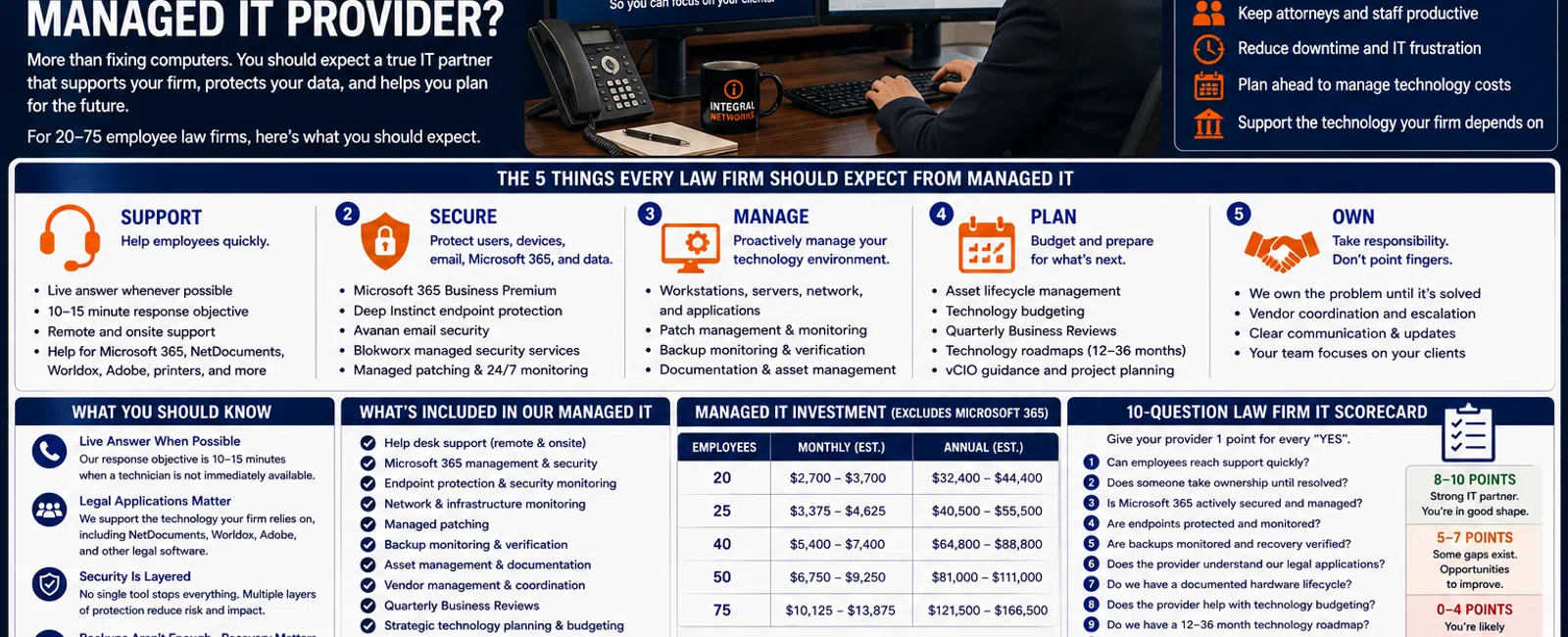
What Should a Law Firm Expect From Its Managed IT Provider?
A law firm with 20 to 75 employees should expect much more from its Managed Service Provider than someone who fixes computers when they break.
At a minimum, your MSP should provide responsive support, proactive technology management, layered cybersecurity, Microsoft 365 management, reliable backup oversight, legal application support, asset management, technology budgeting, and long-term strategic planning.
Employees should also know what happens when they need help.
At Integral Networks, whenever possible, a technician answers the phone live. If someone isn't immediately available, our response objective is generally 10-15 minutes.
For law firms throughout the Greater Sacramento region and Northern Nevada, here's a practical framework for determining whether you're actually receiving the level of managed IT service you're paying for.
The 5 Things Every Law Firm Should Expect From Managed IT
A mature managed IT relationship can be evaluated using five categories:
1. SUPPORT — Help employees quickly.
2. SECURE — Protect users, email, devices, Microsoft 365, and data.
3. MANAGE — Proactively maintain the technology environment.
4. PLAN — Budget and prepare for what's coming next.
5. OWN — Take responsibility instead of pointing fingers.
Let's break those down.
1. SUPPORT: Employees Should Be Able to Get Help Quickly
Attorneys and staff shouldn't spend their day troubleshooting technology.
When something stops working, employees need a simple way to get help.
That might involve:
- Outlook
- Microsoft 365
- NetDocuments
- Worldox
- Adobe
- Printers
- Workstations
- Remote access
- File access
- Other legal applications
Not every problem can be solved immediately.
But employees should know someone is working on it.
Response Time vs. Resolution Time
These aren't the same thing.
Response time measures how quickly the MSP engages and takes ownership.
Resolution time measures how long it takes to actually solve the issue.
A complicated application problem may require escalation or coordination with another vendor.
That's understandable.
Waiting hours just to find out whether anyone saw the request shouldn't be normal.
What We Aim For
At Integral Networks, whenever possible:
A technician answers the phone live.
When that's not possible:
Our general response objective is 10-15 minutes.
The objective is to get the employee connected with someone who can begin moving the issue toward resolution.
2. SECURE: Cybersecurity Should Be Built Into Managed IT
Law firms possess information attackers may find valuable.
That can include:
- Confidential client information
- Legal documents
- Financial information
- Employee information
- Credentials
- Contracts
- Case information
Cybersecurity therefore shouldn't be treated as an optional add-on after the managed IT agreement is signed.
It should be part of the environment from the beginning.
A Layered Security Approach
At Integral Networks, our managed security model includes technologies and services such as:
- Microsoft 365 Business Premium
- Deep Instinct endpoint protection
- Avanan email security
- Blokworx managed security services
- Managed patching
- Microsoft 365 security configuration
- Ongoing monitoring
The objective isn't to depend on one security product.
It's to create multiple layers.
If one control fails, another may still stop the attack or reduce its impact.
3. MANAGE: Microsoft 365 Should Be Actively Managed
Many law firms use Microsoft 365 every day.
But there's an important difference between:
Using Microsoft 365
and:
Managing Microsoft 365.
A managed Microsoft environment should address areas such as:
- Multi-Factor Authentication
- User accounts
- Administrative access
- Exchange Online
- Teams
- SharePoint
- OneDrive
- Device management where appropriate
- Security policies
- Microsoft Secure Score
Integral Networks requires Microsoft 365 Business Premium for managed clients because it gives us access to important security and management functionality.
During onboarding, we review Microsoft Secure Score and remediate appropriate recommendations based on the client's environment.
The goal isn't chasing a perfect score.
It's using the tools available to establish a stronger security baseline.
4. MANAGE: Your Computers and Infrastructure Shouldn't Be Invisible
Your MSP should know what technology exists in your environment.
That includes:
- Workstations
- Laptops
- Servers
- Firewalls
- Switches
- Wireless infrastructure
- Backup systems
- Microsoft 365
- Business applications
For every important asset, the provider should understand things such as:
- Who uses it
- What it does
- How old it is
- Whether it's being monitored
- Whether it's patched
- When it should be replaced
You shouldn't discover that 12 computers need replacement because employees suddenly start complaining about them.
Those systems should already appear on the technology roadmap.
5. MANAGE: Backups Need More Than a Green Checkmark
Law firms understandably care about backups.
But:
"The backup ran successfully."
isn't the same as:
"We're confident we can recover."
Your MSP should understand:
- What is being backed up
- How often
- Whether backup jobs are monitored
- Where data is stored
- What systems are most critical
- How restoration would work
The real question isn't:
"Do we have backups?"
It's:
"What happens if we need them tomorrow?"
6. SUPPORT: Your MSP Should Understand Legal Applications
Your IT provider doesn't need to replace the support organization behind every legal application.
But they should understand the technology your firm depends on.
For many law firms, that includes applications such as:
- NetDocuments
- Worldox
- Microsoft 365
- Adobe Acrobat
- Other practice-specific legal software
When an application stops working, your employee shouldn't be told:
"That's not our software. Call the vendor."
A better response is:
"We'll help determine what's happening and work with the vendor if necessary."
That's a significant difference.
7. OWN: Vendor Management Should Be Part of the Relationship
Law firms may depend on several technology vendors.
For example:
- Internet provider
- Phone provider
- Document management vendor
- Practice-management software
- Copier company
- Microsoft
- Security vendors
- Cloud providers
When something fails, those vendors sometimes point at one another.
The internet provider says it's the firewall.
The software company says it's the network.
The network looks healthy.
Meanwhile, the employee still can't work.
Your MSP should help coordinate those conversations.
Employees shouldn't have to become technology project managers just to get an issue resolved.
8. PLAN: You Should Have a Hardware Lifecycle
Computers shouldn't be replaced only after they fail.
Your MSP should maintain an asset inventory and help leadership understand:
- Which computers are aging
- Which systems are under warranty
- Which devices need replacement
- Which servers or network equipment are approaching end of life
- What future hardware spending looks like
For a 20-75 employee law firm, this can make a major difference in budgeting.
Imagine needing to replace 15 computers.
If nobody knew it was coming, that's an unpleasant surprise.
If those systems have been on the roadmap for 18 months, it's simply a planned business investment.
9. PLAN: Your MSP Should Help Build the IT Budget
Technology spending shouldn't consist of:
Last year's IT expenses + whatever breaks this year.
Leadership should understand upcoming investments.
A mature IT budget should account for areas such as:
- Managed IT
- Microsoft 365
- Legal software
- Hardware lifecycle
- Cybersecurity
- Major projects
- Business growth
At Integral Networks, managed IT typically starts around $135-$185 per user per month, excluding Microsoft 365 licensing.
For a 25-person firm, that translates to approximately:
$3,375-$4,625 per month
or:
$40,500-$55,500 per year
For a 50-person firm:
$6,750-$9,250 per month
or:
$81,000-$111,000 per year
That managed IT investment should come with planning—not just technical support.
10. PLAN: Leadership Should Know What's Coming 12-36 Months Ahead
One of the clearest signs of a mature MSP relationship is that technology conversations aren't limited to current problems.
Your provider should be asking:
- Is the firm growing?
- Are you hiring?
- Are you opening another office?
- Are attorneys working differently?
- Are applications changing?
- Which hardware needs replacement?
- Are there security improvements we should prioritize?
- What should leadership budget next year?
At Integral Networks, strategic management includes:
- Quarterly Business Reviews
- Asset lifecycle planning
- Technology budgeting
- Vendor management
- Technology roadmaps
- vCIO guidance
We can't predict everything that will happen over the next three years.
But we can make sure leadership isn't operating without a plan.
OWN: Someone Should Be Accountable for the Technology
This may be the most important expectation of all.
A Managed Service Provider should create ownership.
When something goes wrong, your employee shouldn't have to figure out:
Is this Microsoft?
Is this NetDocuments?
Is this our internet provider?
Is this our firewall?
Is this our computer?
That's the MSP's job to help determine.
Not every problem will ultimately belong to the MSP.
But the provider should help move the issue toward the right resource instead of simply pushing the employee away.
That's what partnership looks like.
What Does Good Managed IT Look Like in Practice?
Imagine an employee at a 40-person law firm can't access an important document.
Reactive IT
The employee emails support.
They wait.
They follow up.
The technician eventually responds.
The issue appears related to the document-management platform.
The employee is told to call the software vendor.
The employee calls the vendor.
The vendor says the issue may be network related.
The employee goes back to IT.
Hours have passed.
Managed IT
The employee calls support.
A technician answers or responds quickly.
The technician begins troubleshooting.
The issue appears related to the legal application.
The MSP contacts or coordinates with the application vendor.
The employee receives updates.
The MSP remains involved until there's a path to resolution.
Same technical problem.
Completely different service experience.
The 10-Question Law Firm MSP Scorecard
Give your current provider one point for every yes:
- Can employees normally reach technical support quickly?
- Does someone take ownership of support problems?
- Is Microsoft 365 actively secured and managed?
- Are endpoints protected and monitored?
- Are backups monitored and recovery considered?
- Does the provider understand our legal applications?
- Does the provider help coordinate vendors?
- Do we have a documented hardware lifecycle?
- Does leadership receive technology budgeting guidance?
- Do we have a 12-36 month technology roadmap?
8-10 Points
You're receiving many of the elements we'd expect from a mature managed IT relationship.
5-7 Points
The relationship may be working, but there are meaningful areas to improve.
0-4 Points
You're likely receiving considerably less than a 20-75 employee law firm should expect from managed IT.
This isn't a formal technical assessment.
It's a simple way to evaluate the relationship based on business outcomes instead of the number of tickets closed.
What Should a 20-75 Employee Law Firm Expect for $135-$185 Per User?
If your firm is investing approximately $135-$185 per user per month in managed IT, you should expect the provider to contribute across all five areas:
SUPPORT
Responsive technical assistance.
SECURE
Layered cybersecurity.
MANAGE
Proactive management of devices, Microsoft 365, infrastructure, backups, and documentation.
PLAN
Budgeting, lifecycle management, Quarterly Business Reviews, and a technology roadmap.
OWN
Accountability and vendor coordination.
If you're receiving only the first item—support—you're missing much of the value a managed IT relationship should provide.
Managed IT for Law Firms in the Greater Sacramento Region
Integral Networks supports law firms throughout the Greater Sacramento region, including Sacramento, Roseville, Rocklin, Folsom, Elk Grove, Woodland, Stockton, Modesto, and surrounding communities.
Our primary focus is organizations with 20 or more employees, although smaller firms may also be a fit when their technology and security requirements justify a managed approach.
Sacramento, CA: (916) 626-4000
Managed IT for Law Firms in Northern Nevada
Integral Networks also supports law firms throughout Northern Nevada, including Reno, Sparks, Carson City, and surrounding communities.
Our regional approach gives clients the combination of remote support and local onsite capabilities when physical presence is required.
Reno, NV: (775) 446-4100
Final Thoughts
Law firms shouldn't judge their MSP solely by whether computers eventually get fixed.
Use five standards:
Support.
Secure.
Manage.
Plan.
Own.
Your employees should receive help quickly.
Your cybersecurity should be actively managed.
Your technology should be documented and monitored.
Leadership should understand future spending.
And when something goes wrong, someone should take ownership.
For a law firm with 20-75 employees, that's what managed IT should look like.
If your current provider is delivering all five, you probably have a strong technology relationship.
If they're delivering only one or two, it may be worth asking what you're actually paying for.
Ready for a Second Opinion?
If you're not sure whether your law firm is receiving the level of managed IT service it should, Integral Networks can review your current environment and help identify what's working, what's missing, and where improvements could have the greatest impact.
We provide flat-rate managed IT, cybersecurity, Microsoft 365 management, legal technology support, asset lifecycle planning, vendor management, and strategic IT guidance for law firms throughout the Greater Sacramento region and Northern Nevada.
Related Articles
How Much Does Managed IT Cost for Law Firms in Northern California? (2026 Pricing Guide)
15 Questions Every Law Firm Should Ask Before Hiring a Managed IT Provider
The 7 Biggest IT Problems We Find When Taking Over a New Law Firm
How Do You Know When It's Time to Fire Your IT Provider?
How Long Should It Take Your IT Provider to Respond to a Support Request?


