
How Long Should It Take Your IT Provider to Respond to a Support Request?
For a business with 20 to 75 employees, you shouldn't routinely wait hours just to hear back from your IT provider.
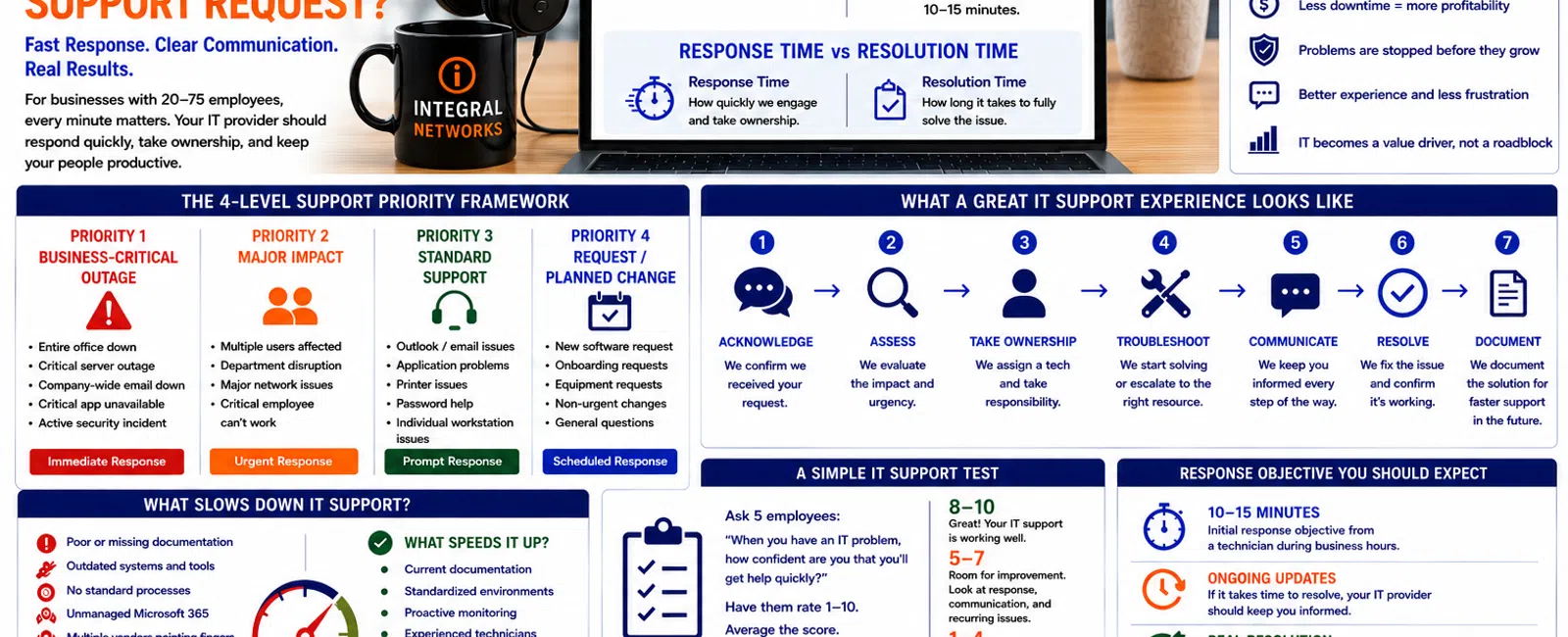
At Integral Networks, whenever possible, a technician answers the phone live. If someone isn't immediately available, our response objective is generally 10-15 minutes.
That doesn't mean every technology problem will be fixed within 15 minutes.
There's an important difference between response time and resolution time.
Response time tells you how quickly someone acknowledges the problem and begins taking ownership. Resolution time depends on the severity and complexity of the issue.
For businesses throughout the Greater Sacramento region and Northern Nevada, responsive support matters because every minute an employee can't work has a business cost.
Here's a practical framework for evaluating whether your current IT provider is responding quickly enough.
Response Time vs. Resolution Time: What's the Difference?
These two measurements are often confused.
Response Time
Response time measures how long it takes your IT provider to engage after you request support.
For example:
8:00 AM: An employee calls because Outlook won't open.
8:07 AM: A technician answers or begins working with the employee.
Response time: 7 minutes.
The problem may take another 20 minutes to solve, but someone has taken ownership.
Resolution Time
Resolution time measures how long it takes to actually solve the problem.
Using the same example:
8:00 AM: Employee reports the problem.
8:07 AM: Technician begins troubleshooting.
8:25 AM: Outlook is working.
Resolution time: 25 minutes.
Both numbers matter.
But from the employee's perspective, the first question is usually:
"Is anyone helping me?"
That's why response time has such a major impact on how employees perceive IT service.
The 4-Level Support Priority Framework
Not every technology problem has the same business impact.
A reasonable IT support process should prioritize issues based on severity.
Priority 1: Business-Critical Outage
Examples include:
- Entire office can't access the network
- Major server outage
- Company-wide email outage
- Critical business application unavailable
- Suspected active cybersecurity incident
These issues require immediate attention.
The objective should be to begin engagement as quickly as possible because a large portion—or all—of the business may be affected.
Priority 2: Major User or Department Impact
Examples might include:
- Several employees can't access an application
- A department can't access shared files
- Major printing or network problems
- Critical employee unable to work
These aren't necessarily company-wide emergencies, but they can still create substantial productivity losses.
Priority 3: Standard Support Request
This is where most tickets fall.
Examples include:
- Outlook problem
- Application issue
- Printer problem
- Password assistance
- Individual workstation problem
- Microsoft 365 question
These issues should still receive prompt attention even though the entire business isn't down.
Priority 4: Request or Planned Change
Examples include:
- New software request
- Future employee onboarding
- Equipment request
- Non-urgent configuration change
- General technology question
These requests can usually be scheduled without disrupting the employee's work.
The important thing isn't whether your MSP uses these exact four categories.
It's whether they have a consistent framework for determining which problems receive priority.
Why Fast Response Matters
Consider a 30-person engineering firm.
An engineer encounters a workstation or application problem and can't continue working.
They submit a ticket.
Then they wait two hours.
The cost isn't simply an unresolved ticket.
The company has lost two hours of productive professional time.
Now imagine the same problem affects five employees.
That's 10 employee-hours lost during a two-hour delay.
For law firms, engineering and architectural firms, financial services organizations, manufacturers, and other technology-dependent businesses, downtime quickly becomes expensive.
That's why IT response time isn't merely a customer-service metric.
It's a productivity metric.
What Should Happen When You Call Your MSP?
A mature support experience should follow a simple process.
Step 1: Acknowledge
The employee should know the request has been received.
Step 2: Assess
The technician determines the business impact and urgency.
Step 3: Take Ownership
Someone becomes responsible for moving the issue forward.
Step 4: Troubleshoot
The technician begins resolving the problem or escalates it to the appropriate resource.
Step 5: Communicate
If resolution takes time, the employee receives updates.
Step 6: Resolve
The underlying issue is corrected.
Step 7: Document
The solution is recorded so future technicians don't have to start from zero.
That process sounds obvious.
Unfortunately, many businesses experience something very different:
Submit ticket.
Wait.
Follow up.
Wait again.
Ask management to escalate.
Finally receive assistance.
That isn't how managed IT should feel.
Live Answering Changes the Support Experience
There's something fundamentally different about calling for help and reaching a technician.
You don't have to wonder whether someone saw your email.
You don't have to submit a ticket and hope it gets prioritized.
You can explain what's happening.
The technician can ask questions immediately.
And both sides understand the urgency.
That's why Integral Networks emphasizes live answering whenever possible.
If our technicians are already assisting other clients, our general response objective is 10-15 minutes.
Again, that's a response objective—not a promise that every technical issue can be resolved in 15 minutes.
Some problems are inherently complicated.
But the client should know we're engaged.
Fast Response Isn't Enough
Here's where response-time promises can become misleading.
An MSP can respond to every ticket in five minutes and still provide poor service.
Imagine receiving this message:
"We've received your ticket."
Five minutes later.
Then nothing happens for three hours.
Technically, the provider may claim a five-minute response.
Operationally, the employee still can't work.
That's why businesses should evaluate more than the initial acknowledgment.
Ask:
- How quickly does a technician actually engage?
- How quickly does troubleshooting begin?
- How often are tickets escalated?
- Are employees kept informed?
- Are recurring issues permanently resolved?
A good support operation balances speed, ownership, communication, and resolution.
The Real Goal: First-Contact Resolution
The best ticket is often the one resolved during the first interaction.
That becomes much easier when the MSP has:
- Good documentation
- Standardized technology
- Experienced technicians
- Remote-management tools
- Current passwords and configurations
- Knowledge of the client's applications
This is one reason onboarding matters so much.
When Integral Networks takes over a new environment, we gather information, perform discovery, deploy our tools, document systems, standardize security, review Microsoft 365, and bring the environment into our support processes.
That work helps our technicians solve future problems faster.
Good support starts long before the support call.
Documentation Directly Affects Response Quality
Imagine two technicians receiving the same ticket.
Technician A
Has no documentation.
They need to determine:
- What computer the employee uses
- Which server they connect to
- What application they're using
- How the network is configured
- Who the vendor is
- Where credentials are stored
Technician B
Has current documentation.
They already know the environment.
Which technician is likely to solve the problem faster?
This is why poor documentation is more than an administrative problem.
It directly affects the employee support experience.
Standardization Makes Support Faster
The same principle applies to standardization.
If every client uses completely different:
- Security software
- Microsoft licensing
- Endpoint configurations
- Management tools
- Backup systems
- Support processes
technicians have to constantly switch between unfamiliar environments.
At Integral Networks, we standardize managed environments wherever practical.
That includes requiring Microsoft 365 Business Premium and using a defined security stack that includes technologies and services such as:
- Deep Instinct endpoint protection
- Avanan email security
- Blokworx managed security services
- Microsoft 365 security configuration
- Managed patching
- Monitoring
Standardization isn't only about cybersecurity.
It also helps technicians know what to expect when they're troubleshooting.
Your MSP Should Understand Your Business Applications
Response time is less valuable if the technician doesn't understand what your employees actually use.
For law firms, that might include:
- NetDocuments
- Worldox
- Microsoft 365
- Adobe
- Legal applications
For engineering and architectural firms:
- AutoCAD
- Revit
- Bluebeam
- SolidWorks
- Microsoft 365
Your MSP doesn't need to replace the application's software vendor.
But they should understand enough about the environment to troubleshoot intelligently, coordinate with vendors, and avoid sending your employees in circles.
Vendor Management Matters During Support Issues
This is another major source of frustration.
An employee has a problem with an application.
The software vendor says it's the network.
The network provider says it's the application.
The internet provider says everything looks fine.
Meanwhile, the employee still can't work.
A mature MSP should help coordinate the problem.
Your employees shouldn't have to become referees between technology vendors.
The goal is ownership:
"We'll work with the vendor and help get this resolved."
That sentence can make an enormous difference in the client experience.
How Should You Measure Your Current IT Provider?
Don't evaluate support based on the worst ticket you've ever had.
Instead, look at the pattern.
Ask leadership and employees:
Response
Do we normally hear from someone quickly?
Ownership
Does someone take responsibility for the issue?
Communication
Do we receive updates when resolution takes longer?
Resolution
Are problems actually solved?
Recurrence
Do the same problems keep returning?
Escalation
Can complicated issues reach someone with deeper expertise?
Employee Experience
Do employees trust IT enough to call when they need help?
That last question matters.
If employees avoid contacting IT because the experience is consistently frustrating, small problems often become larger ones.
Five Warning Signs Your MSP's Response Process Is Failing
Look for these patterns.
1. Employees Regularly Wait Hours for a Response
Occasional delays happen.
Routine delays indicate a capacity or process problem.
2. Management Has to Escalate Normal Tickets
Leadership shouldn't have to intervene just to get ordinary employee issues addressed.
3. Employees Have to Repeatedly Ask for Updates
The provider should own communication.
4. Tickets Close Without Solving the Underlying Problem
Closing tickets isn't the objective.
Solving problems is.
5. Employees Have Stopped Calling IT
This may be the biggest warning sign.
When employees decide dealing with IT isn't worth the effort, productivity suffers quietly.
What About Onsite Response?
Remote support can solve a large percentage of modern IT issues.
But not everything.
Sometimes you need someone physically onsite.
That's one reason geography matters to us.
Integral Networks focuses on two primary service areas so we can combine responsive remote support with local onsite assistance when required.
IT Support Across the Greater Sacramento Region
Our Greater Sacramento service area includes:
- Sacramento
- Roseville
- Rocklin
- Folsom
- Elk Grove
- Woodland
- Stockton
- Modesto
- Surrounding communities
Our primary focus is organizations with 20 or more employees that depend heavily on technology and need a more responsive, proactive support experience.
IT Support Across Northern Nevada
Our second primary service area includes:
- Reno
- Sparks
- Carson City
- Surrounding communities
Northern Nevada businesses deserve the same combination of proactive monitoring, responsive support, cybersecurity, strategic planning, and local service.
When an issue genuinely requires someone onsite, having a provider serving the region matters.
A Simple IT Support Test
Ask five employees this question:
"When you have an IT problem, how confident are you that you'll get help quickly?"
Have them score the experience from 1 to 10.
Then average the results.
8-10
Employees generally trust the support process.
5-7
There are probably opportunities to improve responsiveness or communication.
1-4
Your IT support experience likely deserves serious attention.
This isn't a scientific benchmark.
It's something more useful:
Direct feedback from the people who actually use your IT support.
Final Thoughts
How long should your IT provider take to respond?
For Integral Networks, the standard we're working toward is straightforward:
Answer the phone live whenever possible.
When that's not possible:
Respond within approximately 10-15 minutes.
But speed alone isn't the goal.
Good IT support requires four things:
Fast response.
Clear ownership.
Consistent communication.
Effective resolution.
For a business with 20-75 employees, your technology is simply too important for employees to spend hours wondering whether someone is going to help them.
Your MSP should make it easier for your employees to work—not add another layer of frustration.
Ready for a Second Opinion?
If your employees are frustrated with slow IT support, recurring problems, or poor communication, Integral Networks can help you evaluate whether the issue is response time, process, documentation, technology—or the relationship itself.
We provide responsive managed IT, cybersecurity, Microsoft 365 management, and strategic technology planning for growing businesses throughout the Greater Sacramento region and Northern Nevada.
Related Articles
How Do You Know When It's Time to Fire Your IT Provider?
How to Switch IT Providers Without Downtime: A Business Owner's Guide
What Happens During Your First 30 Days with a New IT Provider?
What's Included in Flat-Rate Managed IT Services? Everything Your Business Should Expect
When Should a 20-75 Employee Business Hire an MSP Instead of Internal IT?


