
How Do You Know When It's Time to Fire Your IT Provider?
If your employees routinely wait hours or days for IT support, the same problems keep returning, nobody is helping you plan your technology budget, or you're unsure whether your Microsoft 365 environment is properly secured, it may be time to evaluate your IT provider.
For businesses with 20 to 75 employees, technology is too important to tolerate consistently poor service.
That doesn't mean you should change Managed Service Providers because of one bad ticket or one frustrating day.
Instead, look for patterns.
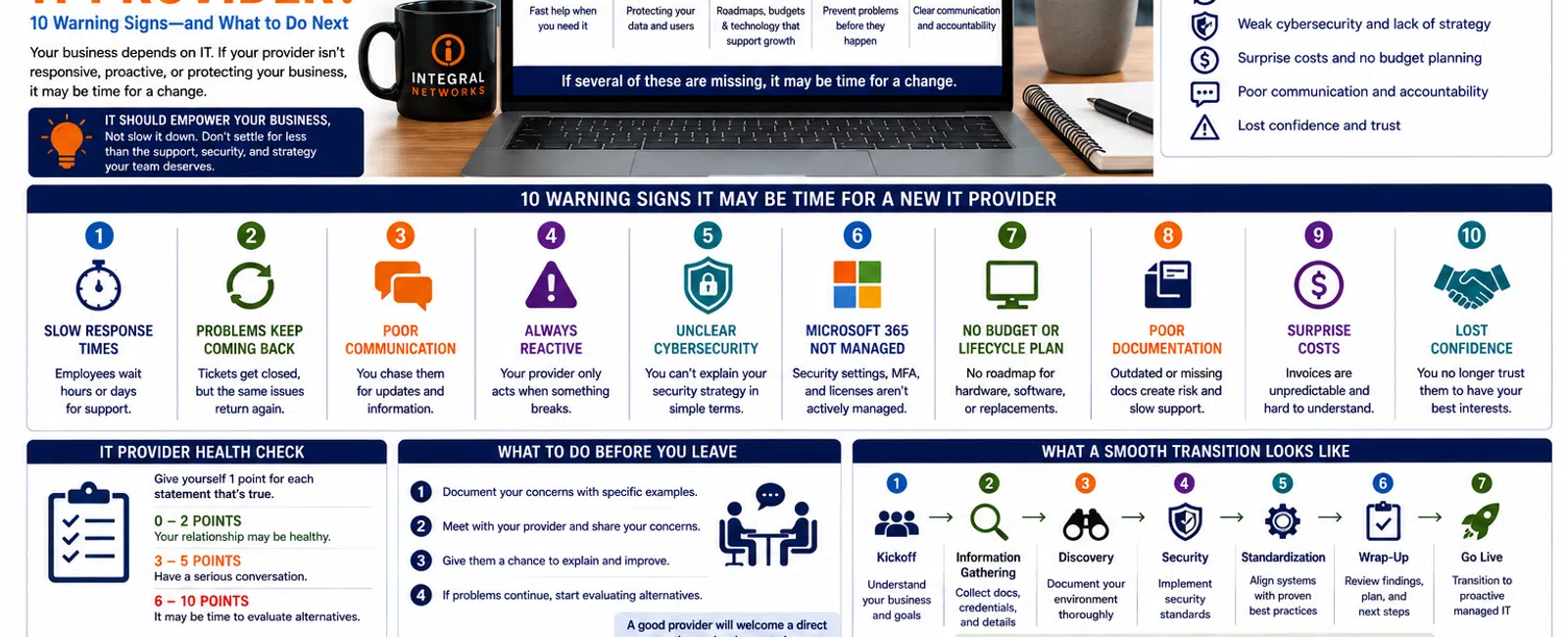
After working with businesses that have left previous MSPs because of poor service, we've found that the warning signs usually fall into 10 categories: response, resolution, communication, recurring problems, cybersecurity, documentation, budgeting, planning, accountability, and trust.
If several of these problems sound familiar, the issue may be bigger than an occasional bad support experience.
1. Your Employees Wait Too Long for IT Support
This is usually the most obvious warning sign.
An employee has a problem.
They submit a ticket.
Then they wait.
And wait.
Eventually they ask their manager to escalate the problem because they can't get anyone's attention.
For a technology-dependent business, that delay has a real cost.
An attorney who can't access documents isn't billing.
An engineer struggling with Revit isn't designing.
An employee who can't access email isn't communicating with customers.
What Should You Expect Instead?
At Integral Networks, whenever possible, a technician answers the phone live.
If someone isn't immediately available, our response objective is generally 10-15 minutes.
Not every problem can be resolved in 15 minutes.
That's an important distinction.
But you should know someone has taken ownership of the issue and is working toward a resolution.
2. Tickets Get Closed, but Problems Keep Coming Back
There's a major difference between closing a ticket and solving a problem.
If employees repeatedly experience the same:
- Network problem
- Printer issue
- Application failure
- Microsoft 365 problem
- Slow workstation
- Remote-access issue
your IT provider should be asking why it keeps happening.
Reactive IT treats every occurrence as a separate ticket.
Proactive IT looks for the underlying cause.
The Question to Ask
Ask your provider:
"Why does this keep happening, and what are we doing to prevent it?"
You should receive a clear answer.
If the solution is always another temporary fix, you may have a larger problem.
3. Communication Is Poor
Technical ability matters.
So does communication.
You shouldn't have to chase your IT provider for updates.
Your employees shouldn't wonder whether anyone saw their request.
Leadership shouldn't discover major technology problems after they've already become emergencies.
Good communication means:
- Requests are acknowledged.
- Expectations are established.
- Employees receive updates.
- Problems are explained clearly.
- Leadership knows about significant risks.
- Someone takes ownership.
You don't need your MSP to overwhelm you with technical details.
You need them to communicate clearly enough that you understand what's happening and what comes next.
4. Your IT Provider Is Always Reacting
If the only time you hear from your MSP is when something breaks, you're probably receiving outsourced break/fix support rather than mature managed IT.
A Managed Service Provider should be working between tickets.
That means:
- Monitoring systems
- Managing patches
- Reviewing backups
- Maintaining documentation
- Managing assets
- Reviewing security
- Planning hardware replacements
- Monitoring Microsoft 365
- Identifying risks
The goal isn't to eliminate every IT problem.
That's unrealistic.
The goal is to prevent avoidable problems and reduce the impact of the ones that still occur.
5. Nobody Can Explain Your Cybersecurity Strategy
Ask your current provider this question:
"Can you explain our cybersecurity strategy in five minutes?"
The answer should be understandable.
For a 20-75 employee organization, you should expect multiple layers protecting areas such as:
- User identities
- Endpoints
- Microsoft 365
- Administrative access
- Patching
- Backups
- Monitoring
At Integral Networks, our managed security approach includes technologies and services such as:
- Microsoft 365 Business Premium
- Deep Instinct endpoint protection
- Avanan email security
- Blokworx managed security services
- Managed patching
- Microsoft 365 security configuration
- Ongoing monitoring
Your provider doesn't need to use our exact technology stack.
But they should have a defined strategy.
If security consists of "we installed antivirus," that's no longer enough.
6. Microsoft 365 Isn't Being Actively Managed
Many businesses pay for Microsoft 365 every month without knowing whether anyone is actually managing its security.
For example:
- Is MFA enforced?
- Who has administrator access?
- Has Microsoft Secure Score been reviewed?
- Are former employees disabled promptly?
- Are security recommendations being evaluated?
- Are user permissions managed?
At Integral Networks, we require Microsoft 365 Business Premium for managed clients because it gives us security and management capabilities we can use to establish a stronger baseline.
During onboarding, we review Microsoft Secure Score and remediate appropriate recommendations for the client's environment.
Simply owning Microsoft 365 isn't the same as managing it.
7. Nobody Has a Technology Budget or Hardware Lifecycle Plan
Ask leadership:
Which computers are we replacing next year?
If nobody knows, that's a warning sign.
The same applies to:
- Servers
- Firewalls
- Switches
- Wireless infrastructure
- Backup equipment
- Other critical technology
Hardware replacement shouldn't be triggered only by failure.
Your provider should maintain an asset inventory and help forecast upcoming replacements.
For businesses with 20, 40, 50, or 75 employees, this becomes increasingly important.
Replacing 10 workstations unexpectedly is an emergency expense.
Replacing 10 workstations because they were already scheduled in next year's technology budget is simply executing the plan.
8. You Don't Have Current Documentation
One of the biggest problems we find when taking over a new environment is missing documentation.
Sometimes documentation is incomplete.
Sometimes it's years out of date.
Sometimes virtually nothing exists.
Your IT environment should have documentation covering important information such as:
- Network infrastructure
- Servers
- Firewalls
- Internet providers
- Microsoft 365
- Vendors
- Backup systems
- Administrative access
- Business applications
- Assets
Documentation improves support because technicians don't have to rediscover your environment every time something happens.
It also protects your business from becoming dependent on one technician or one provider.
9. Your IT Costs Are Constantly a Surprise
Managed IT should make technology spending more predictable.
If every month produces another unexpected invoice, ask why.
There will always be technology expenses outside a normal managed services agreement.
Examples might include:
- Major infrastructure upgrades
- Office relocations
- Large migrations
- New office construction
- Significant new projects
- Hardware purchases
- Software licensing
But normal support shouldn't constantly feel unpredictable.
At Integral Networks, our managed services are flat-rate because we don't want employees hesitating to call support because they're worried about another hourly bill.
Your MSP's pricing model may be different.
The important thing is that leadership understands what is included, what isn't, and what future technology expenses are coming.
10. You've Lost Confidence in Your IT Provider
This is the warning sign that ultimately matters most.
Technology relationships depend on trust.
Leadership needs confidence that:
- Problems will be addressed.
- Employees will receive support.
- Security is being taken seriously.
- Backups are being monitored.
- Documentation exists.
- Risks will be communicated.
- Budgets are being planned.
- Recommendations are in the company's best interest.
Once that confidence disappears, the relationship becomes difficult to repair.
That doesn't automatically mean you should switch providers tomorrow.
But it does mean it's reasonable to get a second opinion.
A 10-Question IT Provider Health Check
Give yourself one point for every statement that's true:
- Employees regularly complain about slow IT response.
- The same technical problems keep returning.
- We regularly have to chase IT for updates.
- Our provider mostly reacts when something breaks.
- Leadership can't clearly explain our cybersecurity strategy.
- We're unsure whether Microsoft 365 is properly secured.
- We don't have a technology budget or hardware lifecycle plan.
- We're not confident our IT documentation is current.
- Technology expenses regularly surprise us.
- Leadership has lost confidence in the provider.
Your Score
0-2: Your relationship may be healthy, although individual areas could still improve.
3-5: There are enough warning signs to justify a serious conversation with your current provider.
6-10: It may be time to evaluate alternatives.
This isn't a scientific score.
It's simply a framework for turning general frustration into specific issues leadership can evaluate.
Don't Switch MSPs Because of One Bad Day
Every service business makes mistakes.
Integral Networks included.
A difficult support ticket doesn't automatically mean you have the wrong IT provider.
What matters is how the provider responds.
Do they communicate?
Do they take ownership?
Do they identify what went wrong?
Do they prevent the same problem from happening repeatedly?
Do they improve?
Look for patterns rather than isolated incidents.
What Should You Do Before Firing Your MSP?
Before making a change, document your concerns.
Create a list of the specific problems you're experiencing.
For example:
- Average support response feels too slow.
- Recurring problems aren't being permanently resolved.
- We don't receive technology planning.
- We don't understand our cybersecurity posture.
- Hardware replacements aren't budgeted.
- Communication is inconsistent.
Then meet with your current provider.
Give them an opportunity to explain what's happening and how they'll improve it.
A good provider should welcome a direct conversation.
If the problems continue—or you don't have confidence in the answers—then start evaluating alternatives.
What Does Switching IT Providers Actually Look Like?
One reason businesses stay with an underperforming MSP is fear.
They assume switching will create downtime or chaos.
It shouldn't.
A structured transition typically includes:
Step 1: Kickoff
Meet with leadership and understand the business.
Step 2: Information Gathering
Collect existing documentation, credentials, vendor information, and technology details.
Step 3: Discovery
Deploy management tools and document the environment.
Step 4: Security
Implement security standards and review Microsoft 365.
Step 5: Standardization
Bring systems into alignment with the new provider's support and security standards.
Step 6: Wrap-Up
Review findings, remaining recommendations, support procedures, and next steps.
Step 7: Go Live
Transition into normal proactive managed services.
With proper planning, employees should experience minimal disruption.
Greater Sacramento Businesses Evaluating Their MSP
Integral Networks works with growing organizations throughout the Greater Sacramento region, including:
- Sacramento
- Roseville
- Rocklin
- Folsom
- Elk Grove
- Woodland
- Stockton
- Modesto
- Surrounding communities
Our primary focus is businesses with 20 or more employees, particularly organizations that have become frustrated with reactive support, weak communication, limited planning, or inconsistent service.
Northern Nevada Businesses Evaluating IT Support
Our second primary service area is Northern Nevada, including:
- Reno
- Sparks
- Carson City
- Surrounding communities
Businesses in Northern Nevada shouldn't have to choose between responsive local support and mature managed IT processes.
Our model combines remote support and monitoring with onsite assistance when needed.
Final Thoughts
Most businesses don't fire their IT provider because of one broken computer.
They leave because of a pattern.
Slow service.
Poor communication.
Recurring problems.
Weak security.
No documentation.
No budgeting.
No planning.
Eventually leadership stops believing things will improve.
If you're experiencing three or more of the warning signs in this article, start by having a direct conversation with your current provider.
If you're experiencing six or more—or you've simply lost confidence in the relationship—getting a second opinion is reasonable.
Changing MSPs isn't something businesses should do casually.
But staying indefinitely with a provider that isn't meeting your needs carries a cost too.
Ready for a Second Opinion?
If you're questioning whether your current IT provider is still the right fit, Integral Networks can review your environment and help you understand where things stand.
We'll explain what we see, identify opportunities for improvement, and show you what a transition would look like if you decide it's time for a change.
Integral Networks provides managed IT, cybersecurity, Microsoft 365 management, and strategic technology planning for growing businesses throughout the Greater Sacramento region and Northern Nevada.
elated Articles
How to Switch IT Providers Without Downtime: A Business Owner's Guide
What Happens During Your First 30 Days with a New IT Provider?
What's Included in Flat-Rate Managed IT Services? Everything Your Business Should Expect
When Should a 20-75 Employee Business Hire an MSP Instead of Internal IT?
What Does Good Cybersecurity Look Like for a 20-75 Employee Business?


